
Ecommerce Migration to a Marketplace: Data, Clocks, and the Freeze Window

An eCommerce migration to a marketplace transfers a trading business from one platform to another. Every obligation still open on the day you switch comes with it.
This chapter covers the clocks you can't stop, the five layers of data, the price of a freeze day, and the three points of no return.
You migrate a working business, and the files are the easy part of it.
Write down which of your open obligations carry a clock, and write down who holds each one. Without that list, your cutover date gets set by the first seller balance that doesn't agree.
This article breaks down:
- What does an eCommerce migration carry over?
- Which 5 layers does an eCommerce platform migration cover?
- Should a seller keep their old number after the migration?
- When does parallel operation of two platforms make sense?
- How much does one day of the freeze window cost?
- Which 3 points of no return does a cutover have?
- What does a seller have to know, and when does a buyer?
Key insights
- Your records copy cleanly. The obligations behind them carry a clock, and a payout made a second time has to be recovered from somebody else.
- Three parties hold clocks: you, your sellers, and the people outside your company. Only the outside ones set your cutover date.
- A migration opens at target scale on day one, and a new marketplace gets a first month of warm-up. You get no month in which a mistake is cheap.
- Price one freeze day in three amounts: your turnover, your commission, and the money your sellers didn't earn. You choose between a weekend window and a single night on that price.
- Verification status usually belongs to your payment provider, and it has little to carry over when you change providers. Multiply your seller count by the minutes each re-verification takes before you promise a date.
- Every object you migrate carries its previous identifier on a searchable field. That one field costs little during the build, and without it you end up with two numbering schemes and no bridge between them.
- A cutover has three points of no return: the first order on the new platform, the first payout from a new balance, and the first document in the new numbering. Bringing the platform up in read-only mode first pushes all three further into the schedule.
What does an eCommerce migration carry over?
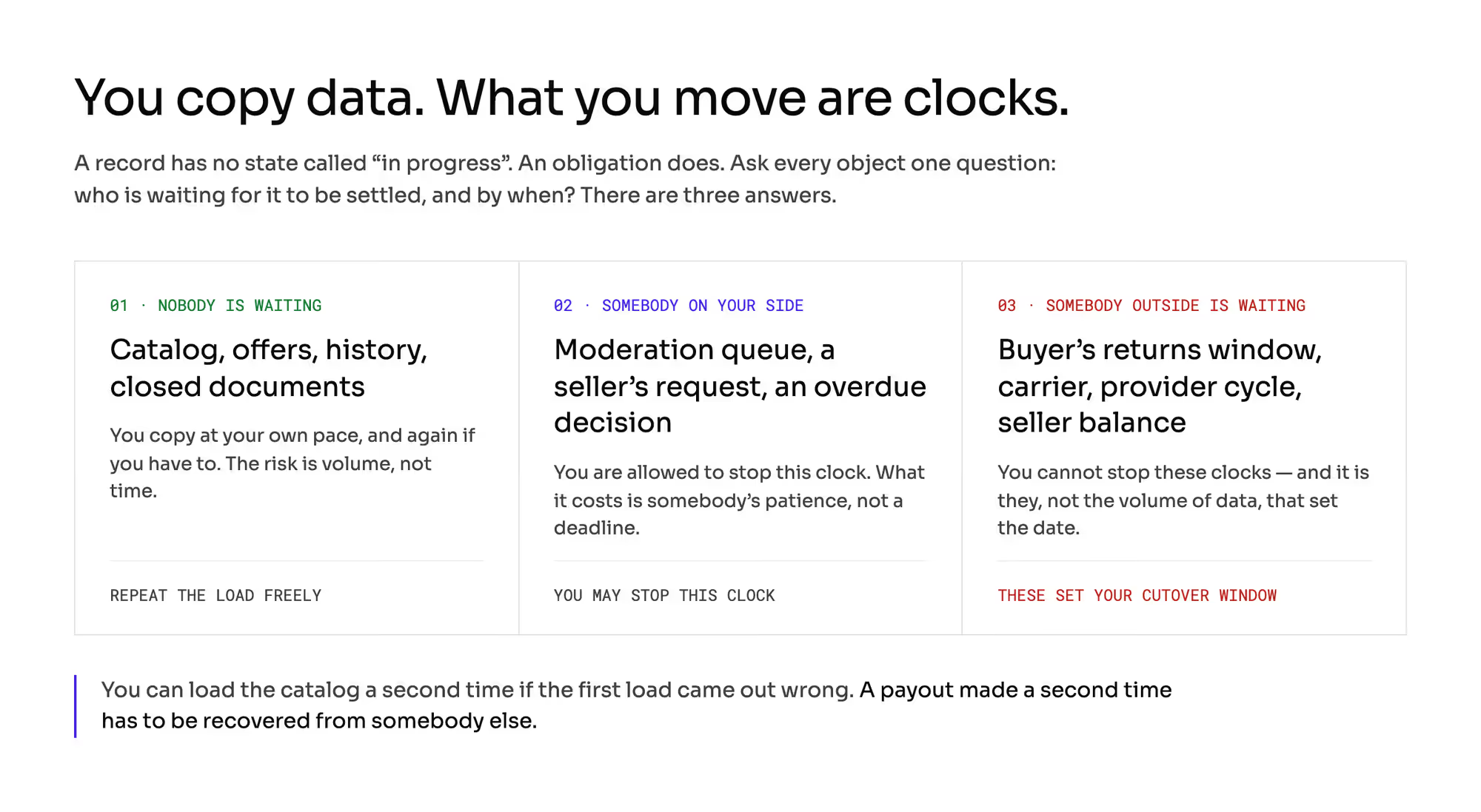
A record has no state called "in progress", and an obligation has one. An order is on its way to the buyer. A return is sitting in inspection, and a balance is due for a payout.
A seller is halfway through verification, and a buyer has a return right on a schedule of its own.
You can load the catalog again if the first load came out wrong. A payout made a second time has to be recovered from somebody else.
You migrate those obligations, and the table is only where they sit.
Ask one question of every object: who is waiting for it to be settled, and by when? You'll get one of three answers.
1. No one is waiting
Catalog, trading history, and closed documents sit in this group. Because you can copy them at your own pace, and copy them again if you have to, the risk here is volume.
2. Somebody on your side is waiting
Moderation queues, seller requests, and overdue decisions belong to you. You're allowed to stop these clocks, and stopping them costs you somebody's patience.
Since a seller whose request sat still through your freeze will expect the same wait next time, write to that queue anyway.
3. Somebody outside is waiting
Four parties outside your company hold clocks you can't stop:
- Buyer with an open returns window.
- Carrier with a parcel in transit.
- Payment provider on its own cycle.
- Seller with money on a balance.
Because those four set your cutover window, write each clock down with its length in days, and the longest one tells you how long your tail lasts.
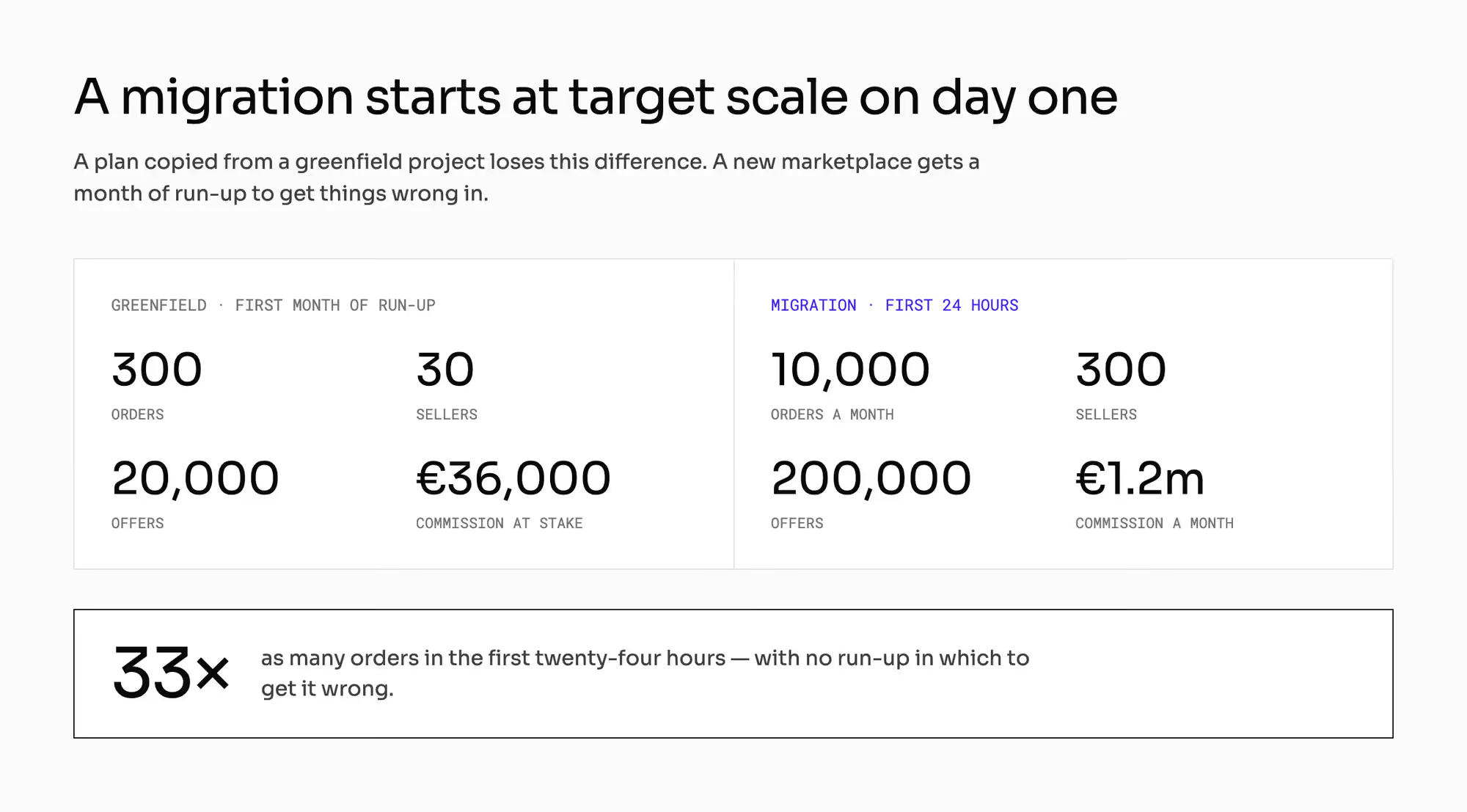
A greenfield project and a migration start at different volumes. A new marketplace gets a month of warm-up at 300 orders, 30 sellers, and 20,000 offers, and mistakes in that month cost €36,000 of commission.
A migration opens at target scale on day one. You start with 10,000 orders a month, 300 sellers, and 200,000 offers. Your commission is €1.2 million a month, and that is thirty-three times as many orders in the first twenty-four hours.
Which 5 layers does an eCommerce platform migration cover?
Five layers carry different risks, and the order below rises in difficulty. Your own work order will differ from it.
Which layer? | What volume at target scale? | Who is waiting, and how long? | What does a repeated load do? | What breaks on a bad transfer? |
|---|---|---|---|---|
Catalog and offers | 200,000 offers | no one | a duplicate or an overwrite | the offer disappears from the store |
Sellers and verification | 300 accounts | the seller, days | the account gets created twice | a blocked payout |
Open states | 4,700 orders, 250 returns | the buyer and the carrier, days | a second fulfillment or a second return | an order with no owner |
Balances due for payout | €2.2 million | the seller, until the end of the cycle | a second payout | the money sits with somebody else |
History and documents | 240,000 orders | no one, but for years | doubled history | no answer years later |
1. Catalog and offers
Catalog is the largest layer and the least risky. No one is waiting on it, and you fix a mistake with another load.
Two more pieces of work arrive with the catalog, and the first is matching offers to shared product pages by identifier. Read product matching on a marketplace before you map them.
Duplicates also diverge in the new data model differently from the old one. Read duplicate products on a marketplace for the merge. Cleaning up catalog debt at the same time needs its own budget, and you'll find that budget in catalog debt on a marketplace.
2. Sellers and their verification status
Copying stops at the seller account. Identity and company verification usually belong to your payment provider, and when you change providers, the status "verified" has little to carry over.
In some products, a new seller account is suspended by default until the payment provider confirms it, and the day after cutover you then hold 300 accounts that can't take a payout.
Do the arithmetic before you promise a date. 300 sellers at 25 minutes each to collect and check documents is 7,500 minutes, or 125 hours, or three weeks of one person's work, and it assumes everybody answers the first time.
3. Open states
Open states are the obligations with a clock on them, and at 10,000 orders a month you take 333 a day. If an order lives fourteen days from placement to closure, you hold around 4,700 open orders at any moment.
That is €4.7 million of turnover, €4.1 million of it belongs to sellers, and returns come on top.
At five percent you get 500 cases a month, and a case that lives fifteen days leaves around 250 open at once.
4. Balances and settlement history
A balance is built out of entries, and an opening amount with no breakdown holds up until the first adjustment. Read the marketplace ledger for why a balance has to match the transfer.
Reconcile every opening amount against an independent record, such as a bank statement, a payment provider report, or the ledger. Marketplace payment reconciliation sets out how the three are matched.
5. Order history and documents
History has no clock on it, and it has volume and a shelf life counted in years. Two years of trading is 240,000 orders, and the export is often capped.
In some products one file covers a few tens of thousands of rows, and the reporting window covers a few tens of days. Two years then comes out in five files of 50,000 rows and eight passes of 90 days.
Because a copy of a document is a different artifact, you can't recreate the document itself. Numbering and retention periods are set out in marketplace order documents.
Should a seller keep their old number after the migration?
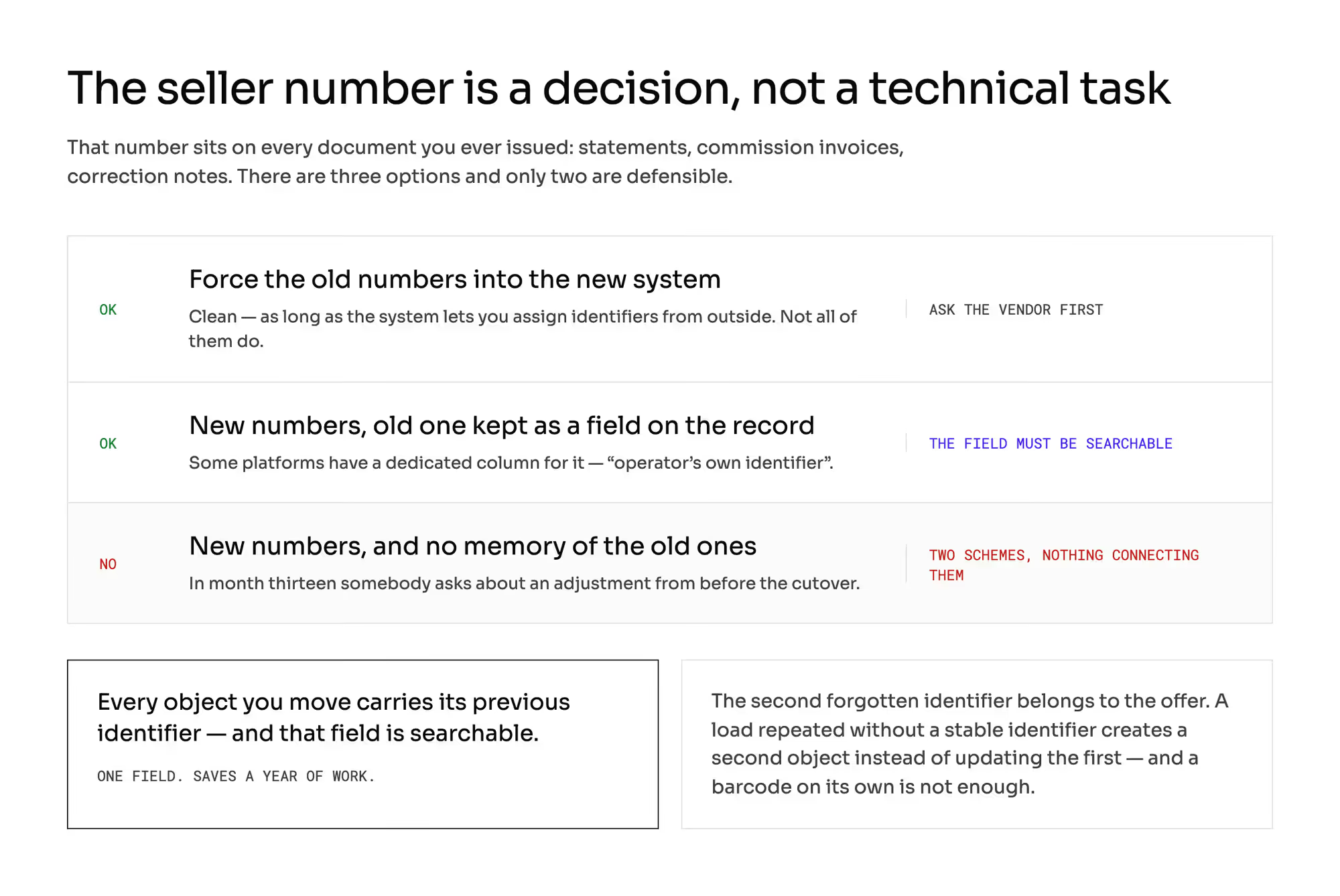
The seller number is a business decision. That number sits on every document you ever issued to them, and statements, commission invoices, and correction notes all carry it.
You have three options, and two of them are defensible.
1. Force the old numbers into the new system
Forcing the old numbers across stays clean as long as the system lets you assign identifiers from outside. Not every system does, so ask the vendor before you pick this option.
2. Assign new numbers and keep the old one as a field
Keeping the old number as a field on the record works on any platform that gives you somewhere to put it. Some platforms carry a dedicated column for it, called the operator's own identifier.
3. Assign new numbers and forget the old ones
Forgetting the old numbers holds up until month thirteen, when somebody asks about an adjustment from before the cutover. You then hold two numbering schemes with no bridge between them.
Carry the previous identifier on every object you migrate, and make that field searchable. One field costs you a day during the build and saves you a year of work.
Offers need a stable identifier too, and teams forget that one. A load repeated without it creates a second object, and the first one stays where it was. A barcode alone won't prevent that, and vendors write the same warning into their own integration guides.
Read idempotency on a marketplace for the mechanism behind a repeated load. Read single source of truth on a marketplace to settle whose record wins.
Document numbering after the cutover is a separate decision, and you pick between a new series and a continuation. The tax side sits in marketplace invoicing, marketplace e-invoicing, and marketplace credit notes.
When does parallel operation of two platforms make sense?
Textbook parallel operation puts the same traffic through both systems so you can compare the results. It is the most expensive cutover method in the implementation literature, and most of the load falls on people.
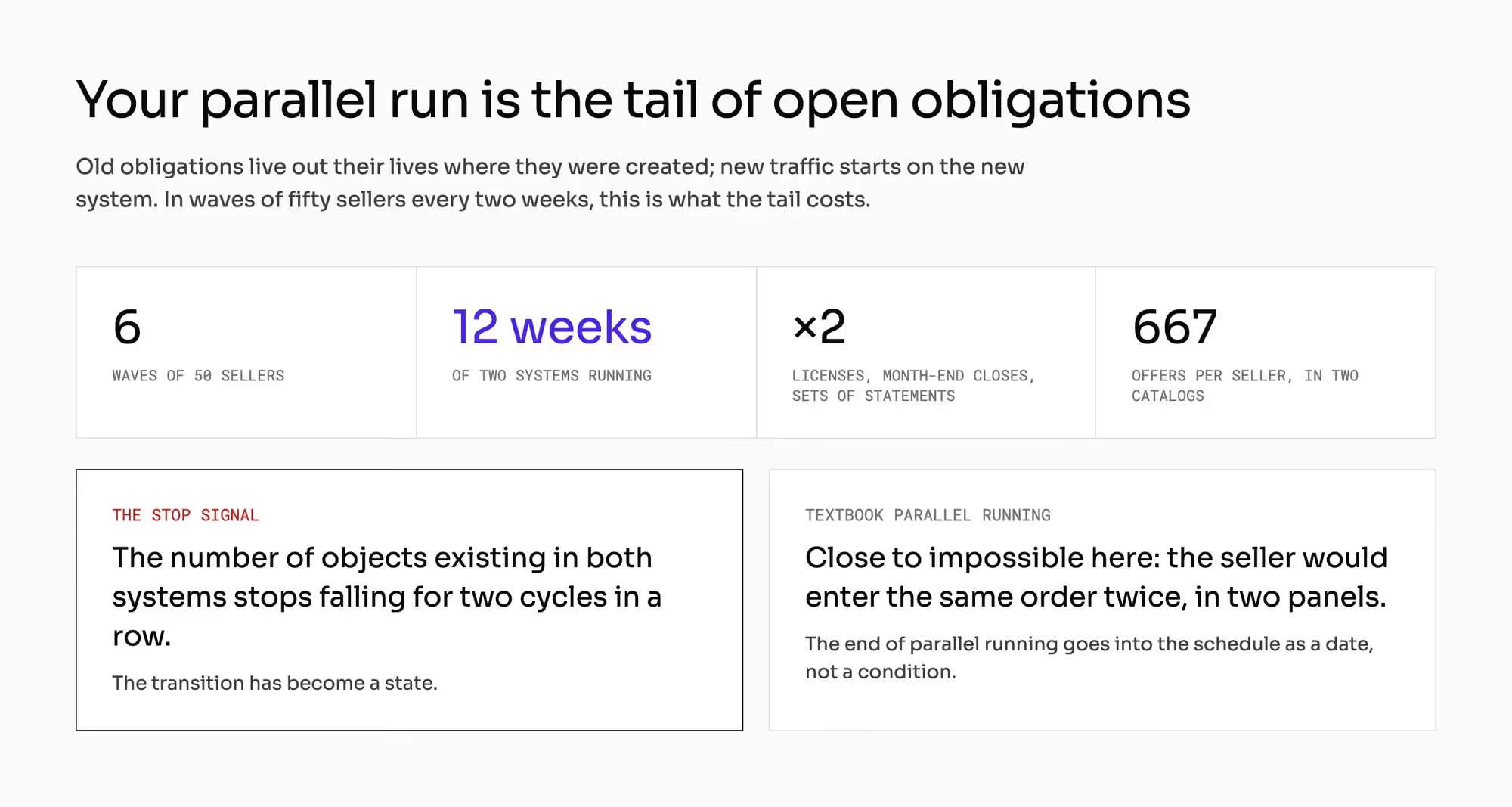
Because a seller would have to enter the same order twice, in two panels, parallel operation comes close to impossible on a marketplace.
Old obligations finish where they were created, and new traffic starts on the new platform. That tail of open obligations is your overlap period, and you get it whether you planned it or not.
In waves of fifty sellers every two weeks, 300 sellers means six waves and twelve weeks. Through all of them, you pay two licenses and close two sets of books, and somebody adds up two sets of statements manually.
Your sellers pay part of the bill. At an average of 667 offers per seller, sitting in two catalogs is double the work that no one asked them for.
Count the objects that exist in both systems, and when that count stops falling for two cycles in a row, the overlap has gone on too long.
Put the end of the overlap in the schedule as a date. Two licenses at once is also a line in your rollout budget, and you'll find it in the marketplace business case.
How much does one day of the freeze window cost?
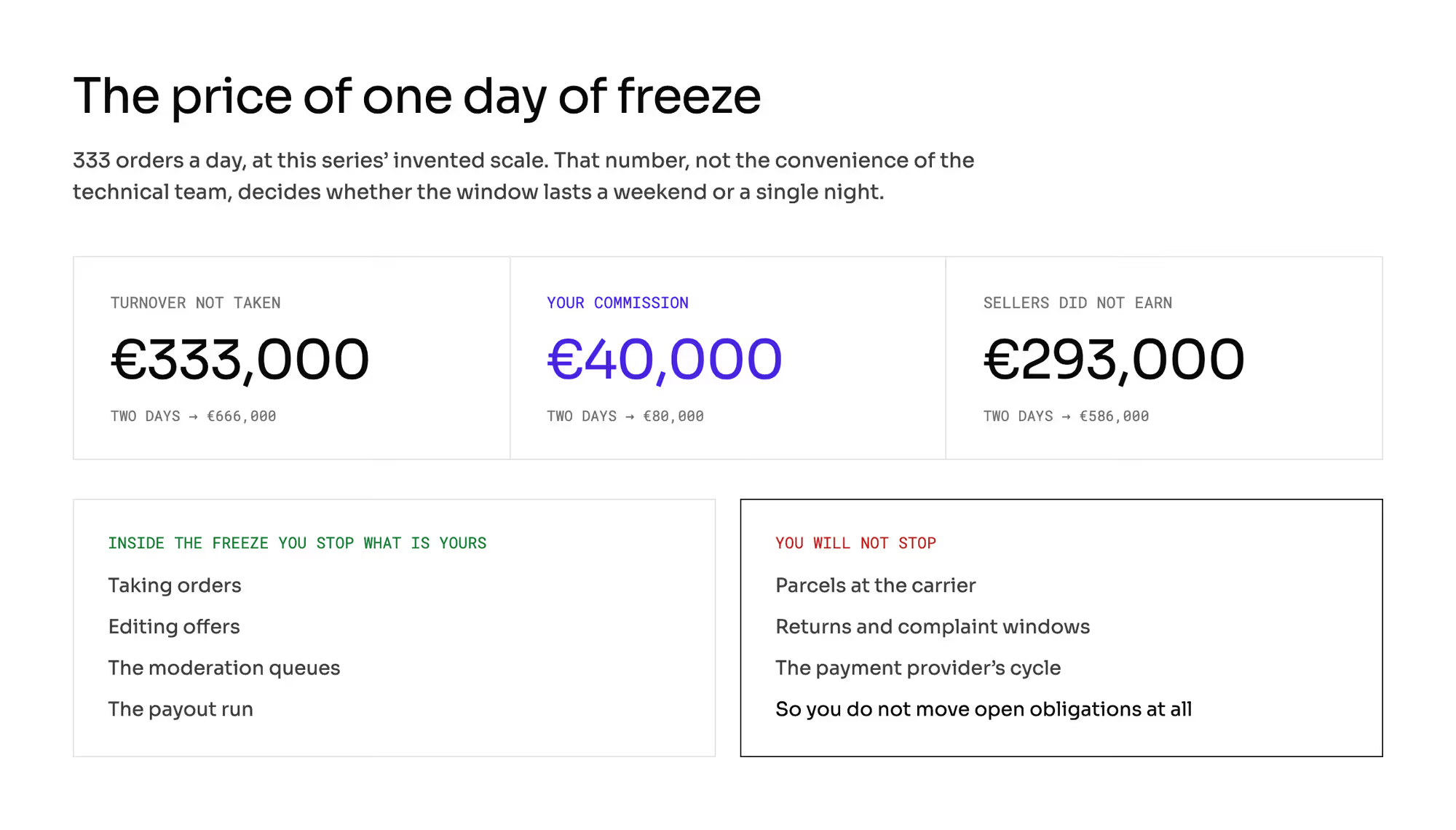
The freeze is the interval in which neither platform creates a new obligation. The old one has stopped, and the new one hasn't started.
Inside it, you stop only what belongs to you, which means taking orders, editing offers, the moderation queues, and the payout cycle.
You won't stop parcels at the carrier or the payment provider's cycle. Returns and complaint windows on the buyer's side stay open too. For that reason, you don't migrate open obligations at all, and you let them finish on the old system.
333 orders a day is €333,000 of turnover. Your commission on it is €40,000, and €293,000 is money your sellers didn't earn that day. Two days of downtime is €666,000 of turnover and €80,000 of commission.
Choose between a weekend window and a single night on that figure, and let the convenience of the technical team come second.
Pick the date from your own calendar and take the weakest day of the week, away from the promotional season and off the month-end close days. You'll find those days in month-end close on a marketplace.
Read marketplace integrations for the order in which systems get connected. Promoting configuration alone between environments is a separate operation with its own risks, and configuration management on a marketplace covers it.
Which 3 points of no return does a cutover have?
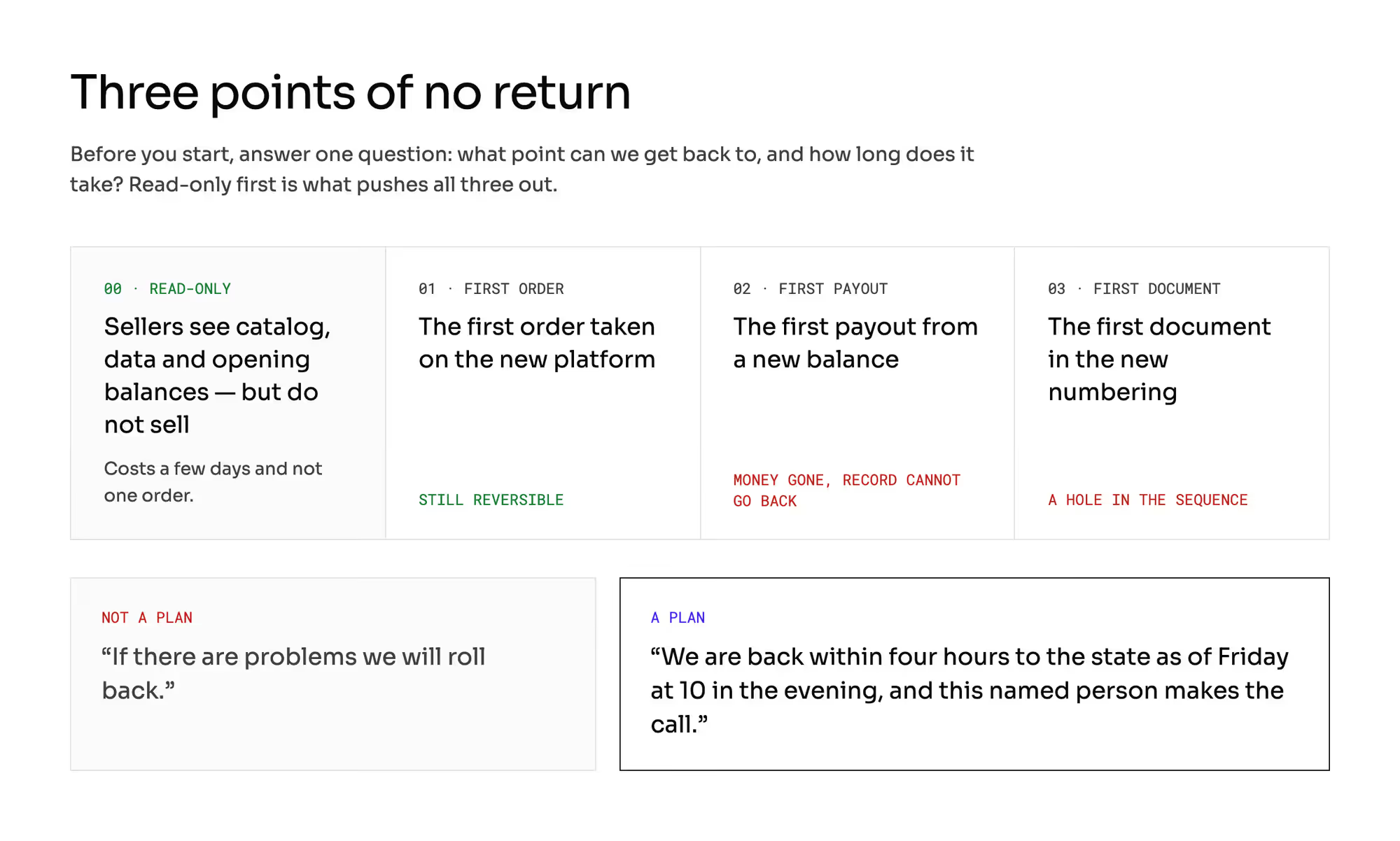
Because a rollback plan is a condition of starting, answer one question before you begin: which point can you get back to, and how long does it take?
A promise to roll back if there are problems isn't a plan. A plan reads like this: you are back within four hours to the state as of Friday at 10 in the evening, and one named person makes the call.
1. First order taken on the new platform
You can still turn back at this point, and you finish that order on the new platform and send the traffic back to the old one.
Your rollback window starts at the hour of that first order, and the log is where you keep it.
2. First payout from a new balance
The money has left your account. You can send the traffic back to the old platform, and the settlement record stays where it is. Reversing a payout means asking a seller to give the money back.
Since that conversation is the one you want to avoid, hold the first payout cycle until the opening balances reconcile against an independent record.
3. First document in the new numbering
After the first document in the new numbering, a rollback leaves a hole in a sequence that has requirements of its own. Agree the document series with your accountant before the first invoice goes out on the new platform.
Bring the new platform up in read-only mode first, and all three points push further into the schedule.
Sellers see their catalog, their data, and their opening balances, and they can't sell yet. Cutover practice treats this as the cheapest way to catch problems before the first obligation exists, and it costs a few days and no orders.
Who has the right to stop a go-live is set out in the launch readiness checklist.
What does a seller have to know, and when does a buyer?
You write to sellers on a calendar, and you write to a buyer only when the migration touches them.
Each seller gets three messages.
- Four weeks before: what changes, and what they have to do themselves, meaning re-verification, payout details, a new panel, and the integrator configuration.
- Three days before: the hours of the freeze, and a list of what won't work during it.
- Day after the cutover: where their money is, and when the first payout from the new system arrives.
Send each seller one page of their own. It carries five things:
- Old number.
- New number.
- Balance as of the hour of the freeze.
- Date of the first payout.
- Three things to do.
Send it early and the "why did I get less" queue mostly disappears, and after a cutover that queue is often larger than at an ordinary month-end close.
You also owe the seller notice of a change of terms, and a trail of the decision. Read P2B regulation on a marketplace for both. Some sellers take the occasion to leave, and marketplace seller offboarding sets out what you owe them.
A migration touches a buyer in three cases. The first is their order history, and you decide how much of it shows in the new online store. The second is a return on an order placed before the cutover, and one sentence in the support script says who handles it, and the third is signing in to the account.
Read marketplace GDPR before you transfer personal data to new processors.
What does an eCommerce migration change in your marketplace?
A migration changes your schedule and your budget, and it gives you one chance to fix your data model.
1. Cutover date comes from the longest clock
The longest clock you don't control sets your cutover date. That is usually the returns window or the settlement cycle, and the copy time plays no part.
Put that interval on the schedule under its own name.
2. Tail of open obligations has a budget
Somebody maintains the old system for a dozen or more weeks after go-live. Because they have time for little else, give that work a budget line.
Because a tail owned by whoever happens to be free never closes, name that person before the freeze.
3. Identifiers and the data model get one chance
A migration is the cheapest moment you'll get to change identifiers and the data model. Get it wrong here and you live with it for years.
Agree the identifier rule and the field that holds the old number in the same week you agree the scope.
How do you scope an eCommerce migration in one day?
Do these five steps at your own desk.
1. Today's open obligations, by count and by amount
List orders in fulfillment, returns, complaints, balances, and accounts in verification with a number against each, and that list is the real scope of your migration.
2. Owner of the clock next to each obligation
Write the owner of the clock next to each one: you, the seller, the buyer, the carrier, or the payment provider. The last three set your window.
3. Price of one freeze day
Because an argument about the date is otherwise an argument about convenience, calculate the price of one freeze day in turnover, commission, and seller money.
4. Three points of no return, with a time to come back from each
Fix the three points of no return and the time to come back from each, with a decision maker named in person. A plan that names a role gives you no one to call at two in the morning.
5. End date of the overlap
Because a date set afterwards gets negotiated every cycle again, put the end date of the overlap into the schedule before the overlap starts.
How do you check an eCommerce migration with a vendor?
- Does every object carry a field for my existing identifier, and can I search on it?
- What happens when I load the same file twice?
- How many rows and how many months does one history export cover?
- Does a seller account get created without an automatic suspension?
- Can the platform be brought up in read-only mode for sellers?
Which mistakes do operators make with an eCommerce migration?
All five of these mistakes look like a tidy plan on the day they're signed off. You pay for them in cutover week, or in month thirteen.
1. Migration planned as a data transfer
Because IT owns the plan and finance and support own the clocks, the gap between them shows up in cutover week.
You can spot it in a schedule that has no interval for the tail.
2. Open orders migrated
The same orders close themselves on the old system within two weeks. You take on the risk and get little back, and every order you migrate gets two possible owners.
3. Opening balance entered as a single amount
The amount agrees on go-live day, and the first adjustment breaks it. With no breakdown to derive the difference from, you can't answer the seller's question.
4. New numbers with no memory of the old ones
This looks like a clean migration for twelve months, and then somebody asks about a document from before the cutover.
5. Overlap with no end date
Every week of delay is easier to justify than the last. You pay for both licenses throughout, and two month-end closes become your routine.
What do you still have to settle about your eCommerce migration?
This chapter doesn't settle whether to cut over in one step or in waves. That is a question about phasing, and the marketplace pilot chapter takes it. The exit criteria for a phase are in the phase gate review.
It also doesn't describe the tests that confirm the money you migrated adds up. Read UAT testing before a marketplace launch for those. Who can block the go-live is in the launch readiness checklist, and staffing the first weeks is in hypercare.
Build your exit from a vendor before you need it, and you'll find the price of that capability in eCommerce TCO for a marketplace.
This chapter isn't a legal opinion. Write out three families of obligation for your lawyer before the migration:
- Protection of personal data, once the database reaches new processors.
- Transparency in the seller relationship, once terms change.
- Requirements for issuing and retaining documents.
Leave the names of acts, thresholds, and deadlines to a specialist.
The arithmetic here uses this series' invented platform, and you should treat it as a method. Substitute your own order count, returns window, and payout cycle, and the amounts come out different while the order of the work stays the same.
Summary: How does an eCommerce migration to a marketplace work?
An eCommerce migration transfers the obligations your business has open, and the data behind them copies cleanly.
Catalog and history wait for you. A buyer, a carrier, a payment provider, and a seller with money on a balance don't wait, and their clocks set the cutover date.
Open orders and open returns therefore finish on the old platform. At 10,000 orders a month, that tail is 4,700 orders and 250 returns, and it stays somebody's job for a dozen or more weeks.
Inside the freeze, you stop only what belongs to you, and one freeze day costs €333,000 of turnover and €40,000 of commission. Price the day before anyone argues about the date.
Then write the rollback plan as a point and a duration, and keep every old identifier in a searchable field. Send each seller one page with their balance as of the hour of the freeze. Migrating a trading business onto a marketplace platform without losing a balance or a document?
Frequently asked questions on eCommerce migration
What is an eCommerce migration?
An eCommerce migration is the transfer of a trading business from one commerce platform to another. The catalog and the closed history copy at your own pace. The orders, returns, balances, and documents still open on the day of the switch set the schedule.
How long does an eCommerce platform migration take?
The longest clock you don't control sets the schedule, and that is usually the returns window or the payout cycle. Open orders and returns finish on the old platform, and somebody owns that tail for weeks after go-live. Price a day of stopped trading, then choose between a weekend freeze and a single night.
What data do you migrate to a marketplace platform?
You migrate five layers of data. They are catalog and offers, seller accounts with their verification status, open states, balances with their settlement history, and order history with documents. You leave the open states behind on purpose.
Ready to build?
We migrate trading businesses onto marketplace platforms with every open obligation, balance, and identifier accounted for before the freeze starts.