
Configuration Management on a Marketplace: Development, Staging, and Production
Configuration management is the practice of tracking, testing, and controlling the settings that decide how a system behaves. Your business team changes a marketplace's settings without a developer: categories, attributes, commission rates, and rules.
Your marketplace has two layers that can break it. Your technical team writes the code, and the code has tests, releases, and a way back. Your business team clicks the settings, and those usually have none of that.
You have to decide how many environments you need and how settings travel between them. You also have to decide who may change production. Copying settings from one environment to another can delete them, and you want to know that before the first import.
This article breaks down:
- What is configuration management on a marketplace, and how many settings does it cover?
- How many environments does a marketplace need?
- What travels when you promote configuration between environments?
- Who may change production settings, and how do you undo a change?
Key insights
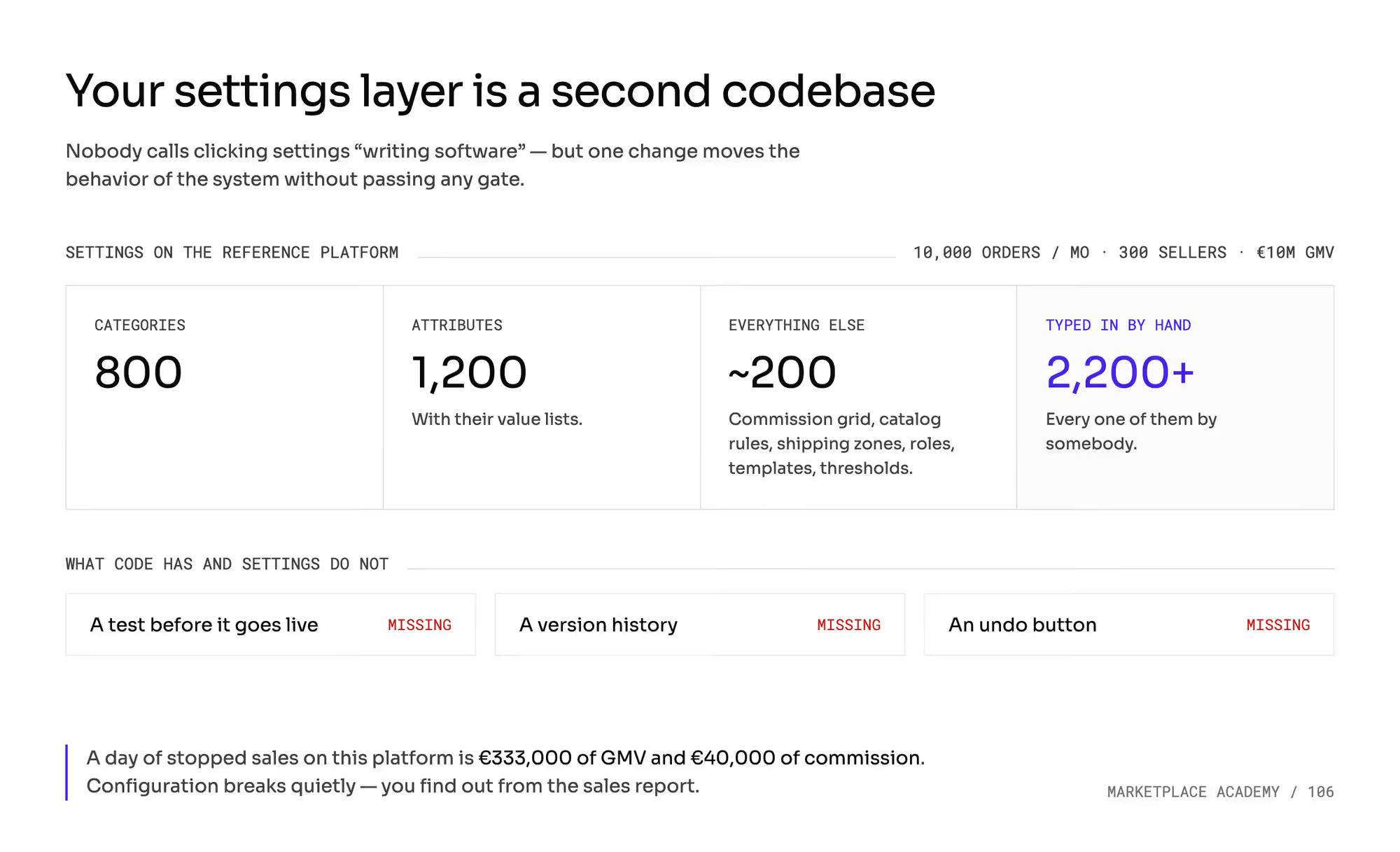
- Configuration management on a marketplace covers more than 2,200 settings that people typed in, such as 800 categories and 1,200 attributes. Those settings usually have no testing, no version history, and no undo, and a day of stopped sales costs €333,000 in GMV and €40,000 in commission.
- A marketplace needs three environments at minimum: a place to break things, a staging environment, and production. Teams often forget to budget for a fourth one: the sandbox for sellers.
- When you promote configuration between environments, settings travel, and data stays behind. Some imports delete every setting that's missing from the file, and rebuilding 2,200 settings takes two people about three days.
- Only named people should change production settings, with different approval for cosmetic, contractual, and destructive changes. You can undo only a switch, and for everything else your way back is a full export signed with a date and taken before every import.
What is configuration management on a marketplace, and how many settings does it cover?
Count the settings someone in your company can change without a developer. Do it once. The total shows how much of your platform depends on settings.
This chapter uses the series' standard example, and every number in it is hypothetical. Your marketplace has 10,000 orders a month, 300 sellers and 200,000 active offers. A €1,000 cart and a 12% commission give you €10 million of GMV a month.
That platform has about 800 categories and 1,200 attributes, each with its list of allowed values. Around 200 other items sit next to them.
Those other items include the commission grid with its exceptions, catalog rules, shipping zones, and rates. They also include roles and permissions, notification templates, seller quality thresholds, deadlines and reminders. That's more than 2,200 settings, and someone typed in every one of them.
1. Settings are software written without safeguards
Configuration is programming without the safeguards that code has. It lives in an environment that isn't tested, or can't be tested. One change can alter how the system behaves, and no check stops it first.
2. Settings lack a test, a history, and an undo
Code goes through a test before it goes live, and it has a version history and an undo button. The settings layer almost never has any of the three.
Teams don't treat a configuration change as a release. They skip the checks a release gets.
A wrong setting can cost as much as a bad release. A day of stopped sales on this platform is €333,000 of GMV and €40,000 of your commission.
3. Configuration breaks quietly
When configuration breaks, the system stays up. It starts doing something different from what it did the day before.
You find out from the sales report or from a seller. By then, the wrong setting has been live for hours or days.
How many environments does a marketplace need?
Count environments by their roles, and ignore their names. Platform vendors give an operator at least two environments, and more often three. Large implementations use the same setup.
A serious project doesn't need a fourth or a fifth environment. Each extra environment adds to your vendor's invoice.
The infrastructure bill is the small part of an environment's cost. The larger part is the person who keeps its 2,200 settings in line with production. That work takes time, people, and tooling.
If no one refreshes an environment, your tests pass there on settings that production no longer uses. Two environments that match production are better than four where two hold last year's settings. The minimum is three environments, each with its own role.
1. Place to break things
This is where your team clicks settings for the first time. Mistakes are allowed here, and no one signs anything off.
2. Staging environment
A staging environment looks like production. You approve the configuration you intend to use in staging before it reaches real buyers.
3. Production
Production holds real money and real people. Every mistake here reaches a buyer or a seller.
How do the 4 marketplace environments compare?
The fourth environment in the table is the sandbox for sellers. Each environment has its own rules for data, access, and the cost of a mistake.
What does each environment decide? | Place to break things | Staging | Seller sandbox | Production |
|---|---|---|---|---|
Why it exists (purpose) | learning and trials | signing off the configuration | integration tests by sellers and integrators | selling |
Whose data is inside (source) | invented | an anonymized copy of production | the seller's test data | real |
Who can change settings (role) | anyone on the team | the owner of the area | you only | a short named list |
Where its configuration comes from (direction) | typed in manually | typed in, then exported onward | from staging | from staging |
Who spots a mistake first (party) | you | you | the seller | the buyer |
Cost of a day of downtime (€) | 0 | a delayed release | seller onboarding on hold | €333,000 of GMV and €40,000 of commission |
What changes when you promote configuration between environments?
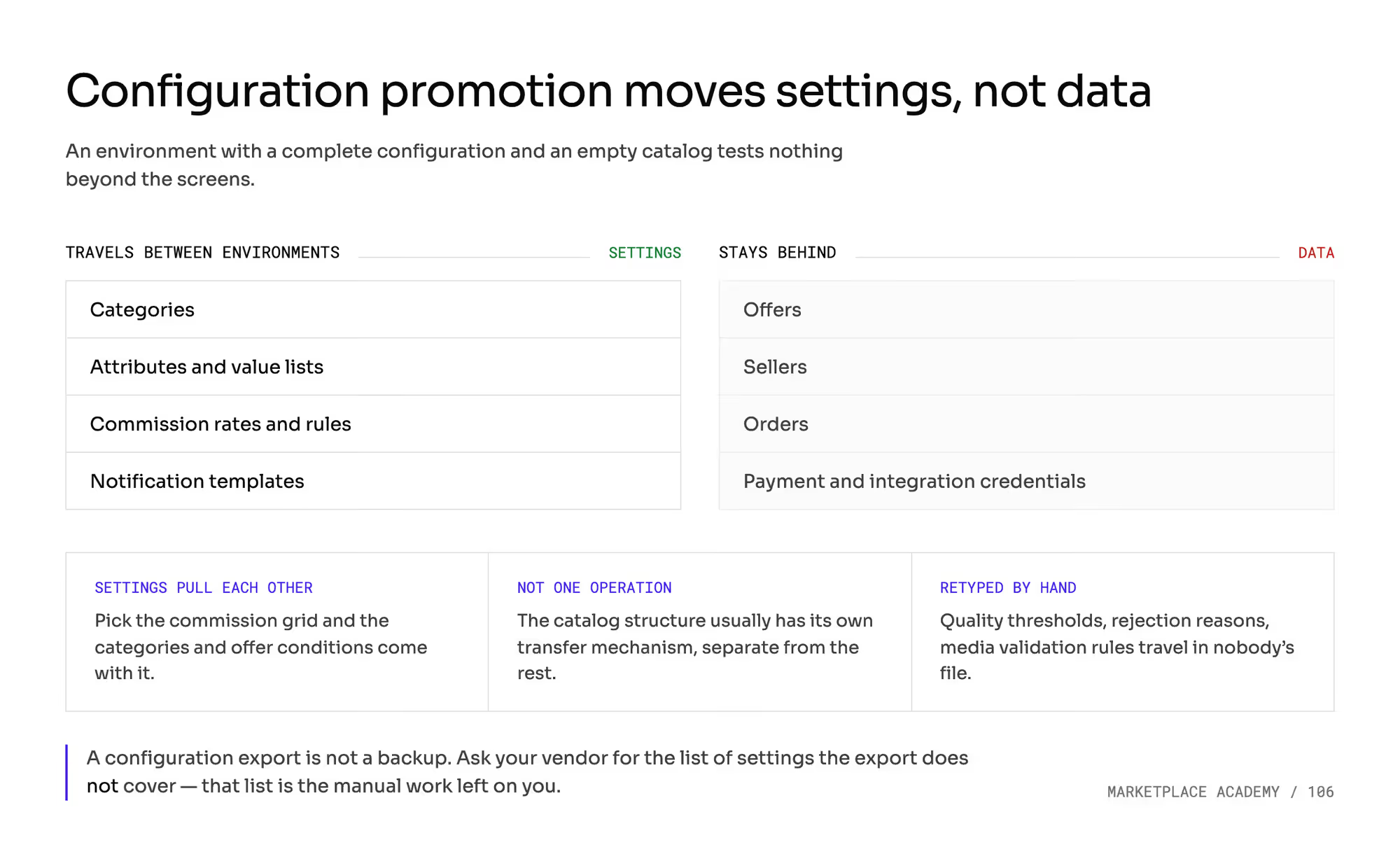
Copying settings from one environment to the next is called configuration promotion. Operators often miss three things about it.
1. Settings travel, and data stays behind
Categories, attributes, rates, and templates travel. Offers, sellers, and orders stay where they are.
If an environment has a full configuration and an empty catalog, you can test only the screens. You can't see there how a rule treats 200,000 real offers.
2. Settings pull other settings along
You pick the commission grid, and the categories and offer conditions come with it. A rate needs its categories and conditions to attach to.
3. Promotion takes more than one operation
In many products, the catalog structure has its own transfer tool, and the other settings travel through a different one. Part of the configuration has no tool at all.
Seller quality thresholds, rejection reasons, and media validation rules then get retyped manually. Some export files work only with one version of the system. The vendor guarantees older files for a few months only.
A configuration export isn't a backup. Ask your vendor for the list of settings the export doesn't cover. That list tells you how much manual work you start with.
How can a configuration import delete your settings?
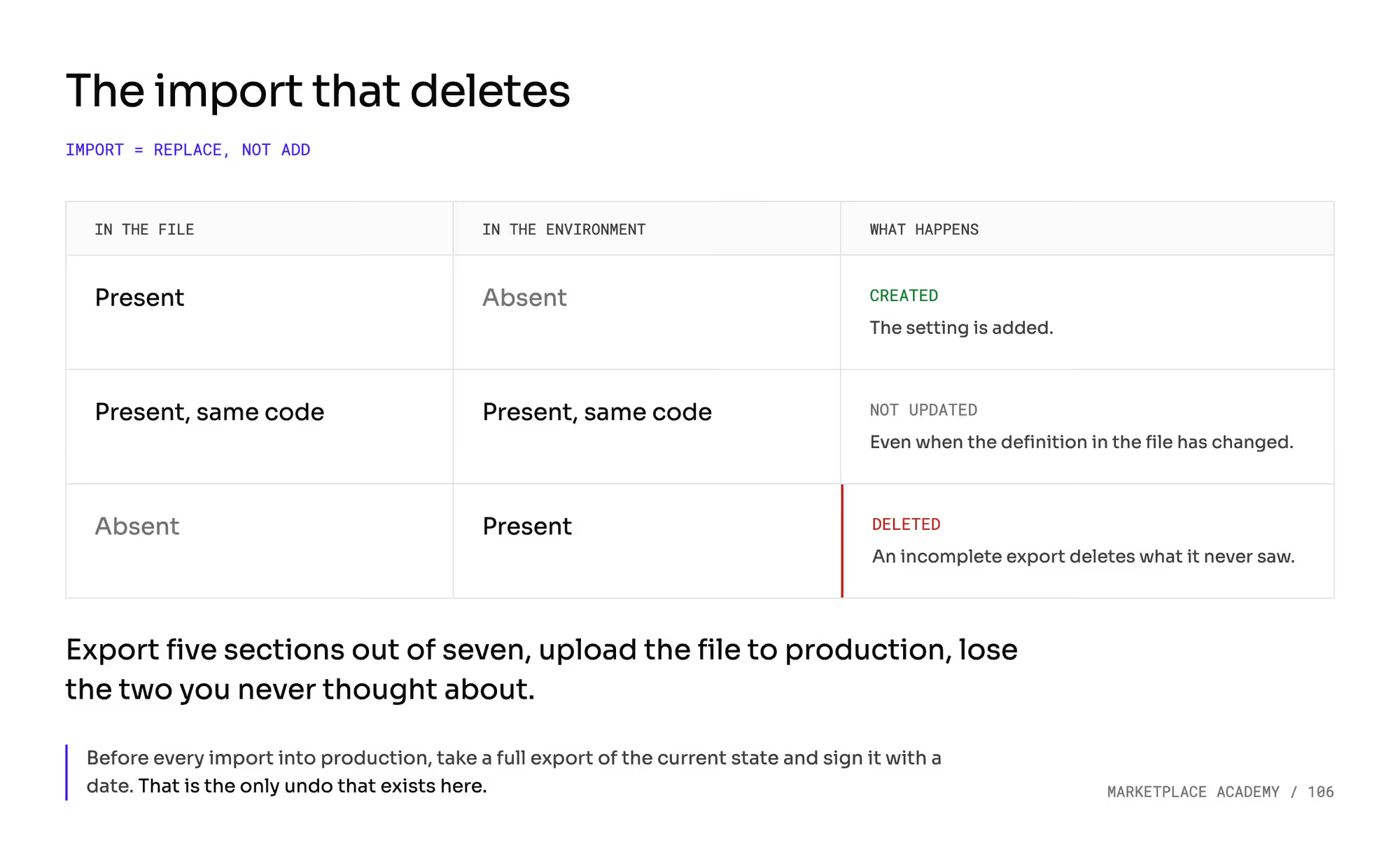
A configuration import can replace the settings in an environment instead of adding to them. Some products document three import rules:
- A setting that's in the file and missing from the environment gets created.
- A setting with the same code isn't updated at all, even when its definition has changed.
- A setting that's in the environment and missing from the file gets deleted.
Combine the third rule with a partial export. If you import an incomplete export, you delete every setting it left out.
Say someone exports five sections out of seven, because those are the only ones they changed. They upload the file to production and lose the two sections they never thought about.
Some vendors warn in writing never to use this import on a live environment. The warning tends to sit at the end of a long instruction that people read only halfway.
Count the cost of rebuilding before you write your policy. After an import like that, you don't know what disappeared.
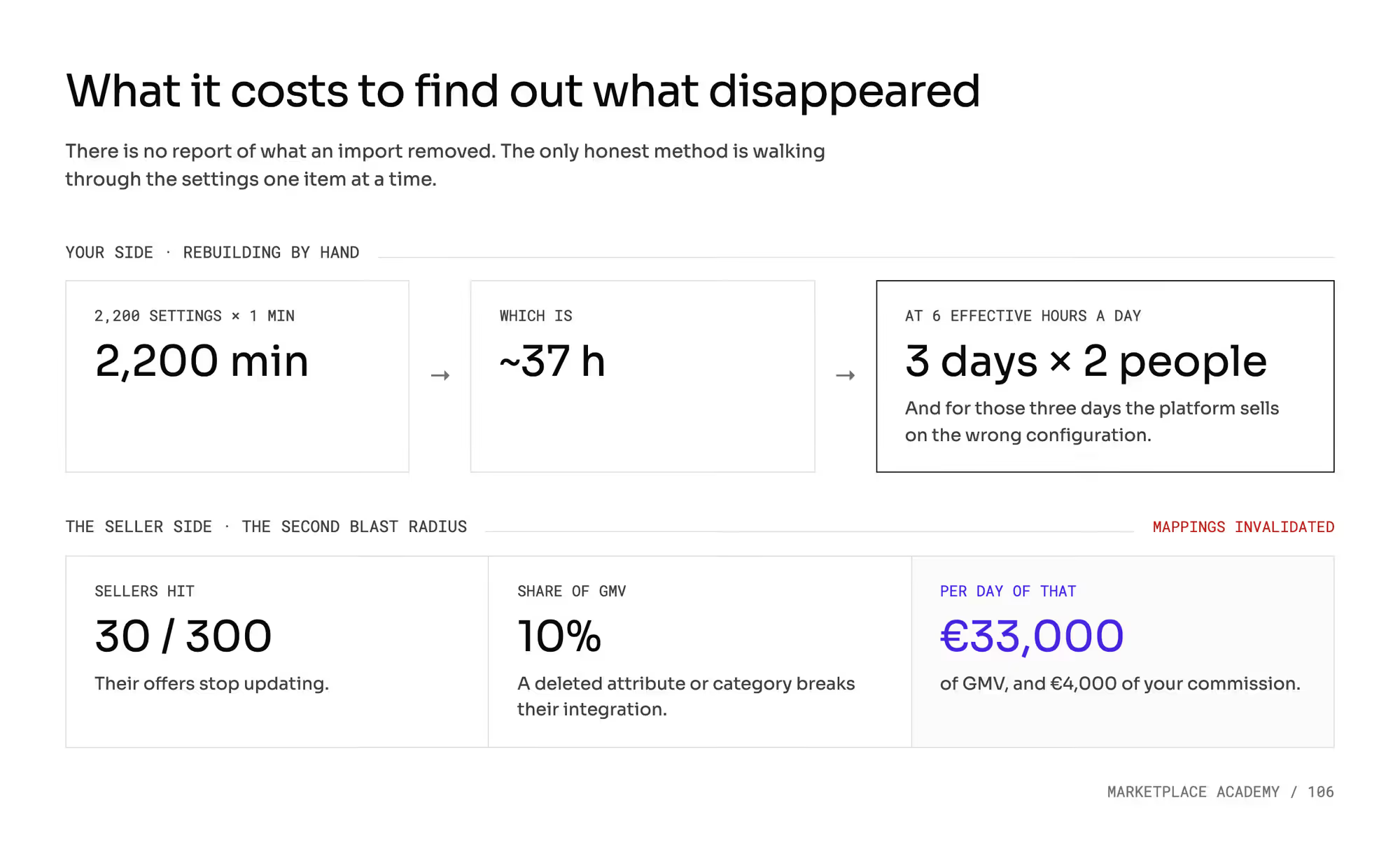
You have to check all 2,200 settings one by one. Each item takes a minute. That's 2,200 minutes, or about 37 hours.
Two people working six productive hours a day need about three days. Your marketplace sells on the wrong configuration for those three days.
Your sellers lose too. Deleting an attribute or a category breaks the mappings that sellers and their integrators built in their own systems.
Suppose it hits 30 of your 300 sellers, who carry 10% of your GMV. Their offers stop updating, and you lose €33,000 of GMV and €4,000 of commission a day.
Before every import into production, take a full export of the current state and sign it with a date. That export is the only undo you have.
Where does test data for a staging environment come from?
Copying production is the obvious choice, because production holds the only realistic data you have. Operators do copy it, with three safeguards in place.
1. Personal data is stripped before the copy leaves production
You anonymize the copy before it leaves production. The chapter on marketplace GDPR covers how anonymization works and where it stops.
2. Test environments can't reach real money or real people
A test environment must not reach real payments, real carriers, or real mailboxes. In some products, a refresh clears the payment provider and integration credentials on purpose and wipes the outgoing notification channels.
Email is the dangerous channel, because those messages land in real inboxes. The chapter on transactional email covers sending domains and address masking.
3. Anything created only in a test environment is temporary
A refresh usually replaces the whole database and doesn't merge data. Configuration created only in the test environment disappears with it.
The vendor usually sets the refresh schedule. You then plan your tests around the vendor's dates.
Why does a marketplace need a sandbox for sellers?
A seller with their own integration doesn't test it in their own systems. They test it in your test environment.
The sandbox checks their data against your category tree and your required attributes. It takes their test order and shows the result. You let them into production after that.
The chapter on API versioning counts what a slow sandbox costs in days to a first sale. Settle four things about the seller sandbox before launch.
1. You maintain the seller sandbox
It's your environment with your configuration, and an outside company works in it. If its settings are a year old, the seller integrates against last year's version of your catalog. They find the differences on the day they go live.
2. Each environment gets its own API keys
The seller needs more than one click to go from test to production. The seller sets up a second configuration on their side and plans a second date in their schedule.
3. Your configuration change can be a release for sellers
Some changes touch the data you exchange with sellers. Examples are how tax is calculated, a new required field or the structure of categories.
Before such a change, warn the sellers who integrate on their own. Give them test orders in the sandbox, an isolated copy of the system without financial consequences. The chapter on P2B regulation covers your duty to inform sellers about a change of terms.
4. Without a sandbox, the first test happens in production
The most common mistake in a first upload is a price in the wrong unit. The seller lists €100 instead of €1,000.
Two hundred units sold bring €20,000 instead of €200,000. The seller loses €180,000, and your commission is €2,400 instead of €24,000. You and the seller then have to agree on who covers the loss.
Who may change production settings, and how do you undo a change?
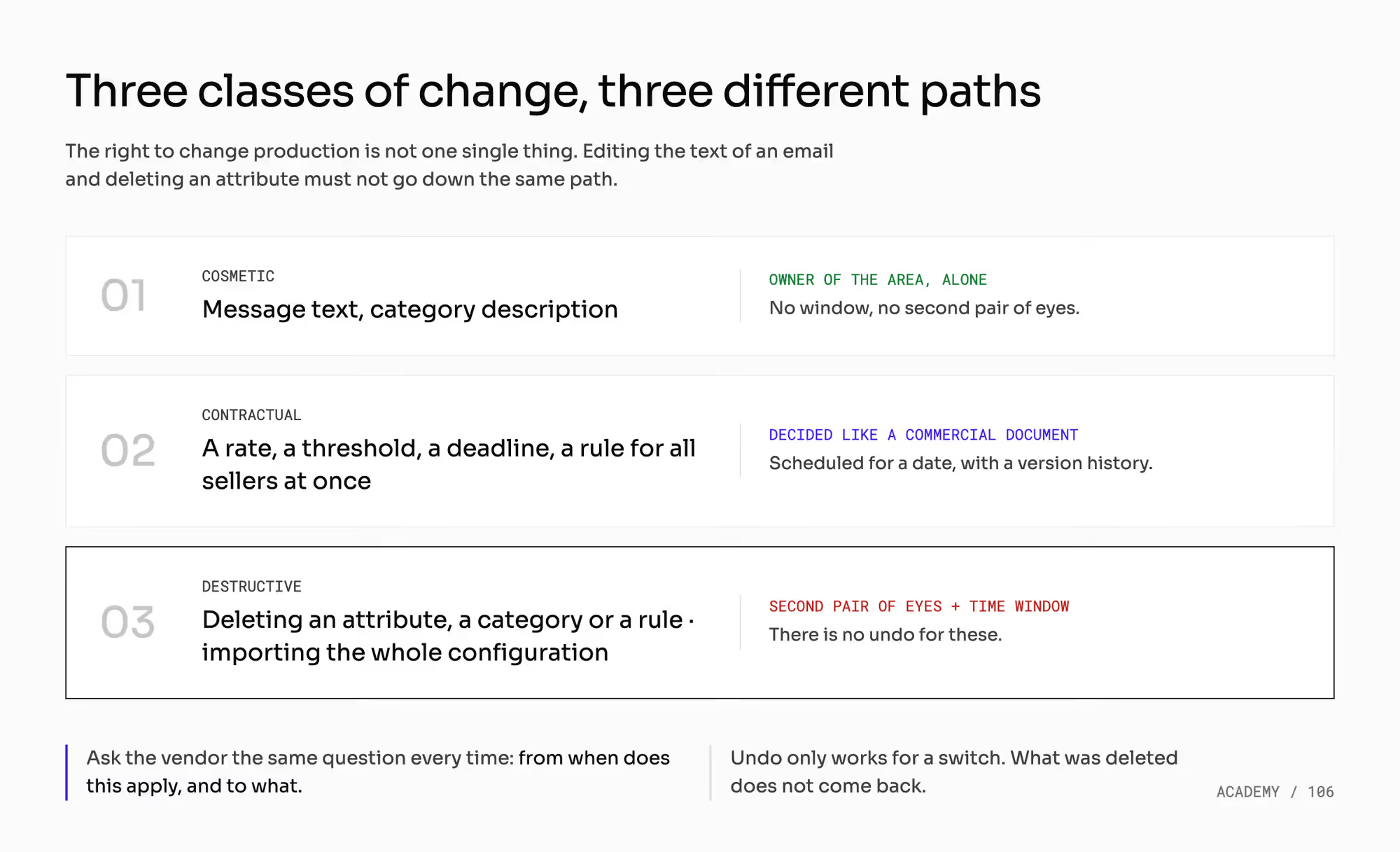
Give people different rights to change production. Split your settings into three classes, each with its own approval threshold.
1. Cosmetic changes
These are the text of a message or a category description. The owner of the area makes them alone.
2. Contractual changes
These are a rate, a threshold, a deadline, or a rule that applies to all sellers at once. They need the same level of approval as a commercial document.
The chapters on marketplace commission levels and commission exceptions cover what goes into the commission grid.
3. Destructive changes
These are deletions of an attribute, a category, or a rule. A full configuration import belongs here too. Destructive changes need a second pair of eyes and a time window, because they can't be undone.
When does a configuration change take effect?
A change takes effect after a delay, and the delay is a setting too. Some changes work at once, some at the next background recalculation, and some only on objects created after the change.
A changed shipping deadline can end up applying to new orders only. A rule applied to a published catalog can also act backward and remove offers that were selling yesterday. The chapter on catalog rules covers that case.
Ask the vendor the same question about every setting. From when does it apply, and to which objects?
Can you schedule and version a configuration change?
Some products already let you schedule a change for a date and keep its earlier versions. You're entitled to ask for both.
Those products give a change of commercial terms a future date, a version history, and a notification when it takes effect. Hold your vendor to that bar.
What can you undo in production?
Undo works only for a switch. You can turn off what you turned on.
What you deleted doesn't come back. Turning something off doesn't reverse the effects it already had. The chapter on the marketplace audit log covers what you record about each change, who sees it, and for how long.
What does configuration management change in your marketplace?
Treat configuration promotion as a software release. Give it a calendar, a time window, and freeze periods. The worst date for a promotion is the Friday before a sales peak.
Your IT team can't be the only owner of configuration. The 2,200 settings mix commercial terms, catalog policy, and permissions, and each area needs an owner on the business side. The chapter on SSO vs MFA covers who holds which roles.
Your environments also affect when you can call a system integrated. The chapter on marketplace integrations covers the order in which you connect systems. The chapter on a single source of truth covers who owns categories and attributes.
If an upstream system pushes your catalog configuration, you promote it twice, in two tools. Plan both promotions into your migration and launch tests.
How do you check configuration management with a vendor?
Take one setting from staging to production before you sign the contract. Follow these five steps:
- Pick one setting from each class: cosmetic, contractual, and destructive. The destructive one is the real test.
- Take a full configuration export, and check whether you can read it without the vendor's help.
- Upload it to an environment that has settings of its own, and count how many of them disappeared.
- Change a threshold, and measure how long it takes to work and which objects it applies to.
- Try to undo the change. Write down what came back on its own, what you had to retype, and what you couldn't recover.
Then ask these four questions, and ask to see each answer on screen:
- Does the import delete settings that are missing from the file?
- Which classes of settings does the export leave out?
- Can I schedule a change for a future date and see its previous version?
- Who maintains the sandbox for sellers, and does a refresh wipe their data?
Which mistakes do operators make with configuration management?
Each of these mistakes is easy to make, and you find it late. Most of them stay invisible until a seller or a buyer reports the result.
1. Test environment refreshed once, at launch
A year later, you test on last year's configuration. Your tests pass on settings that production no longer uses.
2. Configuration import with no export just before it
You never took the one export that would let you undo it. You still don't know what disappeared.
3. Production changes with no risk class
Editing the text of an email and deleting an attribute go through the same path, with no approval on either. Someone in a hurry can cause damage on any day.
4. Seller sandbox cut from the budget
You save one environment. You pay for it with the first real order from a seller who tests in production.
5. Copy of production with the personal data left in
The copy holds every one of your buyers. More people and more companies usually have access to test environments than to production.
What do you still have to settle about configuration management?
This article doesn't tell you how many environments to buy in your contract. That depends on how many sellers integrate on their own and how often you change configuration.
Compare two numbers to decide. One is the hours it takes to maintain an environment, and the other is the cost of a day of downtime.
This article also leaves these neighboring topics to other chapters:
- What happens to a published catalog when you change a rule, in the chapter on catalog validation.
- How sellers connect and test through the API, in the chapter on seller API keys and versions.
This article isn't legal advice. Take two areas to your lawyer:
- The terms on which buyer data may leave production, under the rules on personal data protection.
- How long to keep the trail of configuration changes, under the rules on transparency toward sellers and your own audit trail.
All the numbers above are hypothetical. Count your settings again in a year. That number grows faster than your catalog and faster than the team that handles it.
Summary: How do you keep marketplace settings safe between staging and production?
Configuration management on a marketplace covers more than 2,200 settings that people typed in. They decide how the platform sells, and they usually have no testing, no history, and no undo.
You need a place to break things: a staging environment and production. Add a sandbox for sellers who integrate on their own, and refresh every environment so it matches production.
Promotion copies settings and leaves data behind, and some imports delete what the file leaves out. Split changes into cosmetic, contractual, and destructive, and take a dated export before every import into production.
Building a marketplace where a settings change gets the same care as a code release?
Frequently asked questions on configuration management
What is configuration management?
Configuration management is the practice of tracking, testing, and controlling the settings that decide how a system behaves. It covers a marketplace's categories, attributes, commission rates, catalog rules, and permissions. It gives those settings the version history and approval steps that code already has.
What is a staging environment?
A staging environment is a copy of production where you approve changes before they reach real buyers. A marketplace's staging environment holds an anonymized copy of production data. Only the owner of each area changes settings there, and approved settings are promoted from it to production.
What is configuration promotion?
Configuration promotion is copying approved settings from one environment to the next, usually from staging to production. Settings travel, and data stays behind. Some import tools delete every setting that's missing from the file, and a dated export of production is your way back.
Ready to build?
We build marketplaces that test, version, and promote your settings from staging to production, with a way back for every change.