
SSO vs MFA on a Marketplace: Logins, Roles, and Offboarding

SSO vs MFA is the difference between one login for many systems and a second check on every login. Single sign-on (SSO) lets a person use one company account everywhere, and multi-factor authentication (MFA) adds a code, a hardware token, or a phone confirmation to the password.
More than a thousand people and systems log in to a marketplace platform. Most of them work for your sellers, and no one tells you when they leave.
You decide before launch who logs in through SSO, who has to use MFA, and who takes access away. If you leave it open, two years after launch, you won't be able to say who can log in.
This article breaks down:
- Why is taking access away harder than granting it on a marketplace?
- SSO vs MFA: what does each one do on a marketplace?
- Where should a marketplace enforce MFA, and what do the resets cost?
- How does offboarding work for each group of marketplace users?
Key insights
- Taking access away is harder than granting it because a seller waits for a new account and no one waits for an old one to close. A marketplace with 300 sellers has 1,150 people and systems that log in. Your HR process tells you about departures for only 40 of them.
- SSO vs MFA splits the login into two checks. SSO decides which company account a person logs in with, and MFA confirms each login a second way. SSO through your directory covers only your own 40 employees, which is 3.5% of the accounts. It stops a login, but the account stays open unless your directory can also switch it off.
- A marketplace should enforce MFA on every seller user, because those accounts reach other companies' payouts. Your own staff gets MFA from the company directory, and machine accounts need narrow permissions instead. MFA resets for 900 seller users take about 56 hours of support work a year.
- Offboarding works for each group of marketplace users only when someone owns it. Seller administrators switch off their own people, credentials unused for a quarter expire, and a change of department triggers the same review as a departure. Reviewing all 1,150 identities on that calendar takes 63 hours a year.
Why is taking access away harder than granting it on a marketplace?
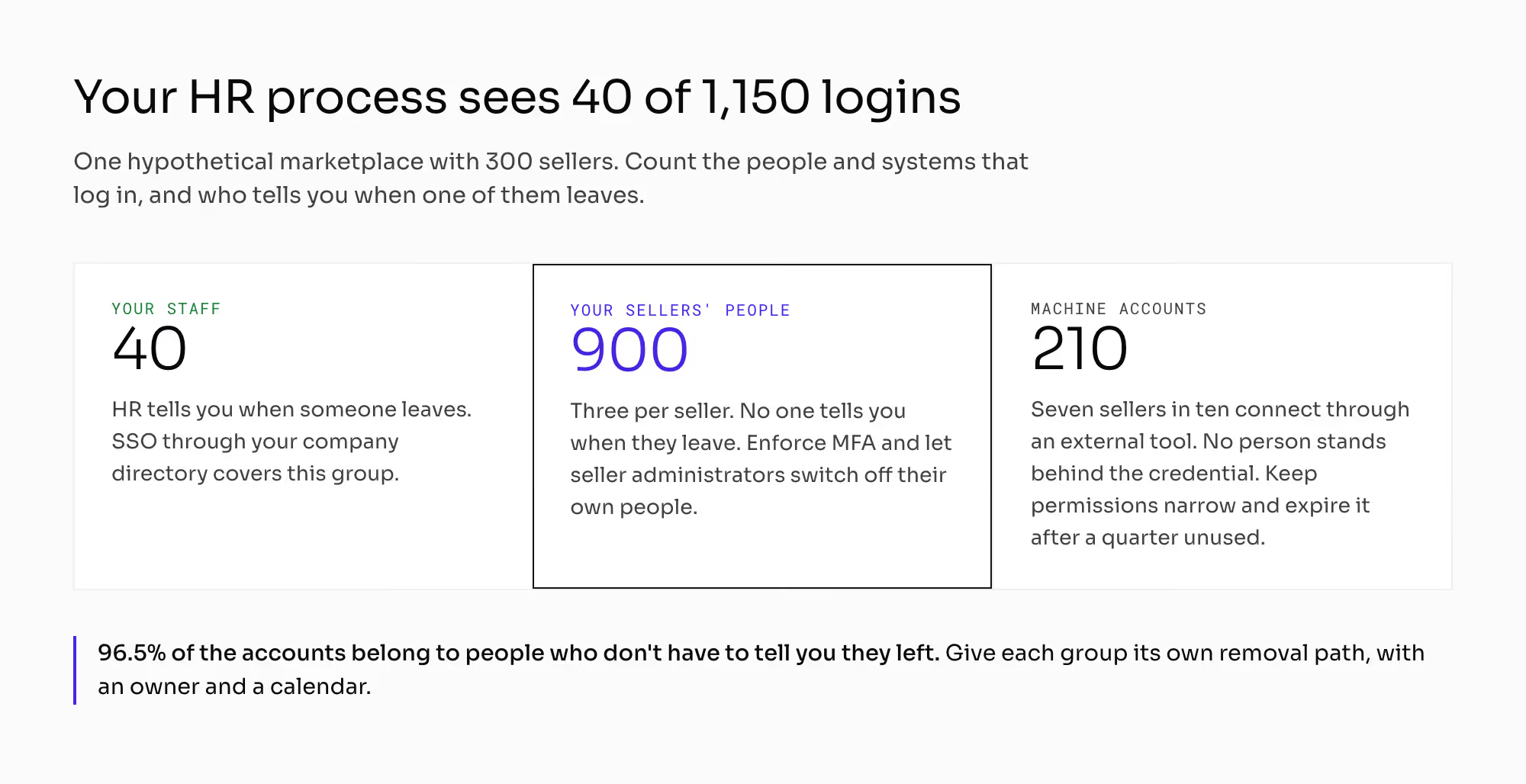
A seller waits for every new account, and your team creates it the same day. No one waits for an old account to close, and no one owns that task. The platform keeps working when you skip it.
This series uses one hypothetical marketplace as its standard example: 10,000 orders a month, 300 sellers and 200,000 offers. The average cart is €1,000, and the commission is 12%. That's €10 million of GMV a month.
Count the people and systems that log in to that platform:
- Your own staff: category managers, customer service, finance, catalog, and IT. That's about 40 accounts.
- Your sellers' people: the owner, the warehouse, the bookkeeper, and whoever handles complaints. Three people per seller make 900 accounts.
- Machine accounts: if seven sellers in ten connect through an external selling tool, you hold 210 credentials with no person behind them.
That adds up to 1,150 identities. Your HR process covers only 40 of them, 3.5% of the total.
The other 96.5% belong to people who don't have to tell you when they join or leave. A seller who lets a warehouse worker go won't email you about it.
An accounting or warehouse system has only your own employees as users. HR tells you when someone leaves, and you don't have to ask.
Your sellers don't tell you when their people leave. You need a procedure for removing access, with a calendar and an owner for each group.
SSO vs MFA: what does each one do on a marketplace?
SSO decides which account a person logs in with. MFA checks that the person typing the password owns the account. You need SSO and MFA together, and each one covers different users.
SSO (single sign-on) means logging in to many systems with one company account. Your employee doesn't set up a separate password with every vendor.
Ask the vendor what "SSO" means in their product before you treat it as settled. It can mean one account across the vendor's own products. It can also mean federation with your company's identity directory, and only federation helps you.
Federation lets your directory decide who logs in. The platform creates the account on the first login, and the role arrives from the directory with the user.
1. Automatic account creation removes a gate
Someone used to create each account on purpose. Federation means IT only adds a person to a group in the directory.
That group was often named for another system. It may hold eighty people where you expected eight.
2. Role name becomes part of the integration
The directory sends the role as text. The role name on the platform side has to match it exactly.
Some products don't let you rename a role later. Agree on the role names with your IT team before the first login.
3. Login and removal are two separate mechanisms
Removing a person from the directory stops their login. The account usually stays open, and so do the machine credentials that never touch a login screen.
A public standard called SCIM (System for Cross-domain Identity Management) lets a directory create an account and switch it off again. Federation without it only creates accounts. Ask whether switching a person off at your end switches off their account and their credentials on the platform.
Where does a local password get around marketplace SSO?
Many products still require a local password for some actions. That local account stays active next to federation, and people can use it to get around SSO.
You also configure federation separately for each environment. The chapter on marketplace configuration management covers how settings differ between staging and production.
Should your sellers' people log in through SSO federation?
Federation for your sellers' people is sometimes possible, and it's usually a bad idea. You would hold accounts for other companies' employees.
You would also take on creating and closing those accounts. Your sellers' people log in with a platform account, and MFA protects it.
Where should a marketplace enforce MFA, and what do the resets cost?
MFA (multi-factor authentication) confirms an identity a second, independent way. The user shows something they carry in addition to the password. That can be a code from an app, a hardware token or a confirmation on their phone.
1. Your own employees
You don't enforce MFA on the platform for your own staff. Your company directory does that when they log in through SSO.
2. Your sellers' people
Enforce MFA on every seller user, with no exceptions. These accounts reach other companies' money, and no security department watches over them.
3. Machine accounts
A second factor doesn't apply to a credential with no login screen. A narrow permission scope and regular rotation protect it instead. The chapter on marketplace API versioning covers both.
What do security standards require from MFA?
NIST's digital identity guidelines are the authentication standard most security departments refer to. They rule out email as a channel for the second factor.
People also use the mailbox to reset their password. A code sent there protects the account weakly.
The same guidelines now require at least one phishing-resistant method. The user can't retype that kind of factor into a page that imitates yours.
A hardware token or a passkey qualifies. An email code as the only option meets the requirement on paper and gives little protection.
How much do MFA resets cost a marketplace?
Assume 15 users in 100 lose their second factor over a year. A new phone, a wiped app or the departure of the person who held the factor all cause it.
Across 900 seller users, that's 135 resets a year. It comes to about 11 a month.
A reset takes more than a click. You confirm the person's identity through a different channel from the one the request came on.
At 25 minutes a ticket, 135 resets take 3,375 minutes. That's 56 hours a year, about a week and a half of one person's work.
Ten times the scale means 1,350 resets and 563 hours a year. That's about a third of a full-time role. At that size, you need self-service recovery.
Compare that cost with the money an account protects. The average seller here has 33 orders a month. That's €33,000 of sales and €29,040 to pay out in the cycle after the 12% commission.
A seller at the top of the table has ten times that. Someone who takes over a seller account can reach the payout details, and one change there sends the whole cycle to another bank account. The chapter on marketplace seller accounts covers how the account and its payout details are built.
How does offboarding work for each group of marketplace users?
Offboarding means taking access away when a person or a tool stops working with you. Offboarding on a marketplace has three paths, and someone has to start each one.
1. Seller's employee leaves
You won't find out about it. The seller's account administrator knows when someone leaves. Give that person the task.
That administrator creates and switches off their own people without a ticket to you. They confirm their list of users once a year. If switching someone off needs your support team, it won't happen.
2. Integrator ends its contract with a seller
No one comes back to revoke the old credential. It stays valid for months, and the seller forgets it exists.
You can catch it with a list of credentials and the date each one was last used. Switch off anything unused for a quarter automatically. A credential no one used for a quarter has no live integration behind it.
3. Your own employee changes department
This is the worst case, because it doesn't look like an incident. No one is leaving, and no one takes anything away. Permissions pile up with each transfer.
Control 5.18 of ISO/IEC 27002 asks you to review access rights when a person changes role, as you do when they leave. Route a change of position through the same platform access review as a departure.
Why switch marketplace accounts off instead of deleting them?
In all three paths, you switch accounts off and keep them. Each past decision has to stay linked to the person who made it. The chapter on marketplace audit logs covers that record.
Deleting an account is a separate decision about clearing personal data. The chapter on marketplace GDPR covers when you have to do it.
How does role-based access control work on a marketplace?
Role-based access control gives each user a role, and the role carries a set of permissions. Platforms offer it in two forms, and the difference is bigger than it looks in a proposal.
1. Closed catalog of roles
You get a handful of ready-made sets: customer service, finance, catalog, and full administrator. You roll it out in an hour.
In the third month, you find the limit. You can't take away one dangerous action without taking away half of someone's daily work.
2. Roles you define yourself
You get several dozen single permissions and build your own sets from them. It costs you a workshop at the start.
In return, your access policy matches your own organization. A closed catalog matches the vendor's idea of how teams divide their work.
3. Dependencies between permissions
Permissions depend on each other, and proposals rarely mention it. The right to perform an action requires the right to see it. The right to approve requires the right to perform.
After a year, teams on large installations often can't say whether a role does what it was meant to. Take away the right to download the seller list, and half of a person's tools can stop working.
Ask for the dependency map in writing. On the demo, ask the vendor to remove one action from a role and show you what else stopped working.
The chapter on seller data isolation covers what a role can see and how seller data stays separate. The chapter on the marketplace seller panel covers operator access to a seller's account.
How often should you review marketplace permissions?
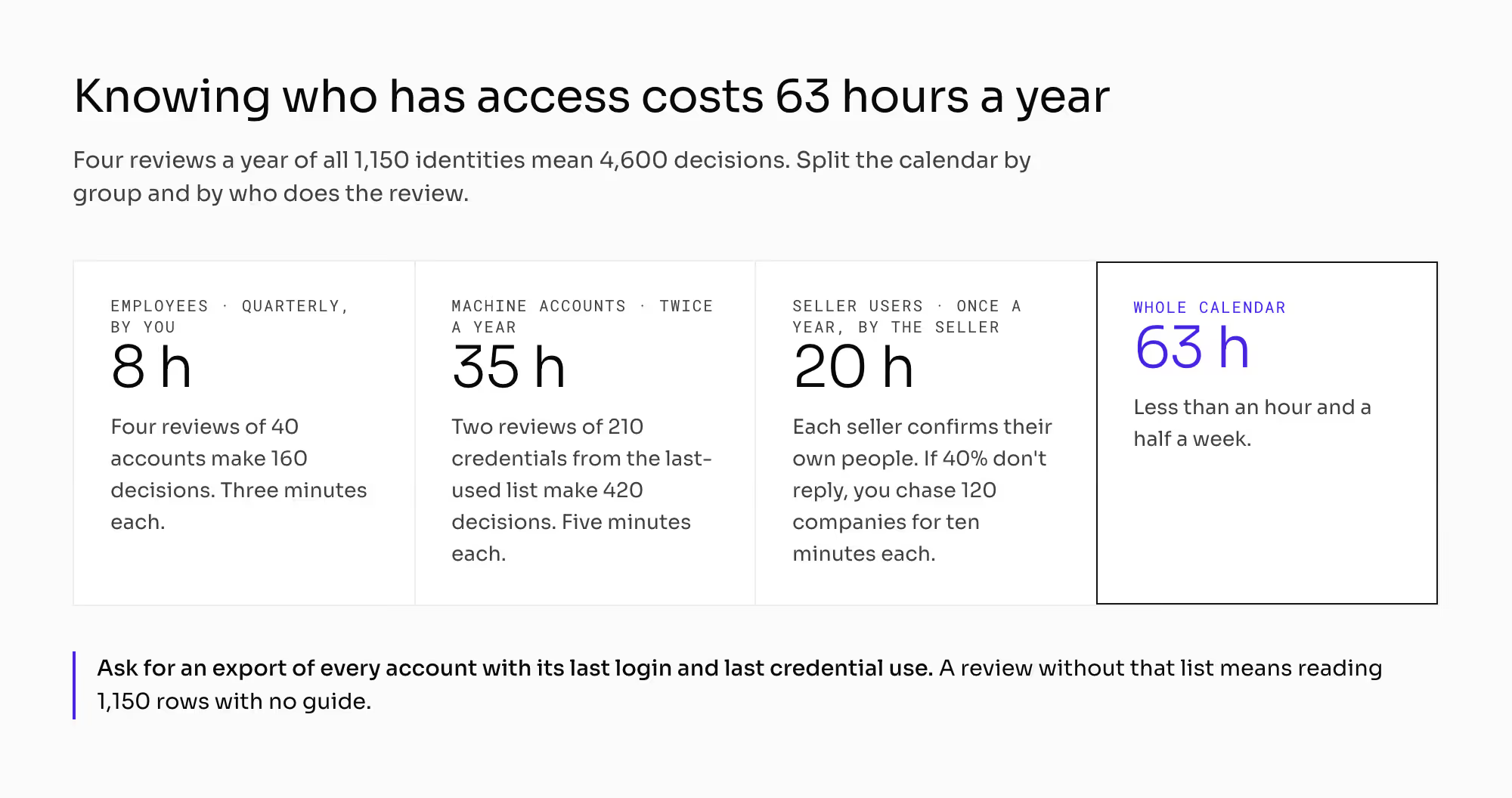
Four reviews a year of 1,150 identities mean 4,600 decisions. No team keeps that up. Vary how often you review each group and who does the review.
1. Employee accounts: quarterly, by you
Four reviews of 40 accounts make 160 decisions a year. At three minutes each, that's 8 hours a year.
2. Machine accounts: twice a year, from the last-used list
Two reviews of 210 credentials make 420 decisions. At five minutes each, that's 35 hours a year.
3. Seller user accounts: once a year, by the seller
You don't review the 900 seller accounts yourself. Each seller administrator gets the list of their own people to confirm.
If 40% of the 300 sellers don't reply, you chase 120 companies. At ten minutes each, that's 20 hours a year.
The whole calendar takes 63 hours a year, less than an hour and a half a week. You pay those 63 hours to know who has access to your marketplace.
Before you sign, make sure the platform can export the full list of accounts with the date of the last login and the last credential use. A review without that list means reading 1,150 rows with no guide. You'll do it once and never again.
How do logins and offboarding compare across the 3 groups of marketplace users?
Users fall into three groups with different owners. Each group logs in differently and gets switched off differently.
What differs between the groups? | Your employees | Your sellers' people | Machine accounts |
|---|---|---|---|
Identities on the example platform (count) | 40 | 900 | 210 |
Who creates the account | you or your directory | the seller, at their end | the seller or the tool vendor |
How you hear about a departure | from the HR system | you don't | you don't |
What they log in with | SSO with a company identity | a platform login and password | a credential with no login screen |
Who enforces the second factor | your company directory | you, on every account | doesn't apply (narrow scope and rotation instead) |
What removes access | the directory, if it controls accounts | switching the account off by hand | revoking the credential |
Who reviews it, and how often | you, quarterly | the seller's administrator, once a year | you, every six months |
What breaks most often | a change of department with old roles kept | an account left behind by someone who left | a credential left behind by an abandoned tool |
Vendors rarely bring up machine accounts in a meeting, and most orders pass through them. Seven sellers in ten connect through an integration. That's 7,000 orders and €7 million of GMV a month going through credentials your employees never created.
What does SSO vs MFA change in your marketplace?
How you set up the seller account limits who you can give a role to. If one legal entity holds three accounts with you, the same person gets permissions three times. They also lose them in three places.
Switching off a whole seller is a bigger job than switching off one user. The chapter on marketplace seller offboarding covers what happens to their offers, orders, and payouts.
Enforced MFA adds a step to seller onboarding. A seller's warehouse worker needs an authenticator app or a hardware token before the first login.
The invitation to a new account travels by email, and onboarding often stops there. If that email doesn't arrive, the new user can't log in for the first time. The chapter on marketplace transactional email covers the sending domain and deliverability.
Export is a permission of its own. A departing employee can take your full seller list with sales results in one download. The chapter on the P2B regulation covers your obligations toward sellers and the record of decisions about them.
Roles define what a person may do. An audit log records what they did. You need both to check who did what on your platform.
How do you check SSO and MFA with a marketplace vendor?
Ask these seven questions, and ask to see the first five on screen:
- When I switch a person off in my directory, does their account on your platform stop working, or does it only stop logging in? What happens to their machine credential?
- Can you build a role that does everything except one action and show me what else disappeared? Can I have the dependency map in writing?
- Can you enforce MFA for a seller's user and show me the reset path? Who performs the reset, and can the seller manage it alone?
- Can you export every account, people, and machines in one file with the date of the last login and the last credential use?
- Can a seller's own administrator switch off one of their users without your support team? If not, multiply that task by 900.
- Do we configure federation ourselves, or is it a ticket to you? How long does it take?
- Can our directory create and switch off accounts on your platform through SCIM?
Ask your own IT team one more question. Your directory can let people in, but can it also switch accounts off in another company's system?
Which mistakes do operators make with marketplace logins and offboarding?
1. Treating SSO as the answer to offboarding
Federation controls the login of your own 40 people. That's 3.5% of the accounts. The topic looks closed, and 1,110 accounts stay out of reach.
2. Leaving seller user switch-offs to your support team
At 900 accounts, that's a few tickets a week. No one puts them first. Accounts of people who left stay active for years.
3. Setting up a machine account on a salesperson's login
It looks harmless until the salesperson leaves and the catalog feed stops. The seller then writes in that you broke their integration.
4. Changing departments without a permission review
After three transfers, a person has wider access than their manager. Each single step had a reason.
5. Planning a review without a last-used list
People do the first review while the idea is new. There won't be a second one.
What do you still have to settle about marketplace logins and offboarding?
This article covers how a person gains a role and loses it. Four neighboring topics have their own chapters:
- The chapter on seller data isolation covers what a role can see and how seller data stays separate.
- The chapter on marketplace API versioning covers how narrow a machine credential should be.
- The chapter on marketplace audit logs covers what stays in the event record.
- The chapter on marketplace seller accounts covers how the seller account object is built.
This article doesn't settle what user data you may hold or how long you keep access records. Data protection law and sector security rules set both. The chapters on marketplace GDPR and marketplace order documents cover the mechanism, and you confirm the scope and the periods with a lawyer.
This article doesn't replace your company's security policy. Your security department picks the authentication methods. You check whether the platform supports them for users outside your company.
All the numbers above are hypothetical. They depend on two figures you measure yourself: users per seller and the share of them who leave in a year.
Summary: Which login controls does each group of marketplace users need?
The answer to SSO vs MFA depends on the user group. Your 40 employees log in through SSO, and your company directory enforces their second factor.
Your 900 seller users need MFA enforced on the platform. Your 210 machine credentials need narrow scopes and rotation instead.
Offboarding needs an owner for each group. Seller administrators switch off their own people, and unused credentials expire after a quarter. A change of department triggers a review.
Before you sign, ask for the full account export with last-login and last-use dates. Without it, the 63-hour review calendar can't start.
Building a marketplace where every seller manages their own users and every departure ends access the same day?
Frequently asked questions on SSO vs MFA
What is the difference between SSO and MFA?
SSO lets a person log in to many systems with one company account, and MFA confirms each login with a second, independent factor. SSO cuts the number of passwords a person keeps. MFA makes a stolen password useless on its own.
Which is more secure, MFA vs SSO?
Neither MFA nor SSO is more secure on its own, and you usually need both. MFA vs SSO compares two controls that protect against different risks. SSO through your directory controls who can log in, and MFA stops someone who has the password but not the second factor.
What is role-based access control on a marketplace?
Role-based access control on a marketplace gives each user a role, and the role decides which actions they can see, perform, and approve. It applies to your own staff and to every seller's team. Each seller's administrator assigns roles to their own people.
Ready to build?
We build marketplaces where every seller manages their own users and a departure ends access on the platform the same day.