
Transactional Email on a Marketplace: Sending Domain, Deliverability, and Address Masking

Transactional email is a message your system sends because of an event in one order or one account. Order confirmations, shipping notices, and password resets are typical examples. Your marketplace sends them from your domain, including the ones a seller wrote.
A buyer who never gets an order confirmation assumes you never accepted the order. You have to decide who sends these messages and from which domain.
Settle it before anyone in your company sends the first campaign from the domain that sends your confirmations. A damaged sending reputation takes weeks to rebuild.
This article breaks down:
- Why does all transactional email on a marketplace share one domain reputation?
- Who should send email to your buyers: you, the seller, or both?
- Why do transactional email and marketing email need separate streams?
- What does masking the buyer's email address break on a return?
Key insights
- All transactional email on a marketplace shares one domain reputation because mailbox providers judge the domain a message comes from. A marketplace with 10,000 orders a month sends about 93,200 messages, and around 1,500 of them are written by sellers you don't employ.
- Email to your buyers should come from you, through one channel on your own domain. You also need a way to stop one seller from sending without suspending their sales.
- Transactional email and marketing email need separate streams because one campaign to 150,000 buyers is about 48 times your daily confirmations. If 0.3% of the recipients complain, you get 450 complaints in one day. Your confirmations bring that many in 150 days.
- Masking the buyer's email address breaks a return when the alias expires before the case closes. If 5% of 800 monthly after-sales cases hit an expired alias, you get 40 stuck cases and about €1,120 a month of extra support work.
Why does all transactional email on a marketplace share one domain reputation?
Most things on a marketplace split per seller. Offers, balances, ticket queues, and quality metrics all belong to one seller at a time.
The reputation of your sending domain doesn't split. A receiving mail system checks the domain a message came from. It doesn't check who wrote the message or why.
Several hundred people you don't employ write from that domain every day.
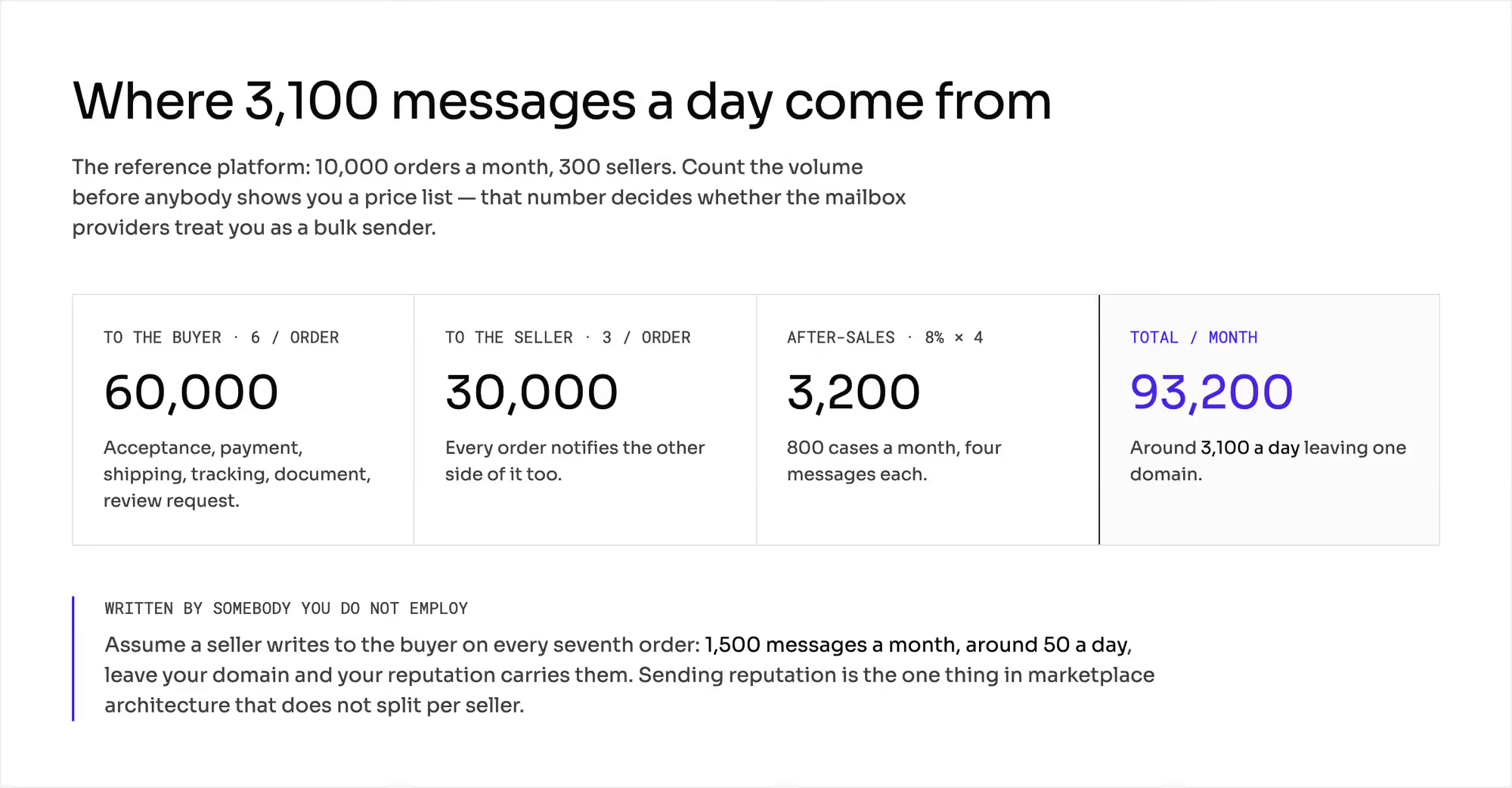
Count the volume on a hypothetical marketplace with 10,000 orders a month and 300 sellers. Every number in this chapter is hypothetical, and you can repeat the arithmetic with your own.
- Each order sends about six messages to the buyer: order accepted, payment confirmed, order dispatched, tracking number, sales document, and review request. That's 60,000 messages a month.
- Each order also sends three notifications to the seller. That's another 30,000.
- After-sales mail adds the rest. If 8% of orders lead to contact and each case takes four messages, that's 3,200 more.
Your domain sends 93,200 messages a month in total. That's about 3,100 a day.
Some of those messages come from people outside your company. Say a seller writes to the buyer on every seventh order.
Then about 1,500 messages a month leave your domain with someone else's words in them. That's around 50 a day.
1. Reputation damage costs you order confirmations
You don't pay a fine when your domain's reputation drops. Your order confirmations start landing in the spam folder instead.
One bad campaign from the same domain can cause that drop. Buyers stop seeing confirmations, shipping notices, and documents for orders they've paid for.
2. Deliverability failures stay silent for weeks
Deliverability can drop without any warning. You get no error, no alert, and no bounce message.
Messages keep going out, and fewer of them reach the inbox. You find out from the support queue, usually a few weeks later.
Who should send email to your buyers: you, the seller, or both?
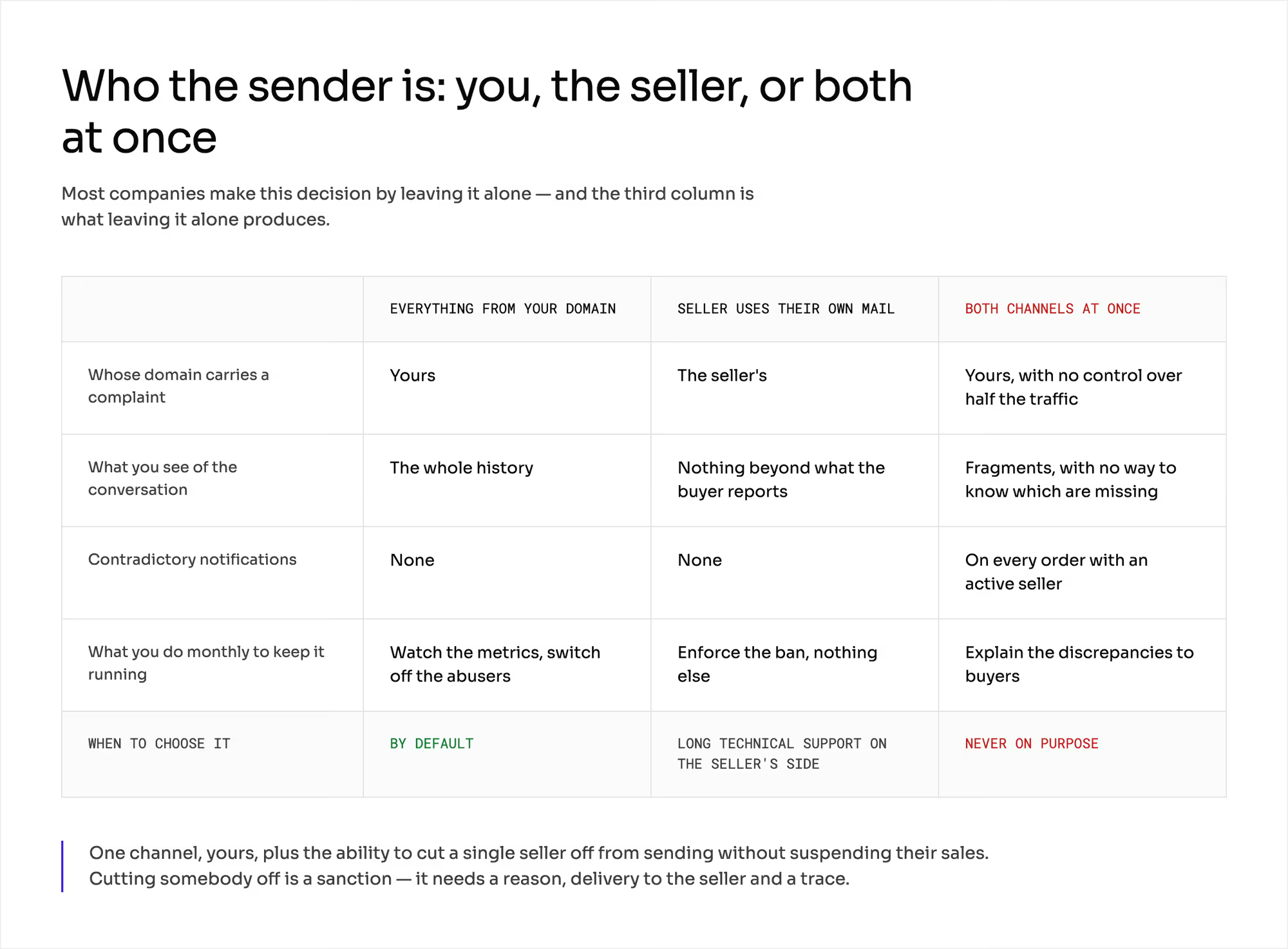
You can choose from three sender models. If you don't choose one, you end up with the third by default.
1. Everything from your domain
Every notification to the buyer and to the seller leaves from your address. That includes the messages sellers write. Your channel relays them to the buyer.
You get one tone of voice, the full history of each conversation, and full evidence in a dispute. Messages other people wrote also count against your domain's reputation. Out-of-office replies, duplicate shipping notices, and the occasional seller promotion all reach the buyer as mail from you.
2. Seller's own mailbox
The seller writes from their own address. The reputation, the cost, and the risk are theirs.
The downside for you is that you can't see what the seller writes to the buyer. You have no record to work with in a dispute. The buyer gets two delivery dates from two senders and writes to you to ask which one is true.
Some operators ban sellers from sending their own transactional notifications. Sellers keep breaking a ban until you explain why it exists. The chapter on marketplace seller education covers how to teach sellers the rules.
3. Both channels at once
This is the state you reach when no one decides. Your domain takes the complaints, and you still can't see half of the conversation.
What does each sender model decide? | Everything from your domain | Seller uses their own mailbox | Both channels at once |
|---|---|---|---|
Whose domain takes the complaints (domain) | yours | the seller's | yours, with no control over half the traffic |
What you see of the conversation (scope) | the whole history | only what the buyer forwards to you | fragments, and you can't tell which are missing |
Risk of contradictory notifications (frequency) | none | none | on every order with an active seller |
What you do each month (work) | watch the metrics and stop the sellers who abuse the channel | enforce the ban | explain the differences to buyers |
When to choose it (situation) | by default | a category in which the seller gives long technical support | never on purpose |
Send everything through one channel on your own domain. Keep the power to stop one seller from sending without suspending their sales.
Stopping a seller is a sanction. It needs a stated reason, a notice to the seller, and a record.
The chapter on P2B regulation covers how to apply a sanction like this to a seller.
Why do transactional email and marketing email need separate streams?
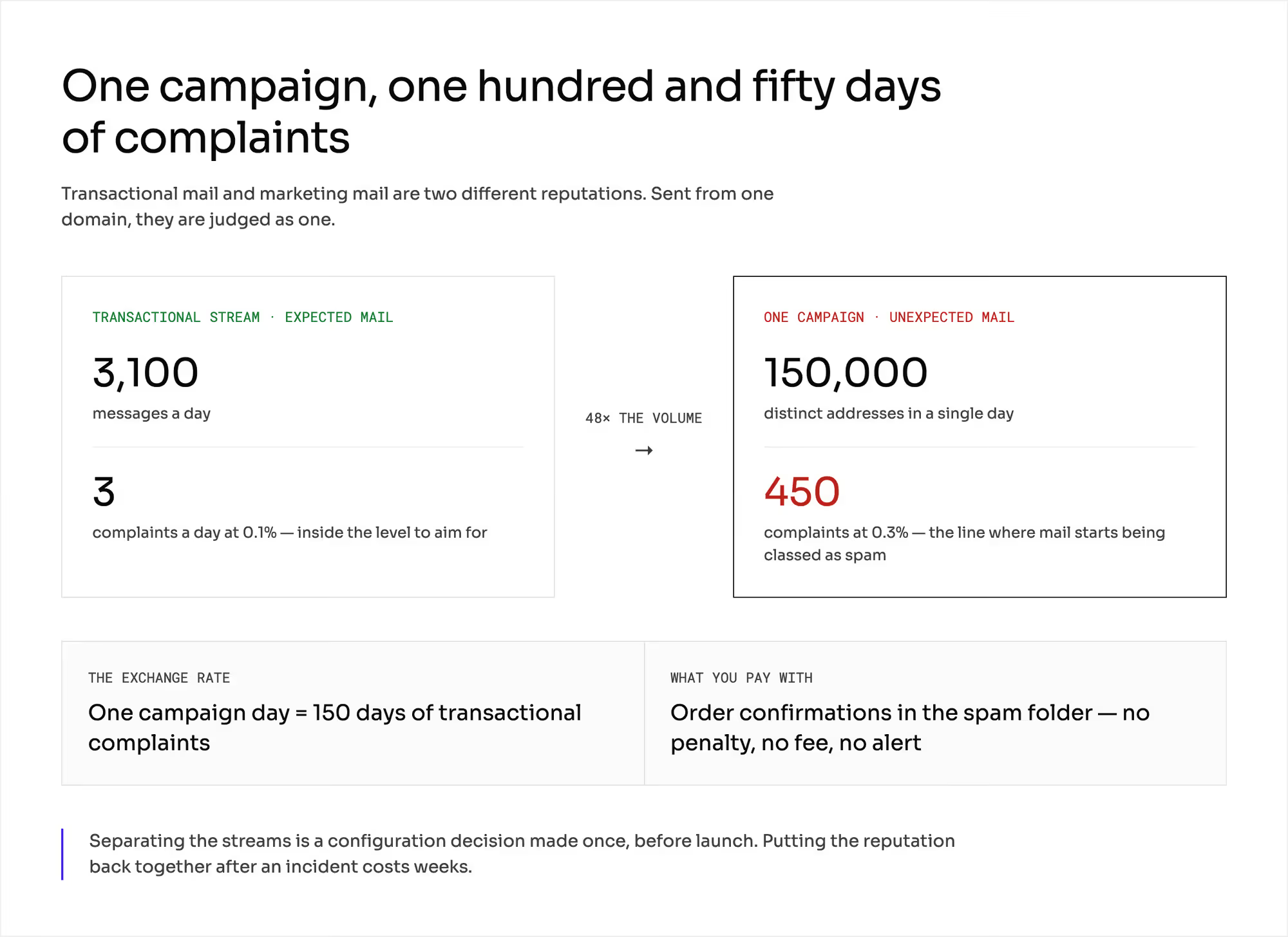
Sending campaigns and confirmations on one stream is the most expensive mistake in this chapter. Your hypothetical marketplace has taken 240,000 orders in two years.
Each buyer places 1.6 orders on average. That gives you 150,000 distinct email addresses.
One campaign to that list sends 150,000 messages in a single day. That's about 48 times your daily transactional volume of 3,100 messages.
1. Buyers react to each stream differently
Buyers expect an order confirmation, and they open it. They don't expect a campaign, and some of them click "Report spam".
Mailbox providers count complaints as a share of the messages you send. Gmail and Yahoo both draw the hard line at 0.3%. Gmail also names 0.1% as the level senders should stay under.
2. One campaign outweighs months of confirmations
A campaign with a 0.3% complaint rate brings 450 complaints in a single day. Your transactional stream gets about three complaints a day. That's 0.1% of 3,100, right at the target level.
One campaign brings as many complaints as your order confirmations collect in 150 days. Both leave from one domain, and providers judge them together. The whole domain drops from the target level to the hard line on the day of the campaign.
3. Mailbox providers give the same advice
Each large provider's sender guidelines say the same three things:
- Send bulk mail from a different address than your transactional notifications.
- Send messages of the same type from the same address.
- Keep promotional content out of order confirmations.
List every message type before launch, and decide what is transactional email and what is marketing email. A review request with a discount code in it belongs to marketing.
You separate the streams in your configuration once before launch. Rebuilding a reputation after an incident takes weeks. The chapter on marketplace launch announcements covers marketing communication for the marketplace itself.
What does masking the buyer's email address break on a return?
The seller gets an alias address generated for one order when you mask the buyer's address. Mail sent to that alias is relayed to the buyer.
The seller can write to the buyer, attach a document, and give the carrier a contact address. They never see the buyer's real address.
Masking also keeps buyers from leaving the platform to buy from the seller directly. The chapter on marketplace disintermediation covers what that protection costs and where it stops working.
1. Seller content goes out on your reputation
The alias address is yours. Every out-of-office reply, duplicate shipping notice, and seller promotion reaches the buyer's inbox as mail from you.
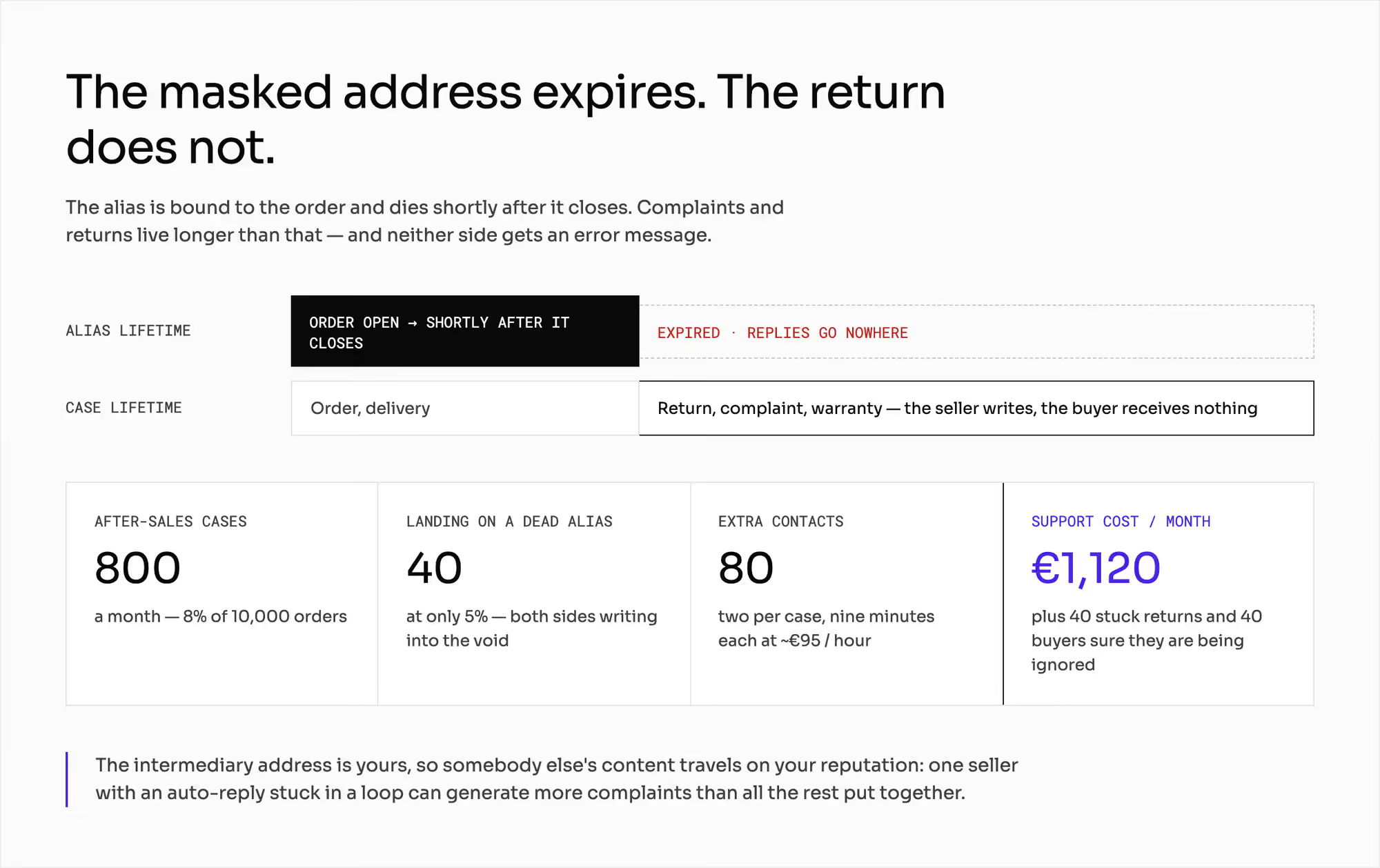
Sellers send about 50 messages a day through your domain. One seller with an auto-reply stuck in a loop can create more complaints than all the others combined.
2. Alias expires before the return is over
The alias is usually bound to the order. It expires shortly after the order closes, or a set time after the last message.
Complaints and returns last longer than that. The seller replies to an address that no longer exists, and the buyer receives none of it. Neither side sees an error message, and each one believes they're waiting on the other.
Count the cost on the hypothetical marketplace. You get 800 after-sales cases a month, because 8% of 10,000 orders lead to contact. If 5% of them land on an expired alias, 40 cases a month go nowhere.
Each of those cases comes back to your support team as two extra contacts. Support time costs around €95 an hour.
A nine-minute contact then costs about €14. That gives you 40 × 2 × €14 = €1,120 a month. You also have 40 stuck returns and 40 buyers who think the seller is ignoring them.
3. Masking is a data protection matter first
Setting up masking means deciding what personal data the seller receives and on what legal basis. You have to settle that before you treat it as a convenience.
The chapter on marketplace GDPR covers the legal basis for masking and the scope of the data you hand over to sellers.
What do mailbox providers check before your transactional email reaches the inbox?
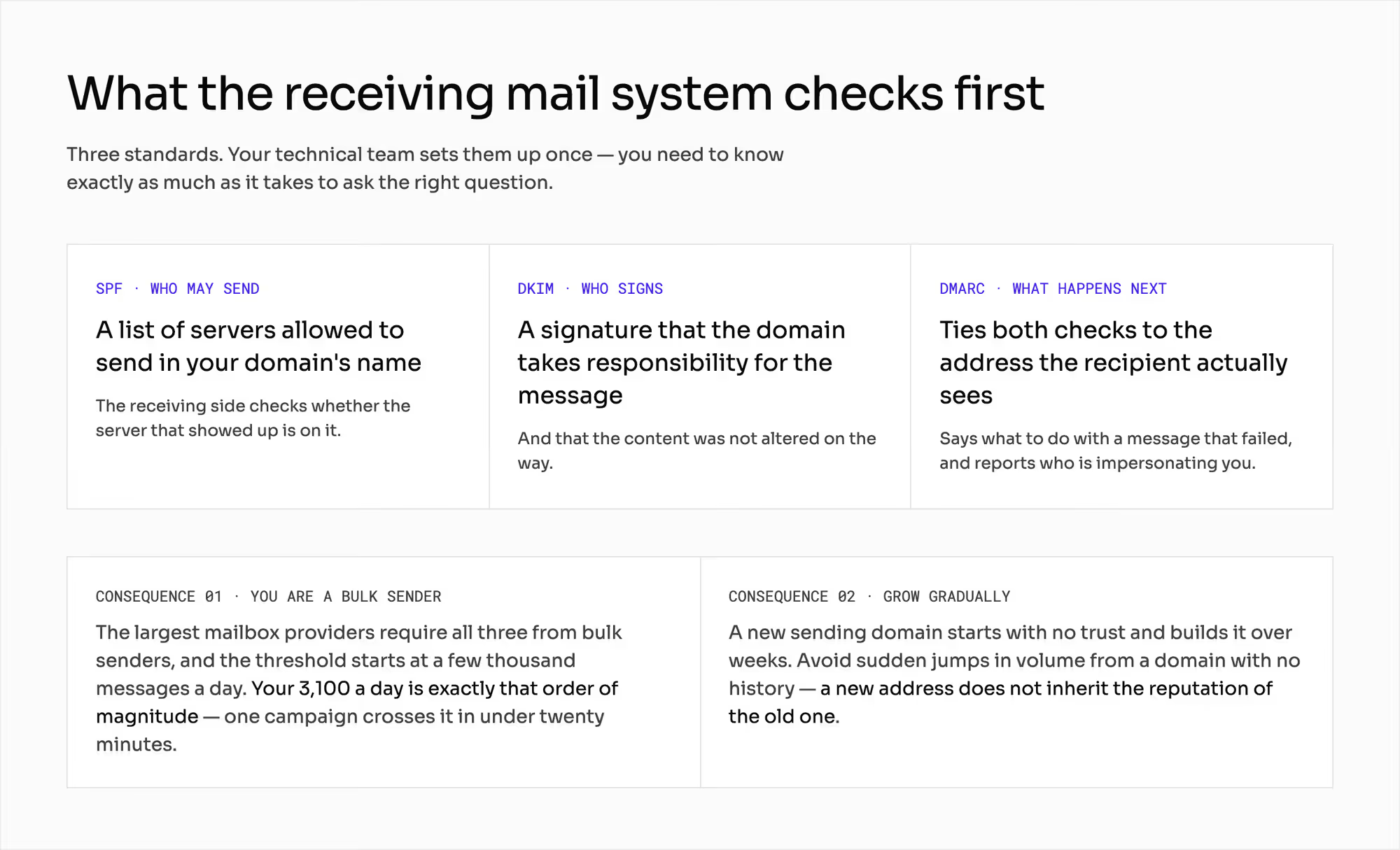
A receiving mail system checks three standards before it trusts your domain. Your technical team sets them up once. You need to know them well enough to ask the right questions.
- SPF is the domain owner's list of servers allowed to send mail in its name. The receiving side checks whether the server that sent the message is on that list.
- DKIM is a cryptographic signature on the message. It shows that the domain takes responsibility for the message and that no one changed the content on the way.
- DMARC ties both checks to the address the recipient sees. It tells the receiving system what to do with a message that fails, and it sends you reports on who's sending mail in your name.
Gmail and Yahoo require all three from bulk senders. Gmail treats you as a bulk sender from about 5,000 messages a day to its users.
Your 3,100 messages a day already sit close to that line. One campaign crosses it in under twenty minutes.
A new sending domain also needs time. The large providers tell senders to avoid sudden jumps in volume from a domain with no sending history.
Mailbox providers don't trust a new domain at first. You build that trust over weeks. A new address doesn't inherit the reputation of the old one, and changing the domain also breaks the buyer's existing conversation threads.
Which metrics show email deliverability on a marketplace?
Some transactional messages carry a document or information you're required to give the buyer. If a document doesn't reach the buyer, you still owe it to them. The buyer comes to you for it either way.
The chapter on marketplace order documents covers what has to reach the buyer and how long you keep it. If 2% of them go undelivered, you lose 200 documents a month and 2,400 a year. Your team has to deal with each one.
Read three metrics, separately for each stream and for each large mailbox provider. An average across all your mail hides a campaign that's collecting complaints right now. You see the problem only when both streams drop together.
1. Deliverability rate
Deliverability rate is the share of messages that the provider accepted and placed in the inbox. A drop here always comes before the first complaint from a buyer.
2. Bounce rate
Bounce rate is the share of messages the receiving system rejected. A rising share of permanent bounces means addresses that don't exist.
Either your address list is going stale, or someone is typing addresses in for buyers.
3. Spam complaint rate
Spam complaint rate is the share of recipients who clicked "Report spam". The 0.3% line is hard at Gmail and Yahoo.
Treat 0.1% as the level at which you start looking for a cause.
What does transactional email change in your marketplace?
Transactional email depends on three other parts of your marketplace. A problem in any of them shows up first as mail that didn't arrive.
1. Notification delays are event delays
A notification is the result of an event in your system. A late notification usually means the event itself was late. The mail server is rarely the cause.
The chapter on webhook integration covers how events travel between your systems.
2. Mail queue can fail like any other system
An hour of downtime at a busy time of day leaves several hundred confirmations unsent. You then have to send them without a sudden spike in volume.
The chapter on uptime SLA covers how to plan for failures like this one.
3. Support model decides whose addresses are in play
Your support model decides who replies to the buyer. It also decides whether a reply to a notification comes back into the same thread.
The chapter on marketplace customer service covers who answers the buyer, you or the seller.
How do you check transactional email with a vendor?
Ask these six questions, and ask to see each answer on screen:
- Can transactional notifications and marketing email go out as two independent streams, each authenticated on its own?
- Can I see deliverability, bounces, and complaints by stream and by mailbox provider, or do I hear about problems from buyers?
- How many notifications come as standard, which can I switch off, and do I need a ticket to change the wording?
- Does content from a seller go through a check before it leaves my channel, or only after it's sent?
- How long does an alias address last, and what happens to a complaint opened after it expires?
- Can I stop one seller from writing to buyers without suspending their sales?
If changing the wording needs a ticket, ask about the turnaround time. That's your real response time when a notification turns out to be wrong.
Prepare two things on your own side. Count your daily email volume before anyone shows you a price list, because that number decides whether providers treat you as a bulk sender.
Then give the sending domain an owner who also answers for customer service. Every change in this layer reaches their queue first.
Which mistakes do operators make with transactional email?
Each of these mistakes shows up first as mail that buyers don't see. You usually learn about it from support tickets.
1. One domain for every kind of mail
The newsletter, the campaigns, and the order confirmations all leave from one place. The first campaign with a weak response lowers the deliverability of confirmations. Your team then looks for the cause in the order system.
2. Sudden start at full volume
You set up a new domain and send the first campaign to 150,000 people. The provider sees a sender with no history and a spike in volume at the same time. Their guidelines warn against exactly this.
3. Masking with no plan for after the order closes
Aliases expire while returns and complaints are still open. You get 40 cases a month in which both sides write to dead addresses and both feel wronged.
4. Sellers sending notifications next to yours
The buyer gets two delivery dates and calls you. You don't know what the other sender promised.
5. Metrics read as one average
One stream is failing, and the average hides it. You see it only when it drags the other stream down too.
What do you still have to settle about transactional email?
This chapter doesn't give technical settings. This chapter names SPF, DKIM, and DMARC so you can talk about them with your technical team.
This chapter isn't legal advice either. Consent for marketing email, the basis for processing an address, and what you can pass to sellers are separate decisions.
The chapter on marketplace GDPR covers the mechanism, and your lawyer confirms the details. Ask them about three areas of regulation:
- Protection of personal data.
- Direct marketing in electronic communications.
- Information duties toward consumers.
Four neighboring questions have their own chapters:
- The chapter on marketplace order documents covers what goes into each document and how long you keep it.
- The chapter on marketplace customer service covers who replies to the buyer.
- The chapter on marketplace launch announcements covers how to plan a campaign or a communication program.
- The chapter on marketplace disintermediation covers what buyers leaving the platform cost you.
All the numbers above are hypothetical. Put in your own volume and your own address list. Then count how much of your complaint budget one campaign uses up.
Summary: How do you keep transactional email on a marketplace out of the spam folder?
All transactional email on your marketplace shares the reputation of one domain, including the messages sellers write. Keep one sending channel on your domain, and keep the power to stop a single seller from sending.
Send campaigns on a separate stream with its own authentication. One campaign to your full buyer list collects as many complaints in a day as your confirmations do in five months.
If you mask buyer addresses, plan for the alias to outlive the order. Read deliverability, bounces, and complaints per stream and per provider.
Building a marketplace whose order confirmations reach every buyer's inbox?
Frequently asked questions on transactional email
What is transactional email?
Transactional email is a message a system sends because of an event in one order or one account. Order confirmations, shipping notices, receipts, and password resets are typical examples. The recipient expects it, and it carries information about their own order or account.
What is the difference between transactional email and marketing email?
Transactional email answers an event in one order, and marketing email goes to a whole list at once. Buyers expect transactional messages and open them. Mailbox providers advise a separate stream for marketing email because it collects far more spam complaints.
How do you improve email deliverability on a marketplace?
You improve email deliverability on a marketplace by separating transactional and marketing mail and authenticating both with SPF, DKIM, and DMARC. Grow volume gradually on a new domain. Then watch deliverability, bounces, and complaints for each stream and each mailbox provider.
Ready to build?
We build marketplaces that send every order confirmation from your own domain and keep campaign mail on a stream of its own.