
How Does Data Isolation Work Between Sellers on a Multi-Vendor Marketplace?
Data isolation on a marketplace means that each seller can access only their own data, although all sellers work in the same system. In software terms, each seller is a tenant. Tenant isolation means one tenant can't see another tenant's records.
Someone can leak data on a marketplace without breaking in. One screen with a download button can cause a leak if the permission behind it is wider than the job needs. Your 300 sellers know exactly what they're looking for.
You decide which seller data each group with access can reach. You set those limits in permissions, reports, and exports before launch.
This article breaks down:
- Why does a marketplace need data isolation between sellers?
- Which seller data can competitors see, and which has to stay hidden?
- How do you limit exports from the operator panel?
- How do integrator keys and support access cross the boundary between sellers?
Key insights
- A marketplace needs data isolation between sellers because 300 competitors log in to the same system with passwords you issued. Data can leak without anyone breaking in. It takes one screen where the system doesn't check whether a record belongs to the user.
- Competitors can see every seller's price, delivery date, and ranking position, because buyers see them too. Sales volume, conversion, return share, and commission rates have to stay hidden. A category comparison needs at least five sellers in each cell.
- To limit exports from the operator panel, set an alert threshold by volume, role, and time of day. If your median export is 200 rows, set the threshold at 600 rows. A full database export of 3,600 rows goes far over it. Every team keeps its export tool.
- Integrator keys cross the boundary between sellers when one key covers many sellers. Support access crosses it when stepping into a seller's panel shows every field. Settle the scope of each key when you issue it, and limit support access field by field.
Why does a marketplace need data isolation between sellers?
Security in your own online store works like a border. You have an inside, an outside, and one crossing point you guard.
A marketplace has no such border. Your sellers are on the inside with passwords you issued.
They do exactly what you invited them to do. They're also each other's competition.
The same screen that shows one seller their own results could show another seller a rival's results. You can't settle this by finding a "security" line in a feature matrix.
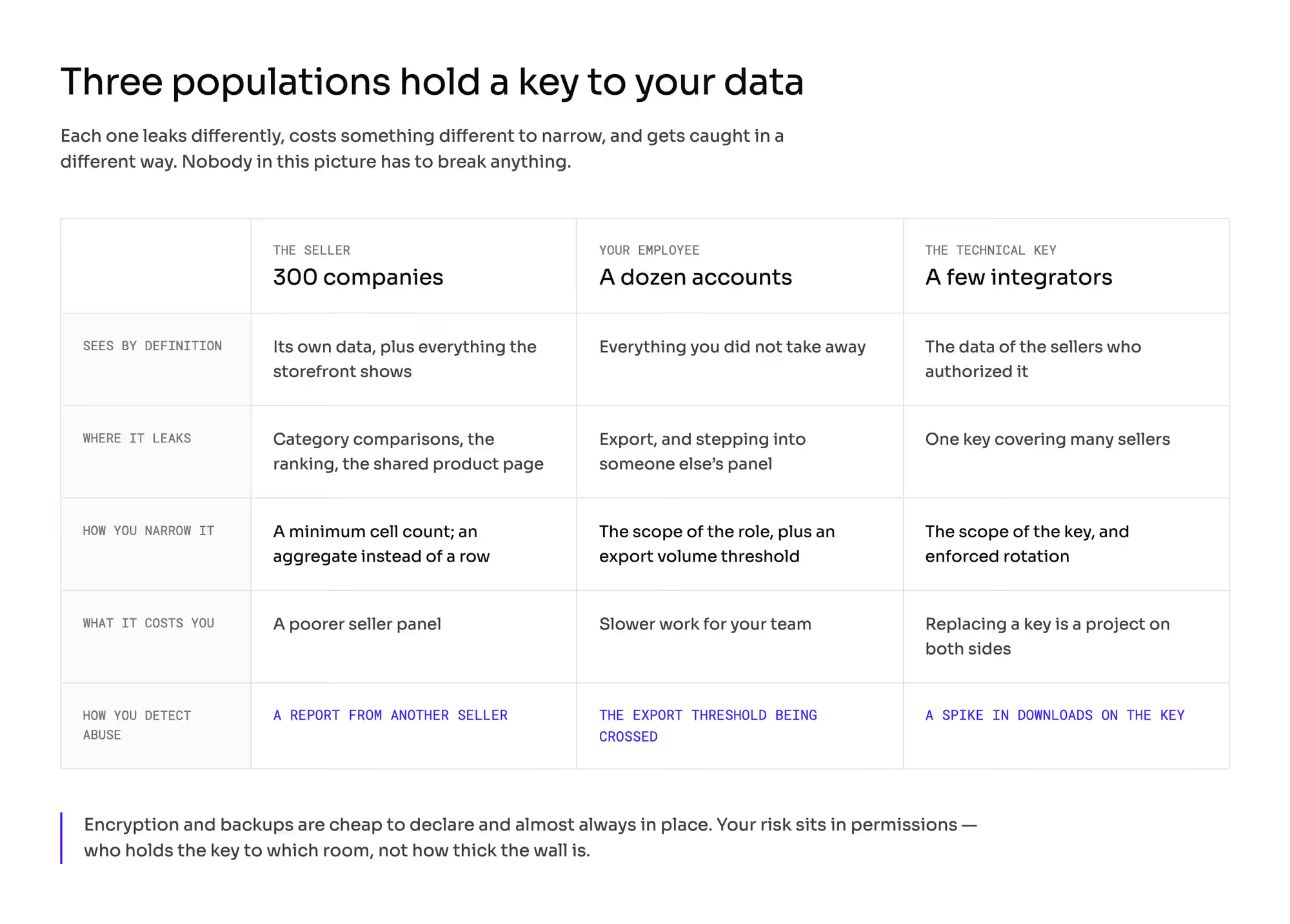
Encryption, protection against outside traffic, and backups are cheap to declare and almost always in place. The real risk is in how you set permissions.
Ask who can open which screen and download which list. Encryption and firewalls matter far less here.
1. Leak without a break-in
The leak happens through actions the system treats as normal. The user logs in, clicks a link, and sees what the screen gives them.
The OWASP Top 10 puts broken access control first on its list of web application risks. That means one request to your marketplace that skips the permission check. The code never verifies that this record belongs to this user.
2. Competitor who knows what to look for
A stranger browses and guesses. A competitor knows the brand, the category, and the price they're fighting over.
A competitor gets far more out of the same second of access than a stranger does.
3. Three groups with access
Three groups reach seller data. The first is sellers and their employees. The second is your own team in sales, catalog, finance, and support.
The third is machine access through API keys issued to integrators. These firms connect many sellers' stores to many platforms at once.
Each group leaks through a different channel and needs its own limit.
Which seller data can competitors see, and which has to stay hidden?
Don't try to protect the price. Every seller can open the product page like any buyer and see every offer on it.
The same goes for delivery dates, availability, and the order in which you rank offers. Sales performance is a different class of data, and it has to stay hidden.
1. Price match as a pricing policy
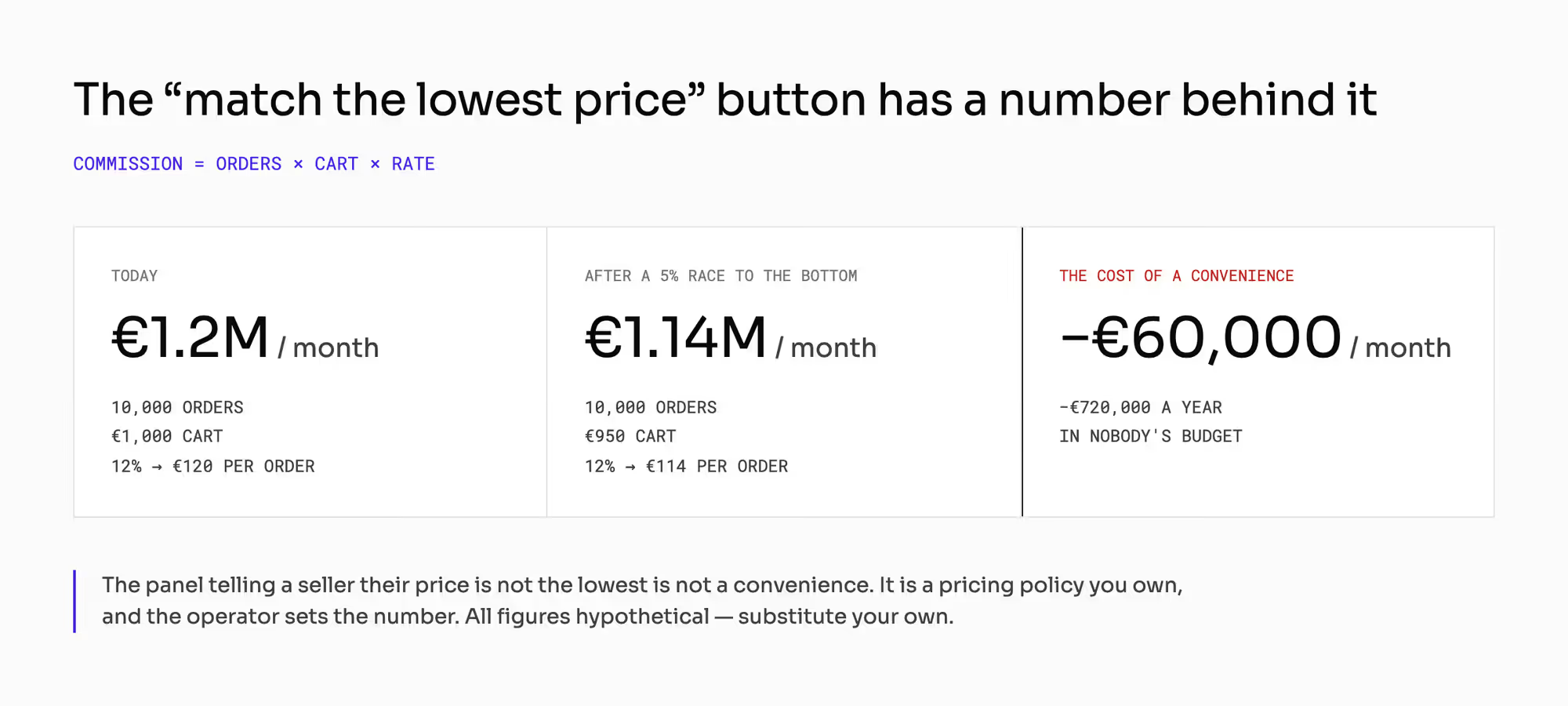
You control part of that visibility yourself. Some platforms tell sellers in their panel that their price isn't the lowest. They add a button to match the lowest price or undercut it by an amount the operator sets.
It looks like a convenience. It works as a pricing policy, and you can count what it costs you.
Take the standard example of this series, with hypothetical numbers: 10,000 orders a month, a €1,000 cart, and a 12% commission. That gives you €120 per order and €1.2 million of commission a month.
Say sellers keep undercutting each other, and the average cart drops 5% to €950. Your commission per order falls to €114. Your monthly commission falls to €1.14 million.
That's €60,000 less every month and €720,000 a year. You won't find that cost in any budget.
2. Sales performance
Sales volume, conversion, the share of returns, and a negotiated commission rate aren't public. They leak along four routes:
- Comparisons with the category average.
- Explanations of why an offer holds its place in the ranking.
- A shared product page that several sellers edit.
- An export with one column too many.
The chapter on product data ownership covers who owns the shared page. The chapter on product data disputes covers what happens when sellers disagree about it.
3. Category comparison with a minimum cell size
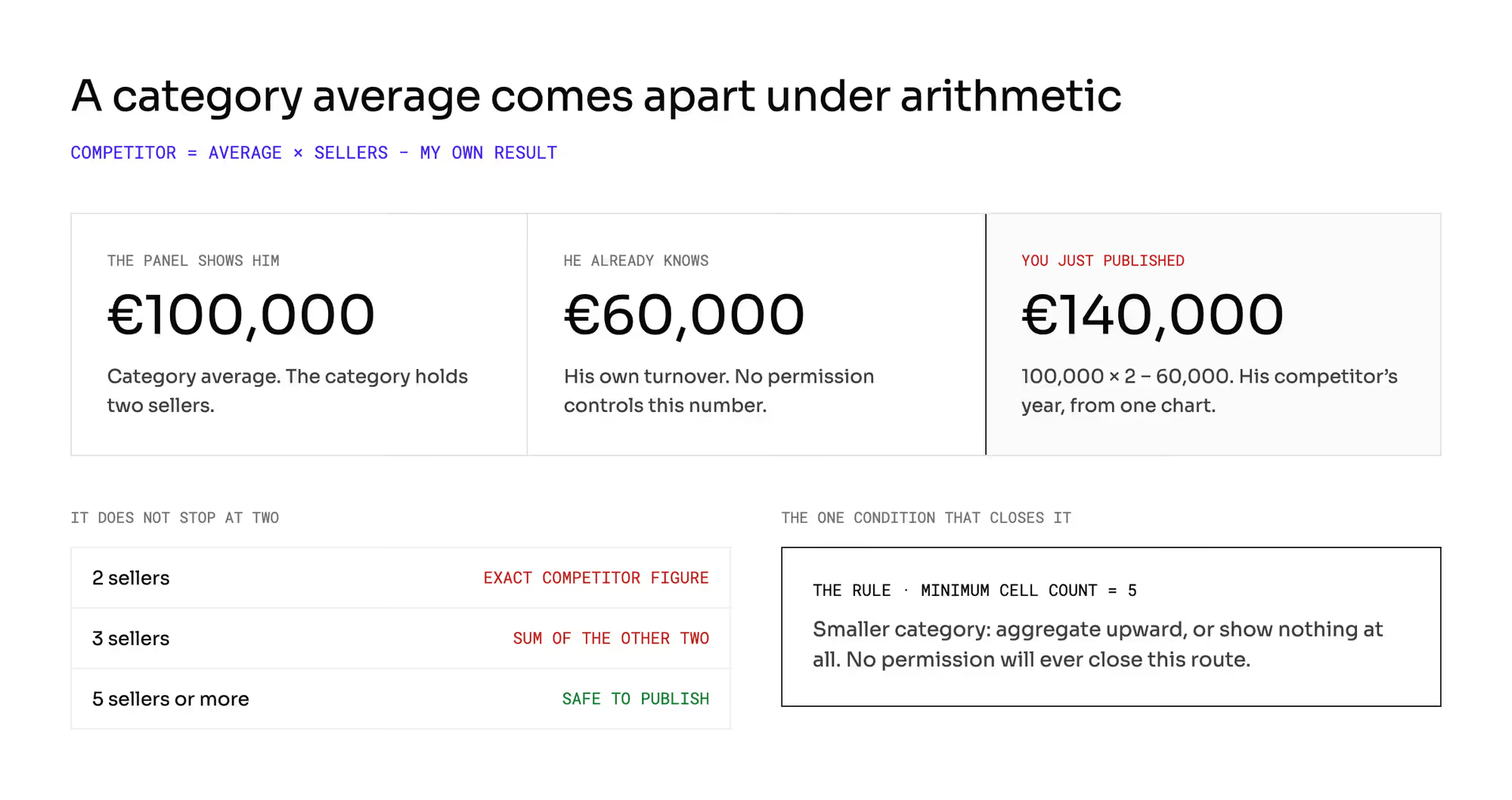
A seller can work out a competitor's sales from a category comparison with simple arithmetic. This is the easiest route to miss.
Say a category holds two sellers, and you show each of them a category average of €100,000. The seller doing €60,000 doubles the average and subtracts their own sales. They now know their competitor did €140,000.
If a category holds three sellers, each one learns the combined sales of the other two. A seller who knows one of the other two can then work out the third.
Publish no comparison for a cell with fewer than five sellers. If the category is smaller, aggregate one level up or show no comparison.
That costs you one condition in a report. No permission setting can block this route.
How do you limit exports from the operator panel?
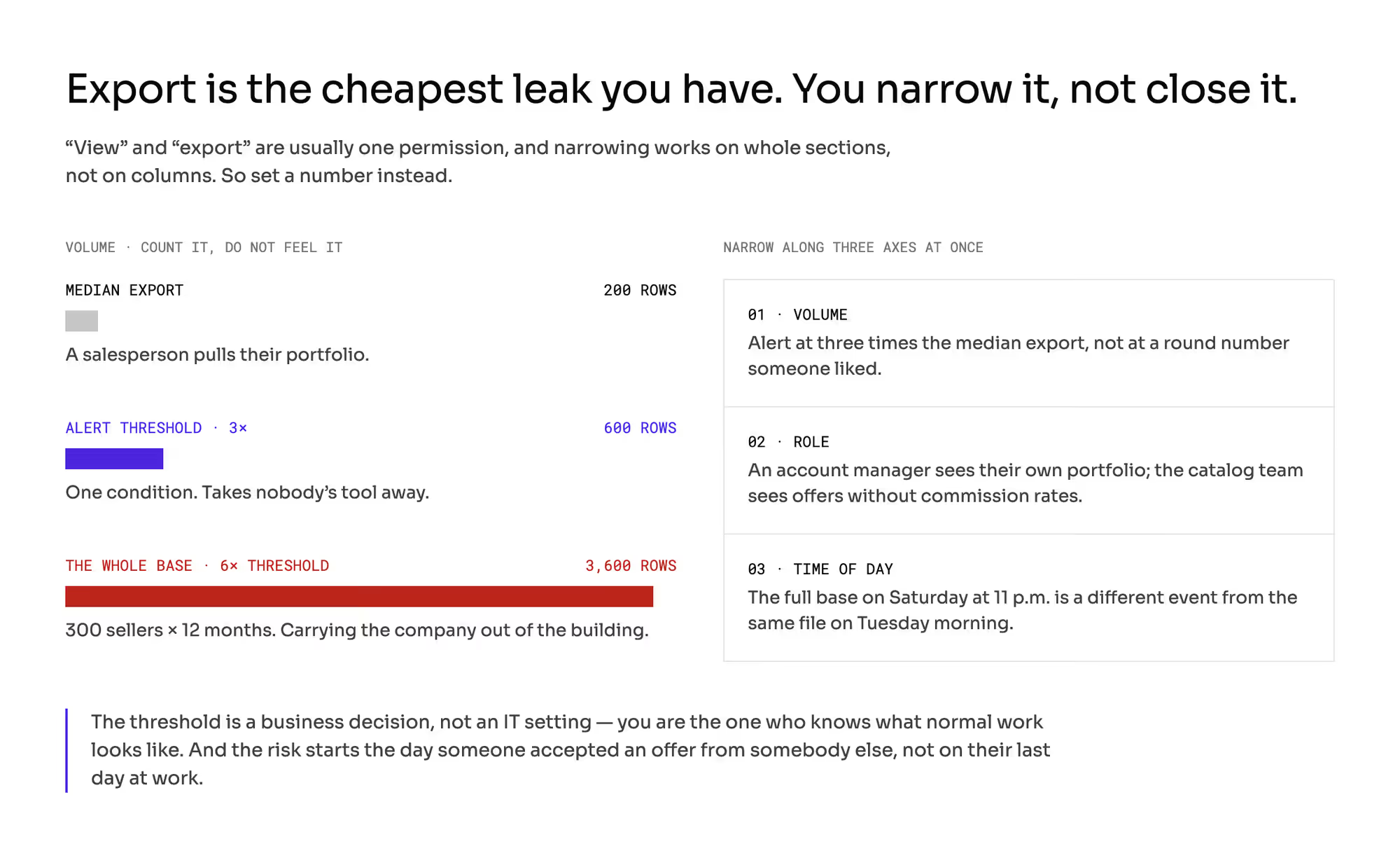
The operator panel has a dozen or so screens, and each one has a download button. A list of sellers with sales, commission rate, and contact person takes one click and a minute.
No one breaks anything here. Downloading the list is a feature of the panel, and the download leaves no sign that anything unusual happened. You can't close this channel with a permission alone.
1. View and export as one permission
Many permission catalogs list downloading and viewing as one entry. You can't take the export away without taking the view away. That person needs the view to do their job.
2. Access narrowed by whole sections
You can usually narrow access only by whole sections of the panel. Switching access off removes an entire screen from the user, with every field on it.
Blocking someone's export often takes other actions away from them too. Teams then leave export open and accept that one person can walk out with the whole database.
3. Export threshold by volume, role, and time of day
Narrow export by volume, role, and time of day at once. Count the volume instead of going by feel.
Say the median export in your team is 200 rows. A salesperson pulls their portfolio, and the catalog team pulls its category.
Set the alert threshold at three times the median. That's 600 rows. The full database with 12 months of history for 300 sellers has 3,600 rows.
That's six times the threshold. You can then tell normal work apart from someone taking the whole database. Every team keeps its export tool.
Use the role to set the scope. An account manager sees their own sellers, and the catalog team sees offers without commission rates.
Use time of day for the rest. A full export on Saturday at 11 at night is a different event from the same file on Tuesday at 11 in the morning.
4. Access narrowed at notice
The risk starts on the day someone accepts an offer from another company. Their last day at work comes weeks later.
Narrow their access as part of the departure procedure, and start it when they hand in their notice. The chapter on SSO vs MFA covers how a person gains and loses a role.
The chapter on the marketplace audit log covers what you record about their activity and who reviews it.
How do integrator keys and support access cross the boundary between sellers?
Say 80% of your 300 sellers work through an integrator instead of your panel. That's 240 companies served by a handful of outside firms.
The largest firm can hold 100 sellers on your platform, a third of your base. With an even spread, that's €3.3 million of sales a month and €400,000 of your commission.
The rule for every group with access is the same: deny by default and grant the minimum the work needs.
1. Scope of an API key
An API key has a scope. It sets which data the key reaches and whether it only reads or also writes.
A key usually can't be changed after you issue it. Narrowing its scope means issuing a new key and switching the integration on both sides.
That's a project. Settle the scope at the moment you issue the key, and ask three questions about it:
- Does the key cover one seller or several at once? Several is convenient, and it puts all the risk in one place.
- Who on the seller's side may issue it? If any employee with an account can, the key outlives the person who left.
- Does the contract require rotation of the key?
The chapter on the marketplace seller agreement covers the documents where a rotation rule belongs. The chapter on the marketplace seller panel covers how sellers work through integrators.
2. Support access to a seller's account
When your own people step into a seller's account, they cross the same boundary from the other side. The right to step in is often one entry on the permission list, and by default it shows everything.
That includes the seller's bank account number. No one needs it to close a ticket. Ask whether the right can be split from the rest of the support role.
Ask also whether you can limit it field by field. Get your lawyer's view on the legal basis for that access.
What do you do in the first hour after a seller reports seeing another seller's data?
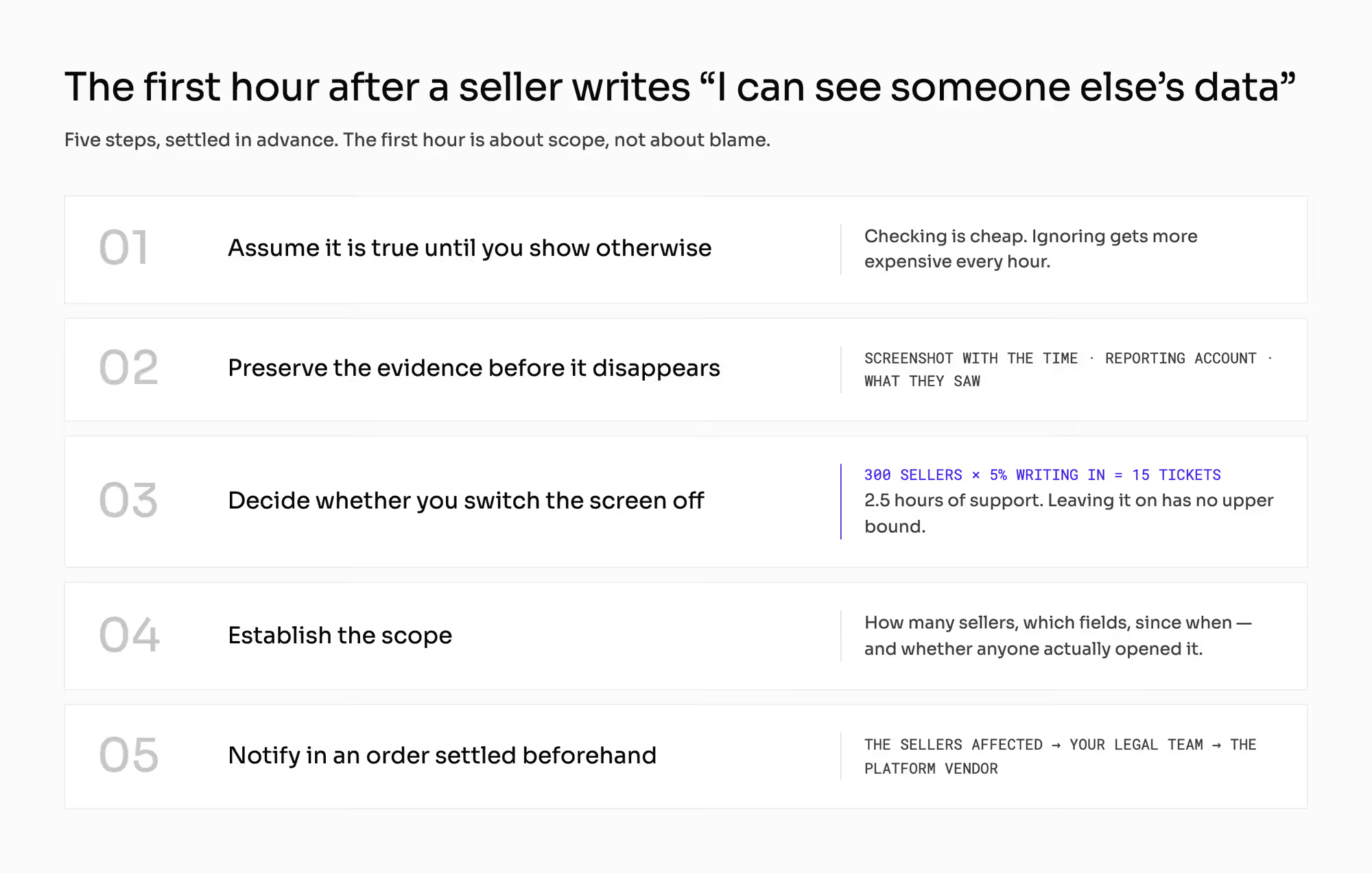
The seller usually reports it in an unsure email. Don't set it aside, even though that's easy.
Settle the five steps for the first hour before launch:
- Treat the report as true until you show otherwise. A check takes little time. The damage grows with every hour you ignore the report.
- Preserve the evidence before it disappears. Keep a screenshot with the time visible, the name of the reporting account, and exactly what they saw.
- Decide whether to switch the screen off. If you switch a report off for a day and 5% of your 300 sellers write in, you get 15 tickets. At 10 minutes each, that's 2.5 hours of support work.
- Establish the scope. Find out how many sellers and which fields it affects, since when, and whether anyone opened the data.
- Notify the affected sellers, your legal team, and the platform vendor. Settle that order beforehand.
If you leave the screen on, the cost can keep growing with no upper limit. You find out in the fourth step whether your audit trail is any good. Only the trail shows who opened the data.
Spend the first hour on scope. Blame and the settlement with the vendor can wait, and the scope gets harder to reconstruct with every hour.
The chapter on marketplace GDPR covers whether the event counts as a personal data breach. Your lawyer confirms it and tells you which deadline starts.
The chapter on the P2B Regulation covers how you explain and deliver a decision that affects a seller.
How do sellers, your team, and integrator keys compare on data isolation?
The table compares the three groups with access to seller data.
What does each group mean for data isolation? | Sellers (300 companies) | Your employees (a dozen or so accounts) | API keys (a handful of integrator firms) |
|---|---|---|---|
What it sees by definition | its own data plus everything your online store shows | everything you didn't take away | the data of the sellers who authorized it |
Where it leaks in practice | category comparisons, the ranking, the shared product page | export and stepping into a seller's panel | one key covering many sellers |
How you narrow it | a minimum cell count, an aggregate instead of a row | the scope of the role plus an export threshold | the scope of the key and required rotation |
What the narrowing costs you | a poorer seller panel | slower work for your team | replacing a key is a project on both sides |
How you detect abuse | a report from another seller | an export above the threshold | a spike in downloads on the key |
What does data isolation change in your marketplace?
Data isolation affects more than permissions. It also changes how you build and release the platform.
1. Data isolation in a multi-tenant data architecture
Isolation is a requirement for the data model. You can't switch it on as a setting before launch.
A marketplace platform has a multi-tenant data architecture. A typical marketplace platform keeps every seller's records side by side in the same database.
The chapter on the single source of truth covers which system owns which object. That decision tells you where seller data is stored.
2. New reports and exports
Every new report and every new export opens a new route to seller data. Add one question to your release process: who will see this besides the person who asked for it?
The chapter on marketplace analytics covers reports and the data behind them.
3. API with the same boundary as the panel
Your sellers' systems connect to yours through the API, with no person involved. The API has the same boundary as the panel.
It's easier to overlook, because teams test it less often than screens. The chapter on API versioning covers versions and rate limits for seller integrations.
4. Sellers and buyers as separate problems
Isolating sellers from each other is a different problem from protecting the buyer from the seller. The second has five channels and economics of its own.
The chapter on marketplace disintermediation covers it. The chapter on marketplace seller accounts covers the seller account model.
How do you check data isolation with a vendor?
If you ask a vendor "what is data isolation?", you get a definition. Ask for a test instead: log in as one seller and request another seller's order by its number.
Then ask for something on screen or a number for each of these seven questions. "Yes, we support that" doesn't answer any of them.
- Show me the operator permission catalog. Are "view" and "export" separate, and does narrowing work on a field or only on a whole section?
- Can I limit an account manager to their own portfolio of sellers?
- Does export have a volume limit and an alert threshold? If not, what can I build one on at my end?
- Does an API key have a scope, and does changing it mean issuing a new key? Who on the seller's side may issue one?
- Do the category comparisons you show a seller have a minimum cell count? If not, I'll switch them off until they do.
- How often do you test security, and over what scope? Does the scope cover the seller panel and the boundaries between sellers, and may I commission my own test?
- How does someone report a vulnerability to you, and how fast do you fix it by severity? Will I find out when a fix concerns my marketplace?
A penetration test is a controlled attack you commission against your own system. It works like an audit and shows the state of a single day. You find most defects earlier, during design and code review.
The response time for a vulnerability belongs in the vendor's SLA. The chapter on the uptime SLA covers how such clauses work and what they leave out.
Which mistakes do operators make with data isolation?
Each of these mistakes looks harmless until a seller reports someone else's data.
1. Security bought as a line in a feature matrix
Encryption is declared, and no one has ever reviewed the permissions. The first leak then comes from a screen inside your own panel.
2. Permissions granted once at launch
The team grows, and roles pile up on each other. Answering "who had access to this?" then takes a week, and the answer is still incomplete.
3. Category comparison with no minimum cell count
The seller panel shows a nice chart, and the category holds two sellers. You publish someone else's sales and hear about it from the seller you harmed.
4. Export threshold handed to IT
The threshold is a business decision, because you know what normal work looks like for an account manager. If IT sets it alone, the threshold either doesn't exist or sits so low that someone switches it off after a week.
5. One integrator key for many sellers
One key covers many sellers, and the contract doesn't require rotation. It's convenient during implementation and hard to undo later. You need the integrator's agreement to change the scope, and the integrator has no reason to hurry.
What do you still have to settle about data isolation?
This chapter isn't legal advice. It doesn't decide whether an event counts as a breach or whom you notify and when. It also doesn't cover the legal basis for your employee entering a seller's account.
The chapter on marketplace GDPR covers the data side, and your lawyer gives the ruling. Name these areas to your lawyer:
- Personal data protection.
- Transparency in the relationship between a platform and its sellers.
- Security requirements for vendors in regulated sectors.
This article also leaves out three neighboring decisions. Each of them changes the size of the problem:
- The chapter on the audit log covers the event log.
- The chapter on SSO vs MFA covers how people gain and lose access.
- The chapter on the marketplace seller panel covers work inside a seller's panel.
All the numbers above are hypothetical. Put in your own seller count, export sizes, and integrator shares.
A leak usually starts on a single screen. Ask who will see each new screen, report, or export before you release it.
Summary: How does data isolation between sellers work on a marketplace?
Data isolation between sellers works through permissions. Prices, delivery dates, and the ranking appear on the product page. Every seller can see them there, like any buyer.
Sales volume, conversion, returns, and commission rates have to stay hidden. Category comparisons need at least five sellers in each cell.
Give each role on your team a narrow scope, and alert on exports above three times the median. Settle the scope of each API key when you issue it, and limit support access field by field.
Building a marketplace where 300 competing sellers share one system and see only their own data?
Frequently asked questions on data isolation
What is data isolation?
Data isolation is the set of rules that lets each user or tenant reach only their own data in a shared system. On a marketplace, each seller sees their own orders, sales, and settings. Competitors see only what buyers see on the product page.
How does tenant isolation work on a marketplace?
Tenant isolation on a marketplace means the platform checks on every request that the record belongs to the seller who asks for it. Each seller is a tenant in a multi-tenant data architecture. The check has to cover the seller panel, reports, exports, and the API.
Can sellers on a marketplace see each other's sales?
Sellers on a marketplace shouldn't see each other's sales, but a category average can reveal them. In a category with two sellers, each one can subtract their own sales from the total. Publish category comparisons only for cells with at least five sellers.
Ready to build?
We build marketplaces that show each seller their own data and keep 300 competing companies out of each other's numbers.