
Marketplace Seller Panel: What a Seller Can Do Without You

A marketplace seller panel is the interface a seller uses for everything an integrator will never cover: clicking through a return through, answering a buyer, handling an incident, and attaching a document to an order.
At the demo, you will hear that your sellers will plug in through an integrator and will barely need the panel. That sentence is false in one specific place, and that place comes back to you as tickets and costs you a full-time role.
This article breaks down:
- Which tasks can only be done in the panel?
- Which 4 routes can a seller use?
- Which 3 panel capabilities save hours?
- How should operator impersonation be limited?
Key insights
- The tasks that can only be done in the panel are the rare and irreversible ones: clicking a return through, answering a buyer's message, handling an incident, and attaching a document to an order, which comes to about 1,440 events a month at 300 sellers and 12,000 orders.
- The four routes are the panel, a file, an integrator, and a direct API, and none of them covers everything, so a seller with no integrator and no programmer is left with the panel and the file, and both have to produce the same result.
- The three panel capabilities that save a seller hours are bulk import with an error preview before the save, working on a filtered set instead of item by item, and an export that matches what is on the screen.
- Operator impersonation should be limited in two ways settled before launch: scope per field, so entering an account to click a return through never exposes the bank account number, and a recorded trail, because entering somebody else's account is an event rather than a convenience.
Which tasks can only be done in the seller panel?
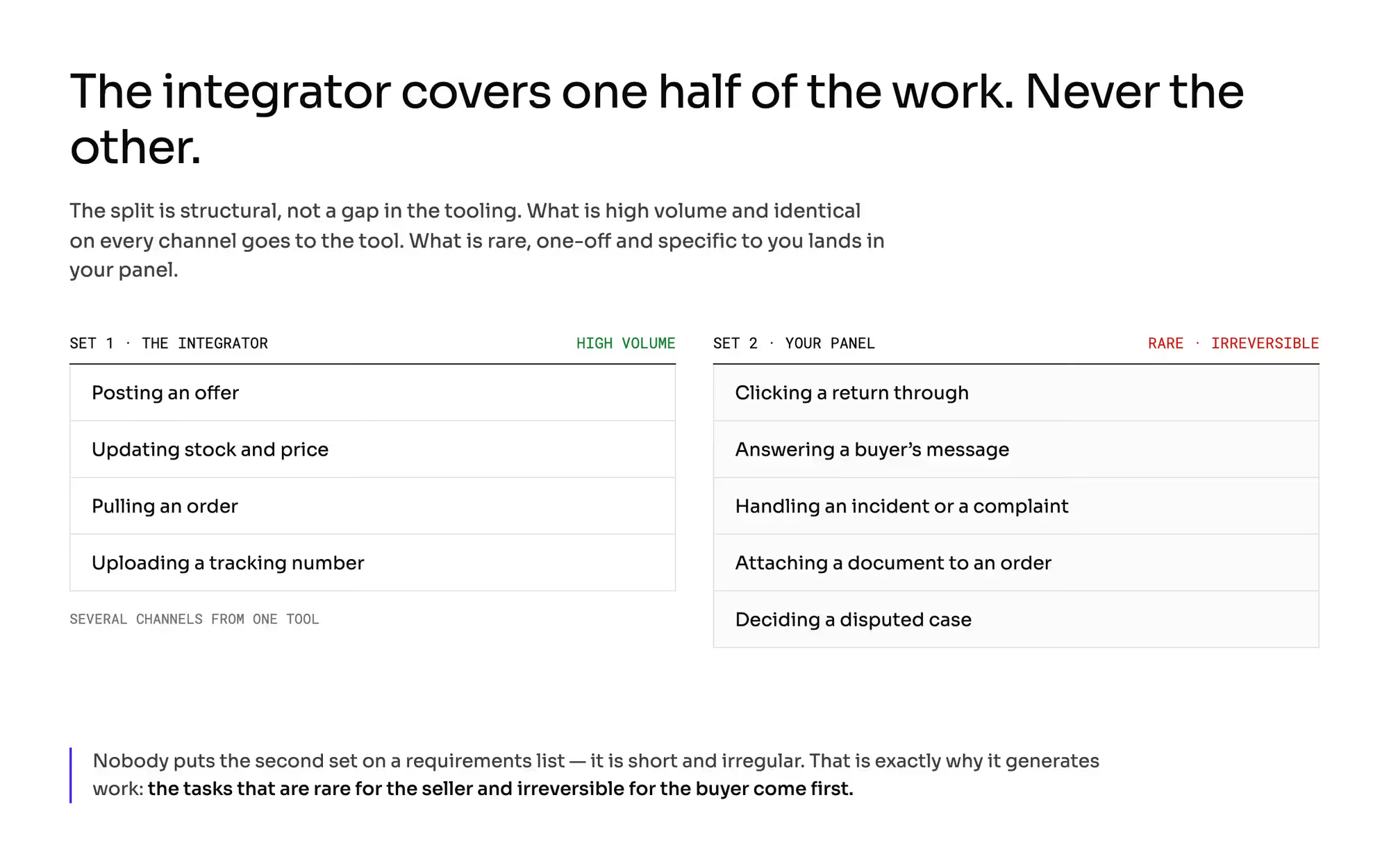
Practitioners say it plainly: a seller running a popular integrator opens the panel least often, but never never. That is a structural split rather than a flaw in the tooling.
The integrator covers what is high volume, repetitive, and identical on every channel: posting an offer, updating stock and price, pulling an order, uploading a tracking number. It makes economic sense: the seller runs several channels at once out of a single tool.
It will never cover what is rare, one-off, and specific to you: clicking a return through, answering a message from a buyer, handling an incident or a complaint, attaching a document to an order, deciding a disputed case. The second set is short and irregular, so nobody puts it on a requirements list.
That is exactly why it generates work.
Do the math once, in the open. 300 active sellers, 12,000 orders a month.
At 6% returns, 4% of orders carrying a buyer question, and 2% incidents, that is 720 plus 480 plus 240, so 1,440 events a month that the integration never touches. Spread across the sellers, that is just under five trips into the panel per seller per month.
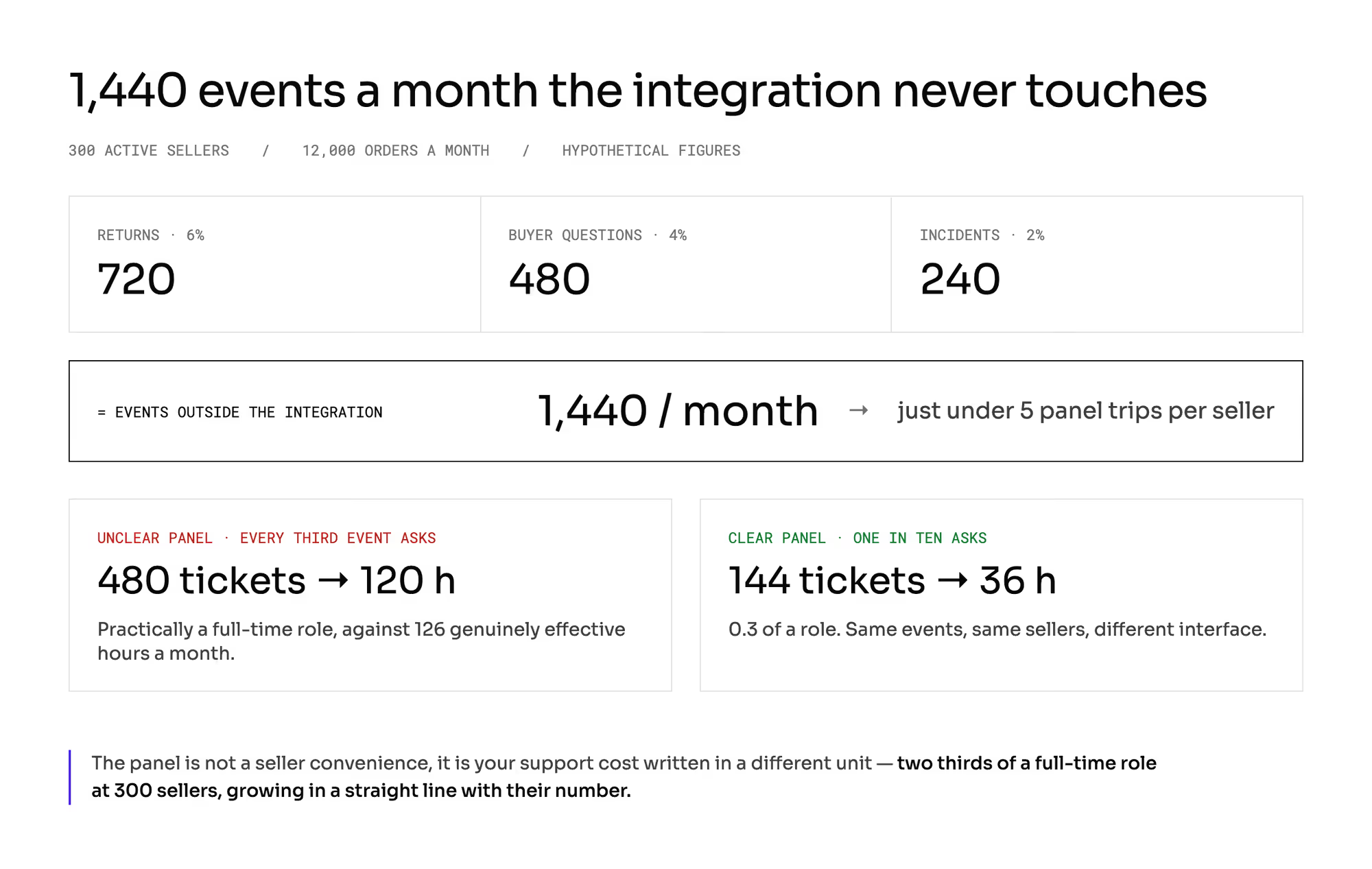
Five times a month is too rarely to remember anything. If every third such event ends in a question to your support team, you have 480 tickets a month.
At fifteen minutes a ticket, that is 7,200 minutes, or 120 hours. Practically a full-time role against 126 genuinely effective hours a month.
If the panel is clear and only one in ten asks, you get 144 tickets, 36 hours, and 0.3 of a role. The difference between a good panel and a bad one is two-thirds of a full-time role at 300 sellers, and it grows in a straight line with their number.
The line to carry into the committee meeting: the panel is our support cost written in a different unit.
How should a seller panel divide the work with an integrator?
Splitting the work into two sets gives a design rule that saves money in both directions.
A panel designed as "everything the API can do" is too expensive. You duplicate the high-volume path the seller will walk with their own tool anyway.
Screens for bulk price edits across four thousand items get looked at by a minority of your base.
A panel without the second set is useless, because a seller's first contact with your interface happens at the worst possible moment: at the first return, the first complaint, or the first buyer question that has to be answered today.
Hence the priority test for your scope document: the tasks that are rare for the seller and irreversible for the buyer come first. Rare, because nobody will automate them.
Irreversible, because the mistake costs the buyer, and costs you in reputation.
And a second consequence: the panel serves two different populations. Some sellers come in a few times a month and look for everything from scratch.
At the other end sits the tail of sellers who update stock levels by hand. Among companies with no IT of their own, that is a real share of the base.
Optimize for the first group, meaning for somebody who has forgotten where the thing was.
Which 4 routes can a seller use to reach your platform?
What does each route into your platform leave out? | Panel | File | Integrator | Own integration |
|---|---|---|---|---|
What it is for | one-off events, learning, exceptions | the first load and bulk corrections | day to day operations | the seller's own process |
Sensible scale (items in the seller's catalog) | up to about 50 | 50 and up | any | any |
Share of incoming offers | negligible | significant at launch | the majority | marginal |
Who owns the mapping and the data quality | the seller | the seller | somebody else's tool | the seller |
What it will not do | bulk work | events during an order | the second set of tasks | nothing, if there is no programmer |
Your cost | designing and maintaining screens | templates and validation | maintaining the contract with the tool | documentation, sandbox, limits |
The conclusion: no route covers the whole thing, and none of them can be skipped. A seller with no integrator and no programmer is left with the panel and the file, so both routes have to deliver the same result.
If the file accepts a field the panel does not have, you have two classes of sellers and two classes of data.
What does depending on an integrator cost you?
Being supported by an integrator popular in your market is a condition of entry for a whole class of sellers, and it shortens recruitment. That is the bright side, and finding your first sellers describes it.
The other side rarely gets said out loud in a buying meeting.
You hand over control of data quality. Offers arrive carrying somebody else's category mapping and descriptions written for a different channel.
Your content requirements (what you can enforce on content) and catalog rules then work as a filter on the entrance to something you did not design.
You hand over control of the pace of change. Say 210 of your 300 sellers work through an integrator, and you add a new mandatory field.
If the tool does not carry that field, the requirement applies in practice to 90 sellers, and the other 210 wait on a release in somebody else's backlog whose dates you do not know. Formally, you have a rule.
In practice, you have a report of rising rejections. Hence the principle: you test every new requirement first in the tool that most of your offers come through rather than in your own panel.
There is a technical layer to check outright as well: an integrator uses a subset of your API, and event channels are not always equally reliable. In some products, the order channel retries and the offer channel does not, so when the receiver is unavailable, the messages are lost and have to be caught up by polling.
Divergent state ends in overselling, and the two of you pay that bill together.
Which 3 panel capabilities save a seller hours?
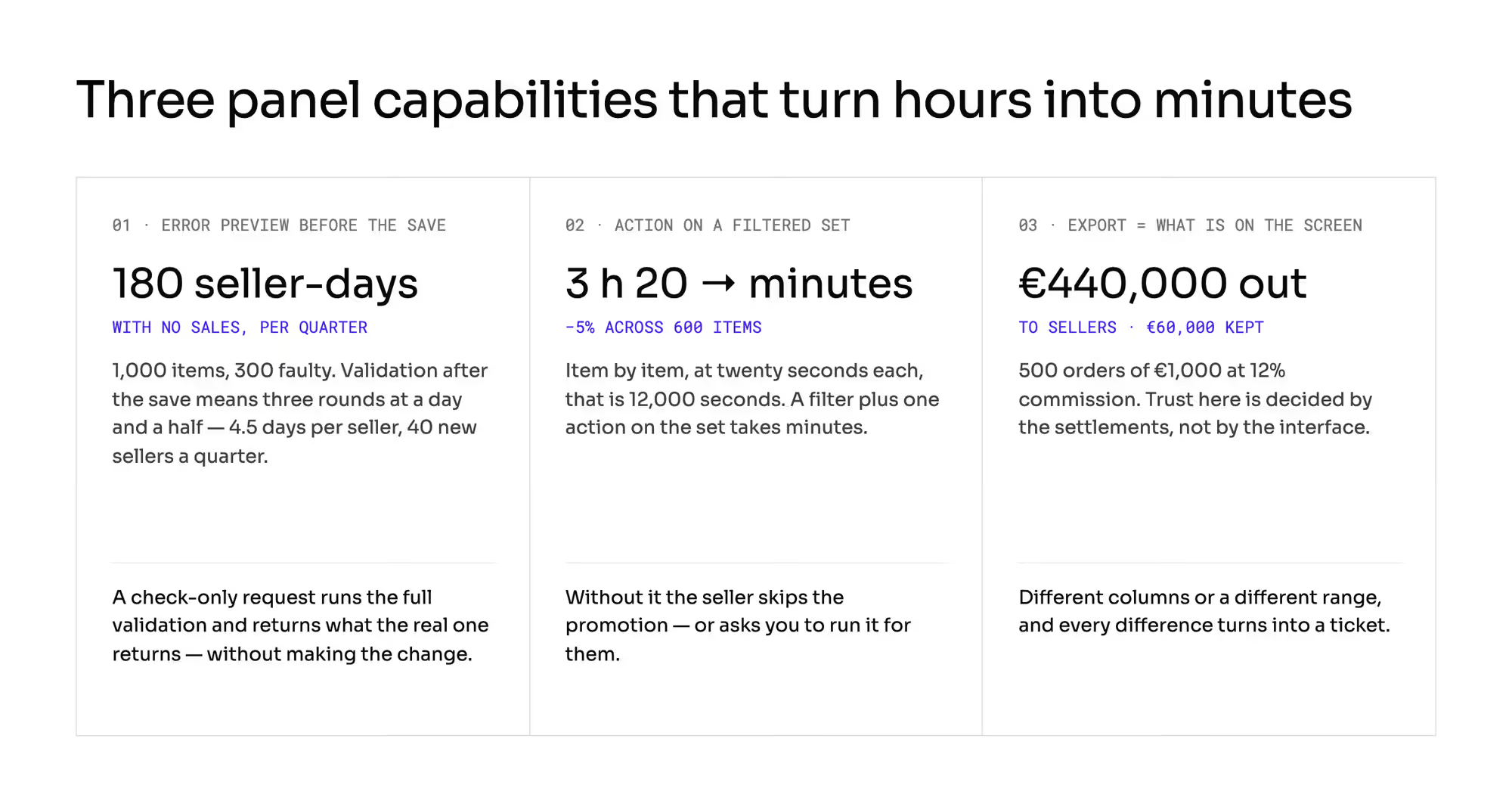
Bulk import with an error preview before the save. A seller uploads 1,000 items, 300 of which have the wrong category.
If validation happens after the save, they get an error report, fix it, upload again, and do that three times. Three rounds at a day and a half each is 4.5 days of delay.
At 40 new sellers a quarter, that is 180 seller-days with no sales, which nobody books as a cost. Preview before the save is written into the standards for designing programming interfaces: a "check only" request has to run the full validation and return what the real request returns, without making the change.
Classic usability heuristics say the same: better to prevent an error than to describe it after the fact.
Working on a filtered set instead of item by item. A seller with 4,000 offers wants to cut the price by 5% in one category where they have 600 items.
Item by item, at twenty seconds each, that is 12,000 seconds, so 3 hours and 20 minutes. A filter plus one action on the set takes minutes.
Without it, the seller either skips the promotion or asks you to run it.
An export of exactly what is on the screen. Trust here is decided by the settlements.
At 500 orders of €1,000 each and a 12% commission, the platform keeps €60,000 and €440,000 goes to the seller. If the export has different columns and a different range than the screen, every difference turns into a ticket, and the seller rebuilds your calculation in a spreadsheet.
What ends it is a published specification of the calculation their finance people can work against (payment reconciliation).
How should operator impersonation be limited?
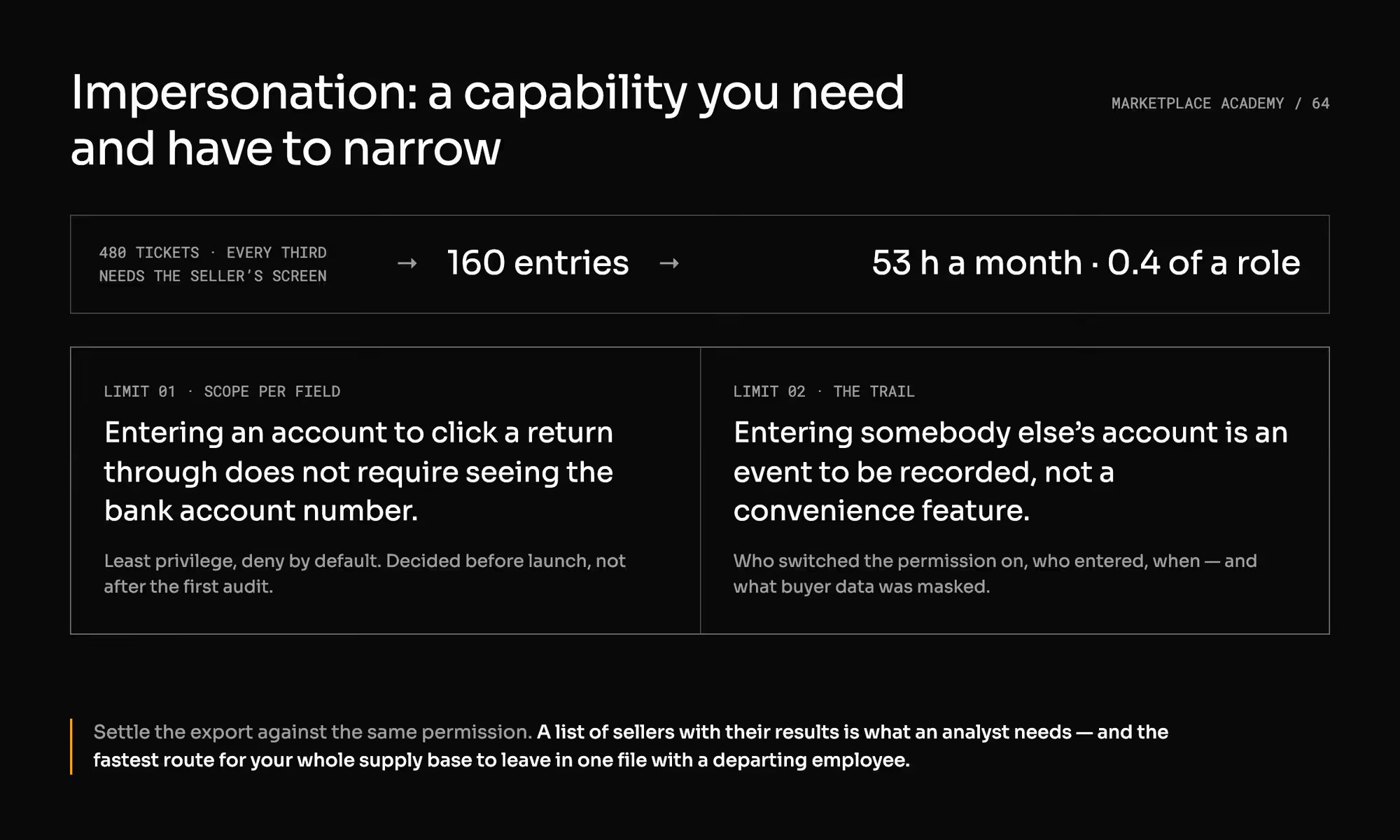
The operator has to be able to enter a seller's account and do something on their behalf. Otherwise, every harder ticket turns into an exchange of screenshots.
At 480 tickets a month, with every third one needing a look at the seller's screen, that is 160 entries. If each one saves twenty minutes of correspondence, you are talking about 53 hours a month, which is 0.4 of a role.
The capability comes with two limits you decide before launch rather than after the first audit. First: scope per field.
Entering the account to click a return through does not require the operator to see the bank account number or any other data that the task does not need. That is an ordinary application of least privilege and of a "deny by default" posture.
Second: the trail. Entering somebody else's account is an event to be recorded rather than a convenience feature.
Logging it, and protecting the personal data visible during it, belongs to who controls the personal data.
Settle the export against the same permission. Downloading a list of sellers with their results is something an analyst needs, and at the same time the fastest route for your whole supply base to walk out of the company in one file with a departing employee.
Practitioners point to this as the weak spot of operator panels.
And one thing you will not build: a panel that replaces the conversation at the first return. Plan that conversation instead of trying to remove it: twenty minutes of an account manager, once per seller, costs less than ten tickets over a year.
Which 4 things will a seller's programmer ask about your API?
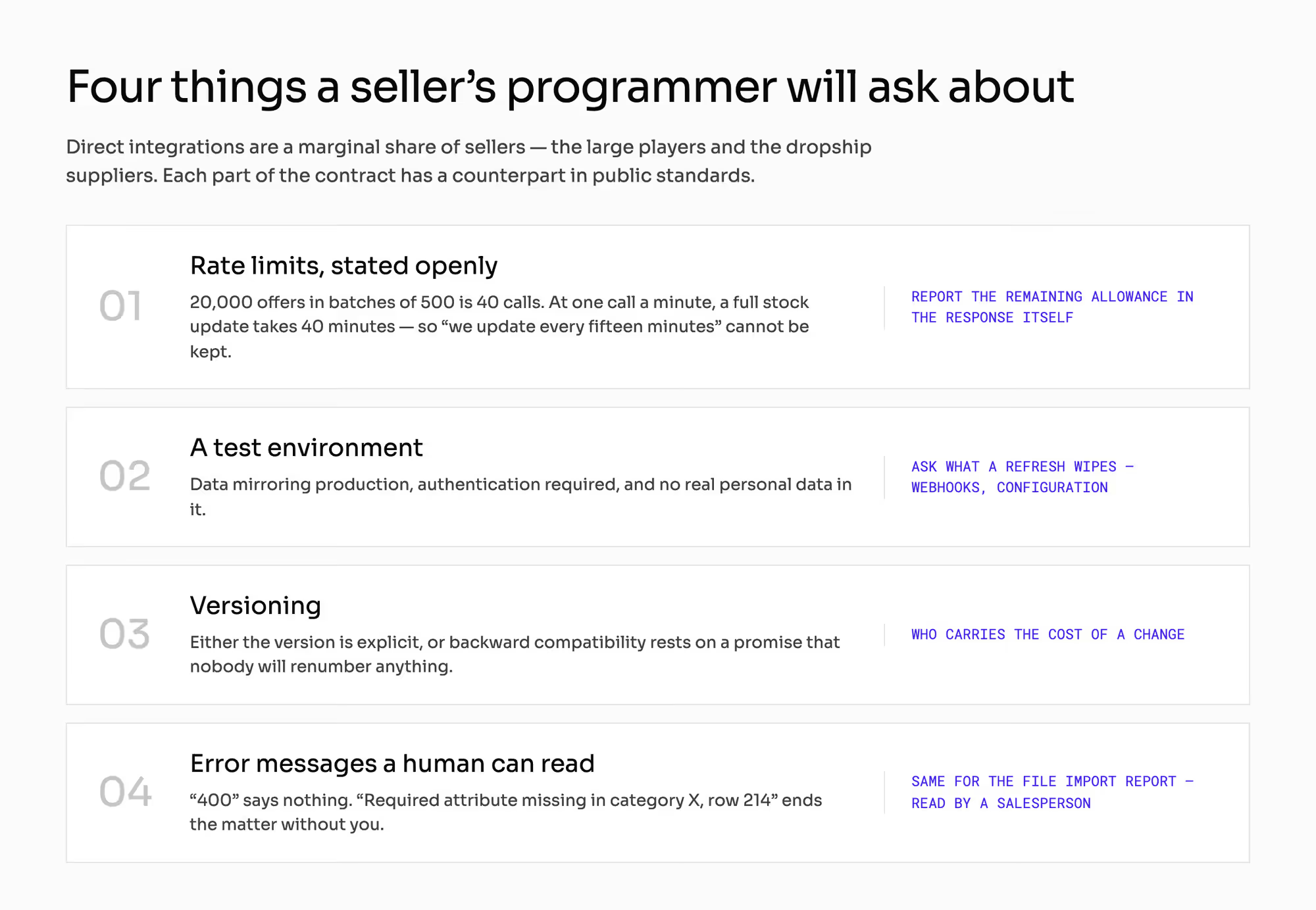
A direct integration is a marginal share of sellers, but an important margin: the large players and the dropship suppliers. The contract for them consists of four things, each with a counterpart in public standards.
Rate limits, stated openly. A seller with 20,000 offers sent in batches of 500 needs 40 calls for a full stock update.
At a limit of one call a minute, the run takes 40 minutes, so the promise "we update every fifteen minutes" cannot be kept. Internet standards recommend that the server report the remaining allowance in the response itself, because without that the client learns it by trial and error.
A test environment. Guidelines for public interfaces say a sandbox has to hold data mirroring production, has to require authentication, and must not contain real personal data.
Ask as well what a refresh of it wipes. In some products it clears webhooks and integration configuration that then have to be set up by hand.
Versioning. Either the version is explicit, or backward compatibility rests on a promise that nobody will renumber anything.
Both approaches exist on the market, and they differ in who carries the cost of a change.
Error messages a human can read. A response of "400" says nothing.
"Required attribute missing in category X, row 214" ends the matter without you. The standard describing error details in programming interfaces exists precisely because a status code is not enough, and the same goes for the report from a file import, read by a salesperson rather than a programmer.
What does the seller panel change about the rest of your build?
1. The seller panel is a product rather than a screen, and somebody has to build it
If the vendor answers "it can all be done through the API", that means you are the one writing the interface for the seller. That is a line in the budget and in the schedule (what a platform includes and what you build).
2. The number of tickets reaching your support team is a function of panel quality
, so your support headcount (seller support and education) and the mechanics of the ticket queue (requests from sellers) depend on decisions taken here.
3. Plan your catalog requirements together with the route offers come in through
A rule that the tool used by most of your sellers does not carry is a rule that binds a minority. Whether it can be applied to an already published catalog is settled separately (catalog rules), and who has the right to change page data is field ownership.
How do you check a seller panel with a vendor?
Six things to have shown at the demo rather than described in a proposal:
- List the tasks the integration does not cover, and show where the seller does each of them. If the list gets drawn on a whiteboard during the meeting, nobody counted it before.
- Upload a file of 1,000 items, 300 of them faulty. Does the seller see the errors before the save or after it? Do they fix them with a file or item by item?
- Filter 4,000 offers down to one category and change the price across the whole set in one action.
- Enter a seller's account as an operator. What do you not see, who can switch that permission on, and where is the record of that entry?
- Export what you see on the screen. Does the file have the same columns and the same rows? Who can download the whole list of sellers with their results?
- Show the call limits, the test environment, and the text of an error that a seller's salesperson is meant to understand rather than their programmer.
Two questions outside the demo, put to the integrator's vendor rather than the platform vendor: which of your fields does that tool carry today, whose backlog decides on adding a new field, and what is the typical time to release.
Which mistakes do operators make about the seller panel?
1. "The integrator will handle it" written into the project scope
The panel drops to second priority, the set of rare tasks goes unserved, and it comes back as a steady stream of tickets. The consequence is numerical: a full-time role that was not in the budget.
2. A panel designed for a daily user
The typical seller comes in a few times a month and looks for everything from scratch. This mistake leaves no trace in your panel metrics, only in the support queue.
3. A new requirement introduced without checking whether the majority route will carry it
The rule binds a minority, the data does not improve, and the report shows a rise in rejections that reads like a drop in seller quality.
4. An import with no validation before the save
Several rounds per seller, a first sale pushed back, and a conclusion that "sellers cannot prepare a file". They can.
They found out about the error too late.
5. Impersonation with no narrowing and no trail
Convenient from day one, awkward at the first question about who saw a seller's settlement data and when.
What do you still have to settle about your own panel?
This article does not design the product approval queue (the approval queue), the requirements for content, or the catalog rules. Those are decisions about what you let in.
This chapter only says which way it comes in.
This article does not settle the structure of accounts, users and roles on the seller's side (the structure of a seller account), the scope of documentation and training, or the onboarding funnel and the thresholds for activating an account. A panel with no materials costs you as much as no panel, but that is a separate budget.
This article does not settle the legal questions around entering somebody else's account. The range of data visible during impersonation, how long the trail is kept, and the masking of buyer data touch the rules on protecting personal data: who controls the personal data carries the mechanism, and you confirm the form itself with a lawyer.
Delivering changes to the terms of work in the panel belongs to the rules on decisions about sellers.
All the numbers here are openly hypothetical, and one quantity to measure in your own first month: what share of the events in the second set ends in a question to your support team. All the arithmetic in this chapter hangs on it.
Summary: What does a seller panel have to cover?
The work nobody automates. An integrator handles what is high volume and identical on every channel, which leaves the panel with what is rare, one-off, and specific to you: the return, the buyer's message, the incident, the document on an order.
At 300 sellers and 12,000 orders, that is around 1,440 events a month, roughly five trips into the panel per seller, which is far too rarely to remember where anything was. That frequency is the whole economics of the screen: if one event in three ends in a question to your support team, you are carrying a full-time role, and if one in ten does, you are carrying a third of one.
Ask a vendor to upload a file of 1,000 items with 300 faults and show you whether the seller sees the errors before the save or after it. Building a marketplace where the panel covers what the integration never will?
Frequently asked questions on the marketplace seller panel
What is a marketplace seller panel?
A marketplace seller panel is the interface a seller uses for the work their integrator never covers. Posting offers, updating stock and price, and pulling orders travel well through a tool the seller already runs for several channels.
Returns, buyer messages, incidents, and documents on an order do not, because they are rare, irregular, and specific to your platform.
Do sellers need a panel if they use an integrator?
Sellers need a panel even when they use an integrator, because the integration covers the repetitive half of the work and nothing else. A seller on a popular integrator opens the panel least often and never, never, and their first visit usually falls at the worst possible moment: the first return or the first buyer question that has to be answered today.
Should an operator be able to log in as a seller?
An operator should be able to log in as a seller, inside a scope narrowed per field and with every entry recorded. Without it, every harder ticket turns into an exchange of screenshots; at 160 entries a month, saving twenty minutes each, that capability is worth about 53 hours.
What it must not do is expose data the task does not need, starting with the bank account number.
Ready to build?
We build marketplaces where the panel covers what the integration never will: the return, the buyer's message, the incident, and the document on an order.