
Webhook Integration on a Marketplace: How Systems Exchange Events Through Webhooks and Polling
Webhook integration connects two systems so one sends a message to the other's address the moment an event happens. A webhook is the message itself: an HTTP request that the sender posts to a URL you registered in advance.
Your platform and your sellers' systems exchange hundreds of thousands of these messages a day. None of them comes with a promise that it will arrive.
You have to decide what happens to messages that don't arrive. If you leave it to the vendor's default, the message often disappears without a trace. You hear about it from a seller months later.
This article breaks down:
- Which 3 questions decide whether a marketplace webhook integration loses a message?
- Webhooks vs polling: which one fits each marketplace channel?
- How many retries does a marketplace webhook get before the message is lost?
- How do you catch up on marketplace events after an outage?
Key insights
- Three questions decide whether a marketplace webhook integration loses a message: who starts the exchange, what happens when the receiver goes quiet, and how you find out a message is missing. The third one costs the most, because a lost message leaves no trace on your side.
- Webhooks fit the marketplace channels with rare and urgent events, like orders and refunds. Polling fits catch-up and control. The offer channel carries 400,000 messages a day, 300 times more than the order channel, and it's often the one without retries.
- A marketplace webhook gets as many retries as the vendor's ladder allows, from zero to several dozen. A ladder that doubles from one minute up to six hours, with a stop after three days, gives you 19 attempts.
- You catch up on marketplace events after an outage through a second channel that returns everything changed since a given hour. After 62 hours of silence, reading the state of 200,000 offers takes about 7 minutes, and replaying 1.03 million events takes about 34.
Which 3 questions decide whether a marketplace webhook integration loses a message?
When you buy an integration, you buy a specific delivery guarantee. You see the gap between two guarantees months later, when an order exists on one side only.
Every way of exchanging data gives its own answer to the same three questions. Check those answers yourself before you buy.
1. Who starts the exchange
With a webhook, the sender calls the receiver as soon as something happens. With polling, the receiver asks on a schedule what has changed since a given hour.
The answer tells you which side has to stay available. It also tells you whose bill grows as the catalog grows.
2. What happens when the receiver goes quiet
The message either waits and comes back later, or it disappears. Most of the cost of an outage depends on this answer.
The answer can differ between two channels inside the same product. Orders may get retries while offers get none.
3. How you find out a message is missing
This is the most expensive question of the three. A message that never arrived leaves no empty row and no error in a report.
You get an order that never appeared on the seller's side. The seller hears about it from the buyer.
Webhooks vs polling: which one fits each marketplace channel?
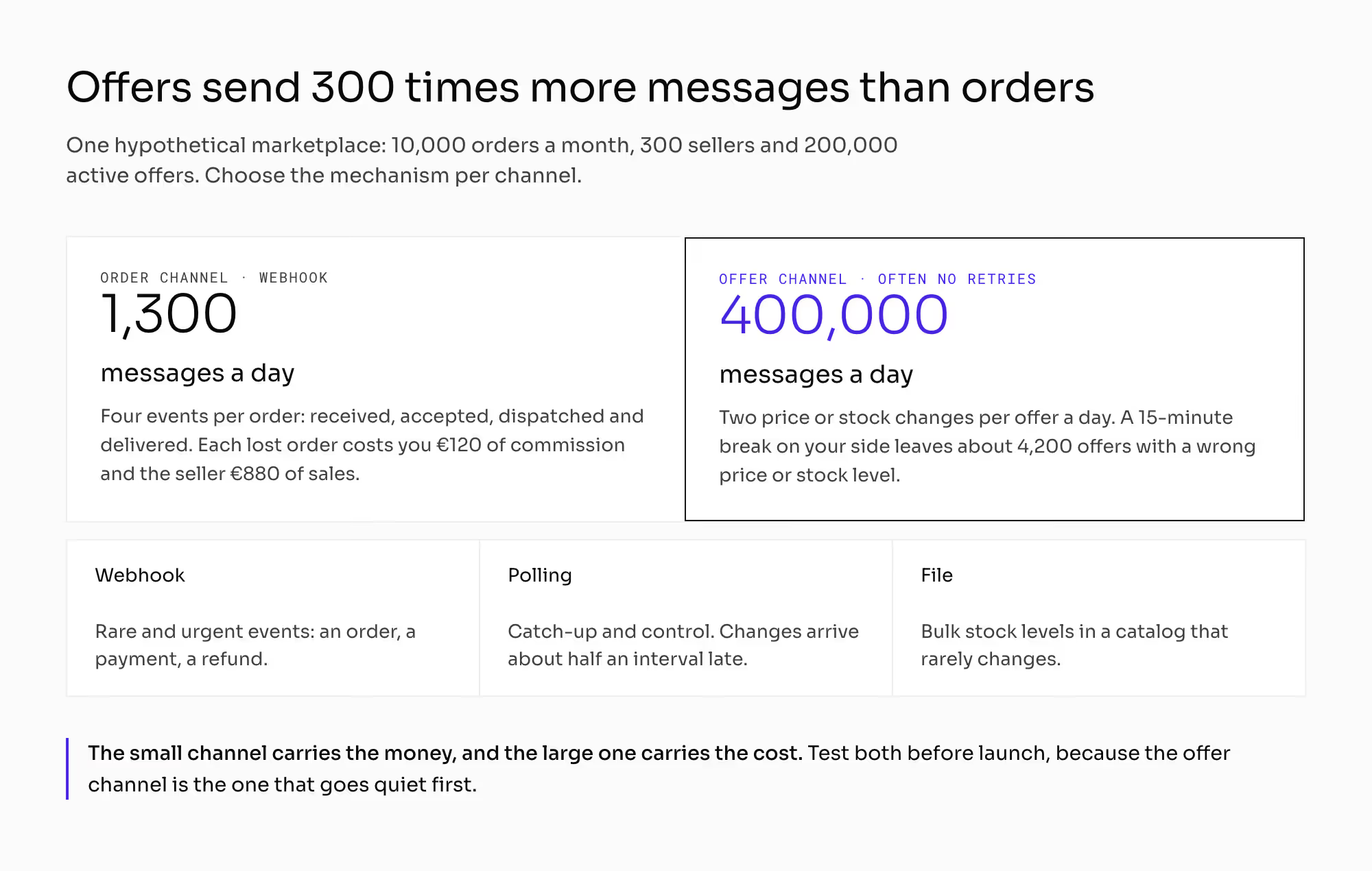
This series uses one hypothetical platform as its standard example: 10,000 orders a month, 300 sellers, and 200,000 active offers. Every number in this chapter comes from it, and you can reuse the arithmetic with your own.
One order sets off several events: received, accepted, dispatched, and delivered. Count four per order. That gives you 40,000 messages a month, or about 1,300 a day.
An offer changes its price or stock level twice a day on average. Your 200,000 offers then send 400,000 messages a day.
The offer channel is 300 times larger than the order channel, and it drives your integration cost. The order channel is small, but every message on it carries money.
One lost order on a €1,000 cart with a 12% commission costs you €120. The seller loses €880 of sales.
Webhooks vs polling is a choice you make per channel. Webhooks suit rare and urgent events like an order or a refund. Polling suits catch-up and control, and a file suits bulk stock levels in a catalog that rarely changes.
What does each mechanism decide? | Webhook (pushed event) | Polling | File exchange |
|---|---|---|---|
Who starts the exchange (party) | the sender | the receiver | the sender or a schedule |
Typical delay from change to receipt (minutes) | under 1 | half the polling interval, about 8 at a 15-minute cadence | the file cadence, up to 1,440 for a daily file |
What happens when the receiver goes quiet (outcome) | depends on the retry policy, from zero attempts to several dozen | the next request arrives anyway | usually retried until it succeeds, while the object waits |
How you learn that something is missing (source) | only the delivery log on the sender's side | by comparing timestamps | from the row count in the file |
What grows on your side as you scale (cost) | the availability the receiver needs | the number of requests, in line with the catalog | the processing window and the handling of bad rows |
Best fit (channel) | rare and urgent events: order, payment, refund | catch-up and control | bulk stock levels in a catalog that rarely changes |
You often don't set the polling cadence yourself. The tool on the seller's side sets it with its own default. The chapter on the seller panel covers what a seller controls there.
A file has one advantage over the other two mechanisms: it's complete. Comparing its row count with your offer count gives you a free check.
The three mechanisms don't compete with each other. Each one serves a different part of the traffic, and a marketplace of this size usually needs at least two of them.
How many retries does a marketplace webhook get before the message is lost?
When a vendor promises "retries", ask for three numbers: how many attempts, over what period, and what happens after the last one.
A typical ladder doubles the gap between attempts. The first gap is one minute, and each next gap is twice as long, up to a ceiling. After the ceiling, attempts repeat at a fixed gap until a hard stop.
Count it out on paper. When you double from one minute, the first nine gaps add up to 511 minutes. That's about eight and a half hours.
Say the ceiling is six hours and the hard stop comes after three days. The remaining 63 hours hold ten more attempts. That gives you 19 attempts over three days, and that's your real time to fix a failure.
Three days sounds long, but it includes a weekend. A failure on Friday afternoon reaches the hard stop on Monday afternoon.
The same ladder with a one-day stop loses everything that arrived on Friday evening. Those messages are gone before Monday morning.
1. Retries on orders and none on offers
One product can have one channel that keeps every message and another that loses them. Order messages go down the retry ladder. Offer and price messages may get no retry at all and disappear whenever the receiver fails to answer.
Vendors usually design it this way on purpose, because the offer channel is 300 times larger. You still carry the cost of the gap.
Your offer channel carries 278 messages a minute. A 15-minute break on your side leaves about 4,200 offers with a wrong price or stock level. The chapter on inventory synchronization counts what that costs you in cancelled orders.
2. Channel that switches itself off
Many mechanisms deactivate the receiver's address after a long series of failed attempts. They stop calling a system that looks dead.
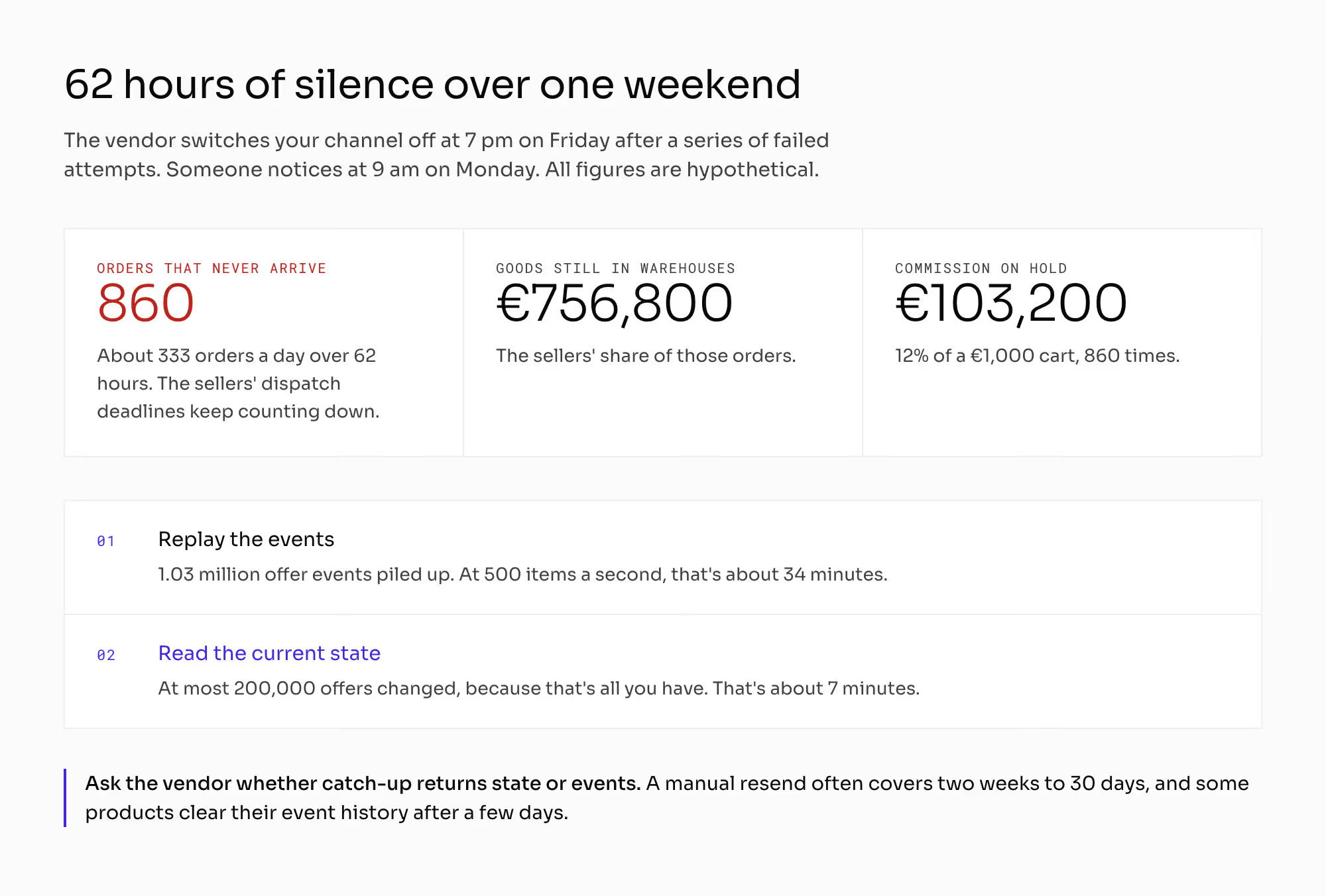
Say the channel switches off on Friday at 7 in the evening. Someone notices on Monday at 9 in the morning. That's 62 hours of silence.
You take about 333 orders a day. Over 62 hours, 860 orders never reach the sellers. That's €756,800 of goods still sitting in warehouses and €103,200 of your commission on hold.
The sellers' dispatch deadlines keep counting down all weekend. Ask who learns about a shutdown and through which channel. That channel has to keep working when the webhook channel stops.
How do you catch up on marketplace events after an outage?
You need a catch-up channel next to the live channel. It answers one request: give me everything that changed since hour X. Teams call this a backfill, because it fills the gap after the fact.
You need it in four situations, and only the first one is a failure on your side:
- After a break on your side.
- After the vendor deactivates your channel.
- On a channel that has no retries.
- When you connect a new receiver with an empty database.
Asking the vendor to send everything again isn't enough. Event logs have short retention.
A typical manual resend covers events from the last two weeks to 30 days. Some products clear their event history after a few days. A receiver that stays down longer than that window gets the data back only by requesting it through the catch-up channel.
1. State or events
Ask whether the catch-up channel replays events or returns the current state of each object. The answer tells you whether you can catch up at all with 200,000 offers.
After 62 hours of silence, about 1.03 million offer events have piled up. That's 62 hours times about 16,667 offer events an hour.
At most, 200,000 offers have changed, because that's all the offers you have. Reading state is five times less work than replaying events. At 500 items a second, that's 7 minutes against 34.
2. Catch-up as a scheduled job
If you never use the catch-up channel in a normal week, expect it to fail on the day you need it. Put it in the schedule as a recurring job over a narrow slice of data.
The weekly job also shows how long a full catch-up takes. You'll want that number during your first real outage.
Why do marketplace events arrive out of order?
A queue can deliver messages in a different order from the one they were sent in. The Amazon SQS documentation says so about standard queues and describes their ordering as best effort.
Stripe's documentation says the same about its webhook events. Stripe doesn't guarantee the order and advises the receiver not to depend on it.
Each event has to carry a sequence number that the sender assigns. You can't sort events reliably by someone else's clock.
The chapter on order statuses covers what to do with a message older than the state you already hold. The chapter on idempotency covers a message that arrives a second time. This chapter covers only whether a message arrives.
How do you detect silence in a marketplace webhook integration?
Integration monitoring usually counts errors. A silent channel produces no errors, because a missing event leaves no entry in any report.
Set your alerts on message volume and age. Derive the thresholds from your own traffic.
1. Order volume per hour
Say 70% of your 333 daily orders fall into 12 hours of the day. That's 233 orders, or about 20 an hour at peak.
Set the threshold at one-third of that number. You get an alarm after an hour of silence at peak, and the alert stays quiet at night.
2. Age of the oldest undelivered message
This alert is a single number. It shows whether a channel is catching up or falling further behind.
3. Silence per seller
An account that receives no messages for a day while it has new orders usually has a broken connection. A drop in sales looks different.
This alert protects sellers from your own penalties. A seller gets suspended for late dispatch, and later it turns out the parcels left on time. The message that changes the status never arrived.
Without a silence alert, you can't tell a seller who didn't dispatch from a seller whose dispatch you never heard about. You end up punishing the second one.
The chapter on P2B regulation covers what you owe a seller at a suspension. The chapter on seller quality metrics covers the thresholds for suspending one.
What does webhook integration change in your marketplace?
When you pick a mechanism, you make a promise to the seller. If your terms give a seller a deadline to accept an order, you also promise that the order reaches them. When a seller disputes a decision, they first ask you for proof of delivery.
Every integrator who connects builds against your event catalog. Adding an event type after launch changes something for all of them.
The chapter on marketplace integrations covers the order in which you connect systems. The chapter on single source of truth covers which system owns which object.
Your receiver has to confirm a message first and do the work afterwards. A receiver that answers only after processing slows down at peak, and the sender reads the delay as a failure.
You also pay for every event you send. Your offer channel sends 12 million messages a month, and both sides pay for them. Switch off the subscriptions no one reads before you trim anything else.
How do you check webhook integration with a vendor?
Ask these six questions and get each answer in writing:
- Can you give me the full catalog of event types, with a note on what's missing from it?
- Does every channel retry delivery? Please answer channel by channel, with orders and offers listed separately.
- How many attempts do you make, over what period, and what happens after the last one? Can you work it out on paper?
- What does your proof of delivery look like? I want a delivery log with the time, the receiver's response, and the attempt count, plus the retention period.
- Can a seller see the same log for their own events and manage their own subscriptions?
- Can you switch off the receiver for ten minutes, switch it back on, and show me the full set coming back? Does the catch-up return state or events?
If the answer to the first question is a list of "the main events", ask again. If sellers can't see their own delivery log, every failure on their side lands in your support queue.
Which mistakes do operators make with webhook integration?
Each of these mistakes stays invisible on your dashboards. You learn about it from a seller.
1. Testing one channel and trusting the rest
Teams test the order channel because that's where the money is. The offer channel is 300 times larger and often has no retries. No one tests it, and it's the one that goes quiet first.
2. No catch-up channel
The contingency plan says "open a ticket with the vendor". The window for recovering the data closes before the ticket gets an answer.
3. Monitoring that counts errors only
The chart stays green all weekend. A dead channel doesn't report any errors.
4. Receiver that confirms only after the work is done
At peak sales, the receiver answers too slowly. The sender treats the delay as no response and switches the channel off when you need it most.
5. Daily file treated as an equal integration
A daily file can be the right choice for a catalog that rarely changes. It's never the right choice for orders.
What do you still have to settle about webhook integration?
This chapter doesn't cover what happens when the same message arrives twice. The chapter on idempotency covers duplicates and the deduplication window.
This chapter also leaves these neighboring topics to their own chapters:
- The chapter on order statuses covers what each status means and who may write it.
- The chapter on inventory synchronization covers the stock level cadence and the staleness window.
- The chapter on API versioning covers versions, request limits, and documentation for seller APIs.
- The chapter on configuration management covers test environments.
- The chapter on uptime SLA covers availability targets and failure modes.
- The chapter on audit log covers log retention and who may read the logs.
This chapter isn't legal advice. Confirm two questions with your lawyer:
- Which personal data you may send in messages and keep in event logs. The chapter on marketplace GDPR covers the roles on each side.
- What a seller can require from you as the reason for a decision. The chapter on P2B regulation covers the marketplace side.
All the numbers above are hypothetical. Put in your own offer count, your own daily changes, and your own outage window. The arithmetic stays the same.
Summary: How do marketplace systems exchange events through webhooks and polling?
Marketplace systems exchange events in three ways. A webhook integration pushes urgent events like orders the moment they happen. Polling asks on a schedule and suits catch-up, and a file carries bulk stock levels.
Each channel needs its own retry ladder, a catch-up channel that returns state, and an alert on silence. The offer channel carries 300 times the volume of orders and is the one most often left without retries.
A channel you can't catch up on will lose data. A seller will tell you about the loss before any report does.
Building a marketplace where every order reaches the seller and every missed event can be recovered?
Frequently asked questions on webhook integration
What is a webhook?
A webhook is an HTTP message that one system sends to another system's URL as soon as an event happens. The receiver registers that URL in advance. On a marketplace, the platform sends webhooks to sellers' systems for events like a new order or a refund.
What is the difference between webhooks and polling?
Webhooks and polling differ in who starts the exchange. With a webhook, the sender pushes a message when something changes. With polling, the receiver asks on a schedule and gets each change about half an interval late.
Is webhook integration the same as event-driven architecture?
Webhook integration is one part of an event-driven architecture. In an event-driven architecture, systems react to events instead of asking each other for their state. Webhooks carry those events between companies, and queues usually carry them inside one company's systems.
Ready to build?
We build marketplaces that log every webhook delivery and recover missed events after an outage.