
Punchout Catalog on a Marketplace: How Your Catalog Enters the Buyer's Procurement System
A punchout catalog is a supplier's online catalog that a buyer opens from inside their own procurement system. The buyer builds the cart on the supplier's site, and the cart goes back to their system as a requisition for approval.
A large company buys inside its own procurement software and won't change that for you. You have to decide how your catalog gets into that software and how the company's order comes back to you.
If you leave both questions open, they'll come up in a negotiation. At that point, the fix means rewriting your order model and your customer model.
This article breaks down:
- Why does your catalog have to travel to the buyer's system?
- What are the 3 ways into a buyer's procurement system?
- What does an inbound purchase order require from your system?
- Do third-party seller offers belong in a punchout catalog?
Key insights
- Your catalog has to travel to the buyer's system because a large company buys inside its own procurement software. The order comes back to you as a document. There's no session, no cart, and no payment at checkout.
- The 3 ways into a buyer's procurement system are a punchout catalog, a static catalog loaded on their side, and a full exchange of order documents. Connecting one customer takes about 60 hours, or €12,000 at €200 an hour. A customer who buys €40,000 a month pays that back in two and a half months of commission.
- An inbound purchase order needs a field for the customer's order number and a record of the buying organization. Your status model also has to hold an order that's accepted with a change. That state doesn't exist at an online checkout.
- Third-party seller offers belong in a punchout catalog only under a policy you choose up front. If 15 of 25 lines come from sellers and each line has a 95% chance of being available, the whole order goes through only 46% of the time.
Why does your catalog have to travel to the buyer's system?
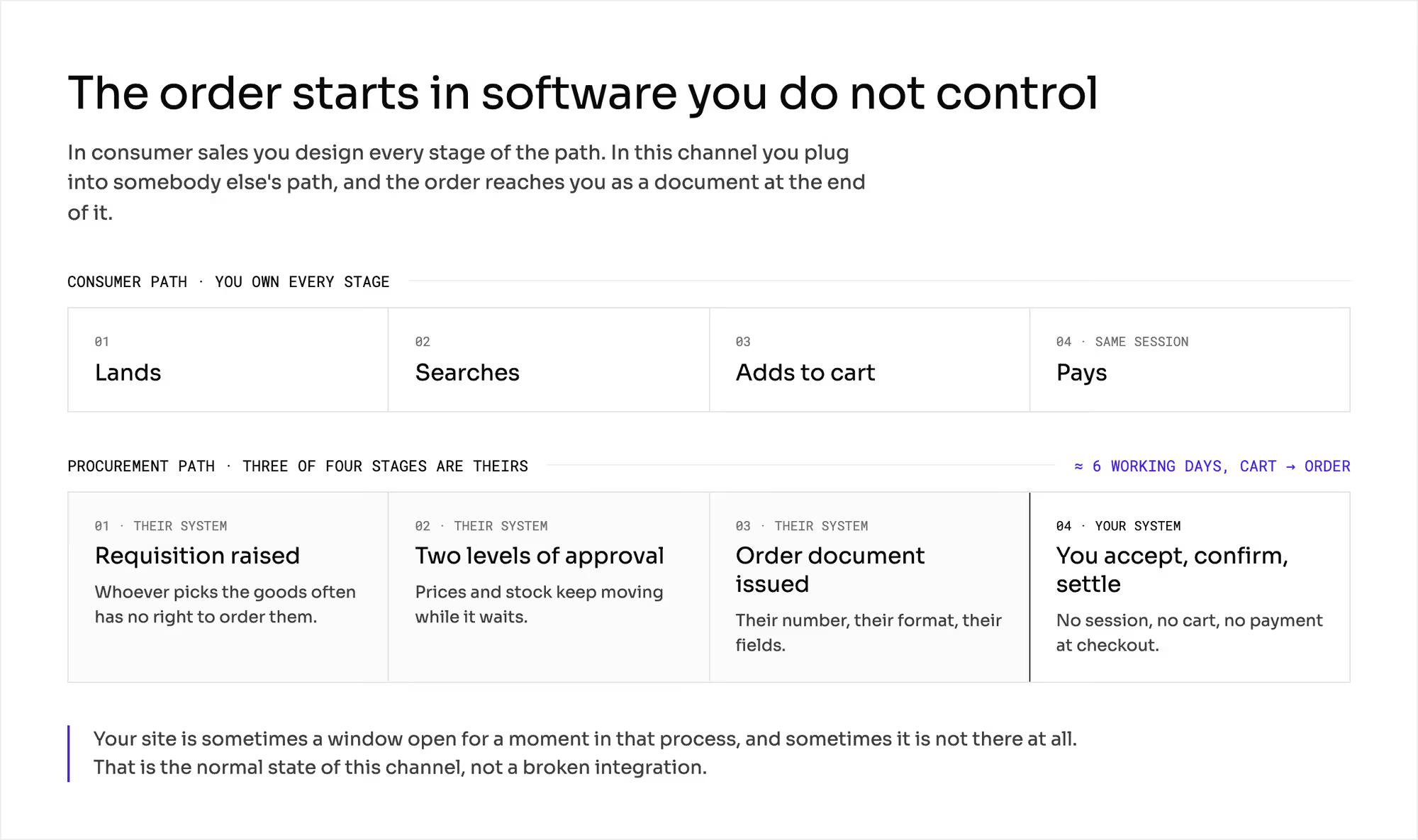
In consumer sales, you design the path. Someone lands on your site, searches, adds to the cart, and pays.
In sales to a company, the path starts inside somebody else's system. A requisition is raised and approved there. After that, it becomes an order.
Sometimes the buyer visits your site for a few minutes during that process. Sometimes they never visit it at all.
1. You plug into somebody else's path
Building a cart and placing an order are two separate jobs inside a company. Different people with different permissions do them.
The person who picked the goods often has no right to order them. That's normal in this channel, and it doesn't mean the integration is broken.
2. Their system decides the fields
The buyer's system expects a line item identifier, a unit of measure, and a code from its purchasing classification. It also expects a contract number, a cost center, and the identifier of the ordering organization.
Your data model has to accept those fields and send them back. A document without them fails validation on the other side.
3. Order comes back as a document
There's no session, no cart, and no payment at checkout. Your system receives a file or a message. It has to accept that document, confirm it, and settle it.
What are the 3 ways into a buyer's procurement system?
This series uses a €1,000 cart and a 12% commission as its standard example. Orders in this channel are usually much larger. In this chapter, the cart is 40 times larger.
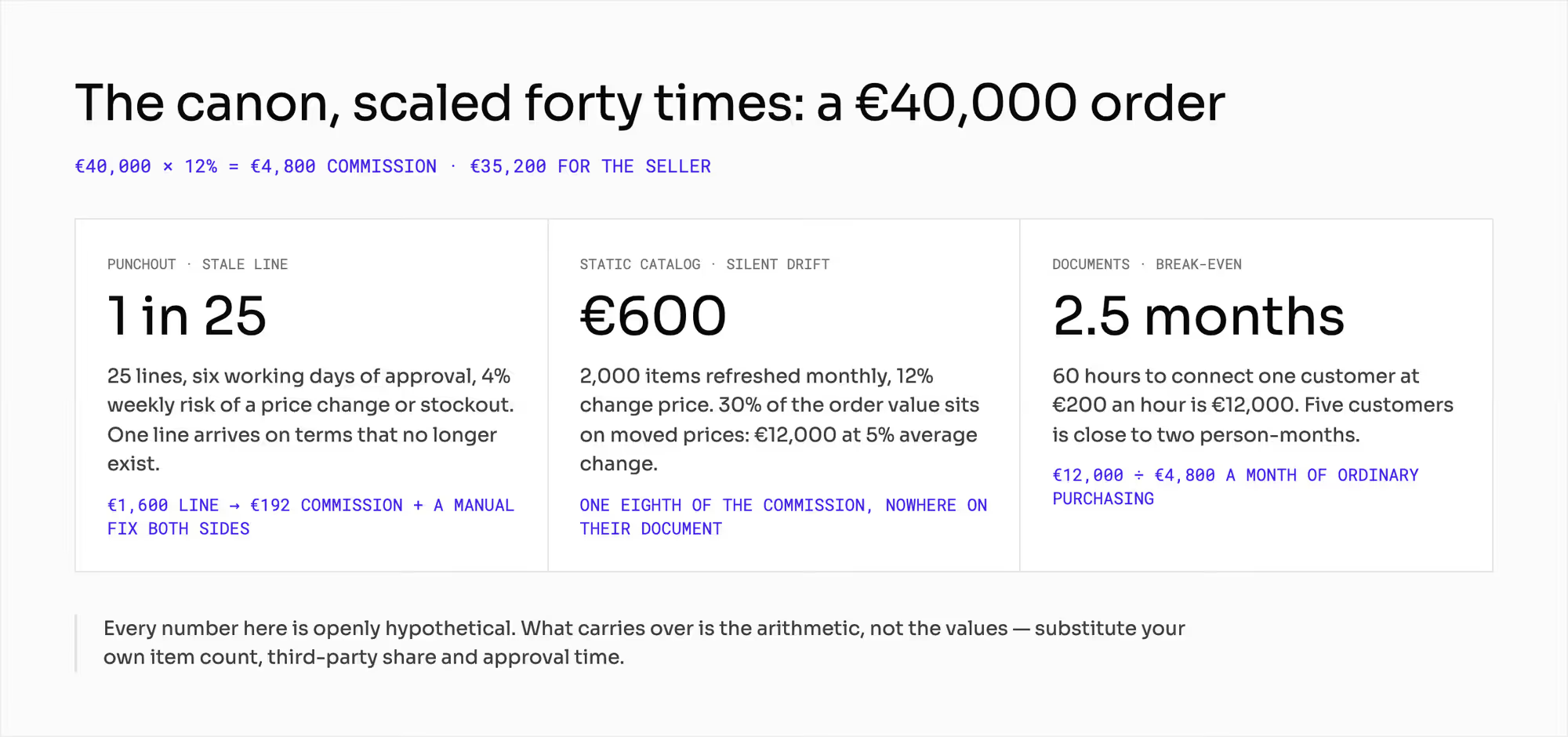
A €40,000 order at the same rate gives you €4,800 of commission and leaves the seller €35,200. Every number below is hypothetical. You can reuse the arithmetic with your own numbers.
Procurement integration has a setup cost you can count in hours. Say connecting one customer takes 60 hours for field mapping, agreeing identifiers, and testing documents.
Five customers then take 300 hours. That's close to two person-months.
At an internal rate of €200 an hour, one customer costs €12,000. A customer who buys €40,000 a month brings in €4,800 of commission. You break even after two and a half months of their normal purchasing.
The names below are the words your customer's IT team uses. You'll hear them at the first technical meeting.
1. Punchout catalog
In a punchout catalog, the buyer's procurement application opens a session on your site. The user builds the cart on your side. The cart then goes back to their system as a requisition waiting for approval.
Two public standards describe the exchange. cXML uses XML documents for the whole purchasing cycle, and a cXML punchout catalog uses it to send the cart back. OCI maps the fields between the supplier's catalog and the cart in the buyer's system.
The upside is that you calculate price and stock on your own side at the moment the buyer looks. The drawback is timing.
The cart comes back on Tuesday, and the order follows six working days later. That's how long two levels of approval take.
Take a €40,000 order with 25 lines. If each line has a 4% weekly chance of a price change or a stockout, one line in 25 arrives with a price or stock level that's no longer true.
An average line of €1,600 carries €192 of commission. It also needs a manual correction on both sides.
2. Static catalog loaded on the buyer's side
You send a catalog file, and the buyer accepts or rejects it. Once they accept it, the catalog sits in their system. The buying happens there.
Public specifications describe exactly this process. The supplier sends the catalog, and the buyer answers with an acceptance or a rejection. Later changes travel as separate messages that add, replace, update or delete an item.
The catalog starts aging on the day it's loaded. It doesn't update on its own.
Take a catalog of 2,000 items refreshed once a month. In a month, 12% of the items change price. That's 240 items.
Say 30% of a €40,000 order falls on items whose price has changed. That's €12,000. At an average change of 5%, you get a €600 difference that doesn't appear anywhere on the buyer's document.
That's one-eighth of your commission on the order.
Withdrawing an item is a message too. When you take an item down on your side, it stays on the buyer's side until their system accepts the deletion.
Until then, your old price is a binding offer in the buyer's eyes. Every order placed against it is your problem.
3. Full exchange of order documents
The purchase order, the order response, the dispatch advice and the invoice all travel as messages in an agreed format.
UN/EDIFACT and ANSI X12 cover this. Each has fixed message numbers and a published version calendar. UBL adds a newer layer of XML formats for commercial documents.
The order response has three possible outcomes: accepted, rejected, or accepted with a change to the quantity, the date or the line item. An online checkout never produces the third outcome. In this channel, it can be the norm.
In enterprise products, this layer is often a separate program you join after qualification. It comes with a closed list of allowed transports and fewer message types than the name suggests. Invoices and returns may turn out to be roadmap promises.
How do punchout, a loaded catalog, and document exchange compare?
The table compares the three ways on the same points. A large buyer can require two of them at once. For example, they may want punchout for one-off purchases and a contract catalog for the items under the agreement.
What does each way decide? | Punchout into your catalog | Catalog loaded at the buyer's end | Document exchange |
|---|---|---|---|
Where the buyer views the offer (place) | your site, in a session from their system | their procurement application | their procurement application |
Age of the price when the order is placed (days) | as long as approval of the requisition takes | however long since the file was loaded | as long as the price list update cycle |
Who stores the item data (party) | you | they do | they do, on the basis of the contract |
Changing the price of one item (action) | no action needed | an update message and its acceptance | a price list change and a message |
Relative cost of onboarding a customer (hours) | medium | lowest | highest |
What you see of buyer behavior (data) | session, searches, cart | only the order | only the order |
Entry for third-party seller offers (condition) | easiest: price and stock counted live | hardest: you vouch for somebody else's price as of the day it was loaded | possible, if you can reject a line |
Main risk (what breaks) | the window between cart and order | silent drift of prices and assortment | the cost of maintaining mappings per customer |
What does an inbound purchase order require from your system?
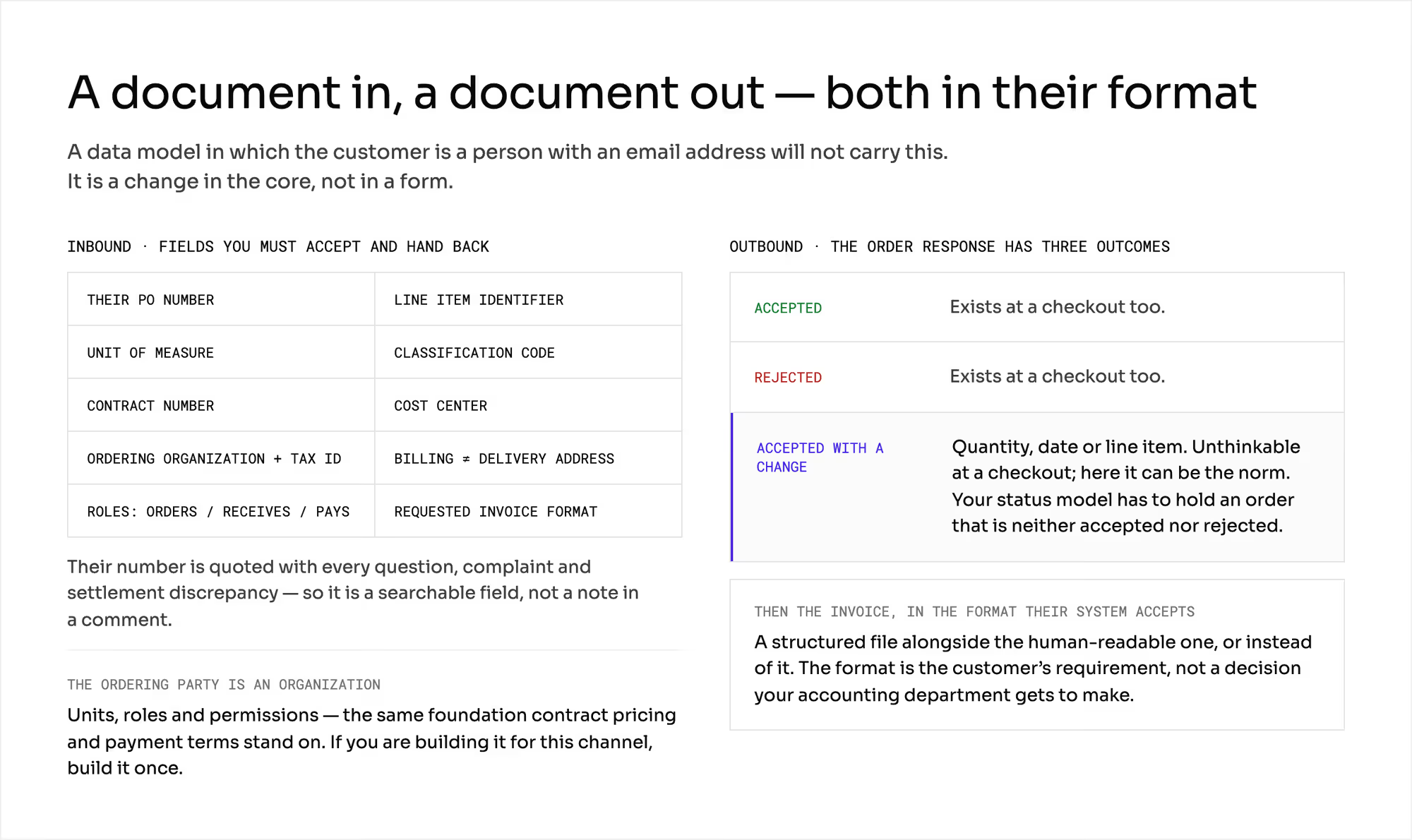
Your system receives a document someone else created. It has someone else's number on it. That number comes up in every question, complaint, and settlement dispute.
The customer's order number has to be a field on the order. A note in a comment won't do.
You also get the identity of the ordering organization with it. That means its name, identifier, and tax number, plus a billing address that differs from the delivery address. It also means separate roles on the buyer's side for ordering, receiving, and paying.
If your data model treats the customer as a person with an email address, it can't carry this. Fixing it means changing the core of your system.
The customer also decides what the document you send back looks like. The buyer expects an invoice in a format their system accepts automatically.
That means a structured file. It either comes next to a readable one or replaces it.
In procurement standards, the document format is set at the order level. The format is the customer's requirement. Your accounting department doesn't get to choose it.
The chapters on marketplace invoicing, marketplace e-invoicing and marketplace order documents cover what goes into the document, whose name it carries and how you archive it.
Teams most often skip the third requirement: an order accepted with a change. If the order response allows it, your status model has to hold an order that's neither accepted nor rejected.
That state doesn't exist at checkout. The chapter on marketplace order statuses covers the status model.
Do third-party seller offers belong in a punchout catalog?
Procurement handbooks don't ask this question. They assume one supplier with its own warehouse.
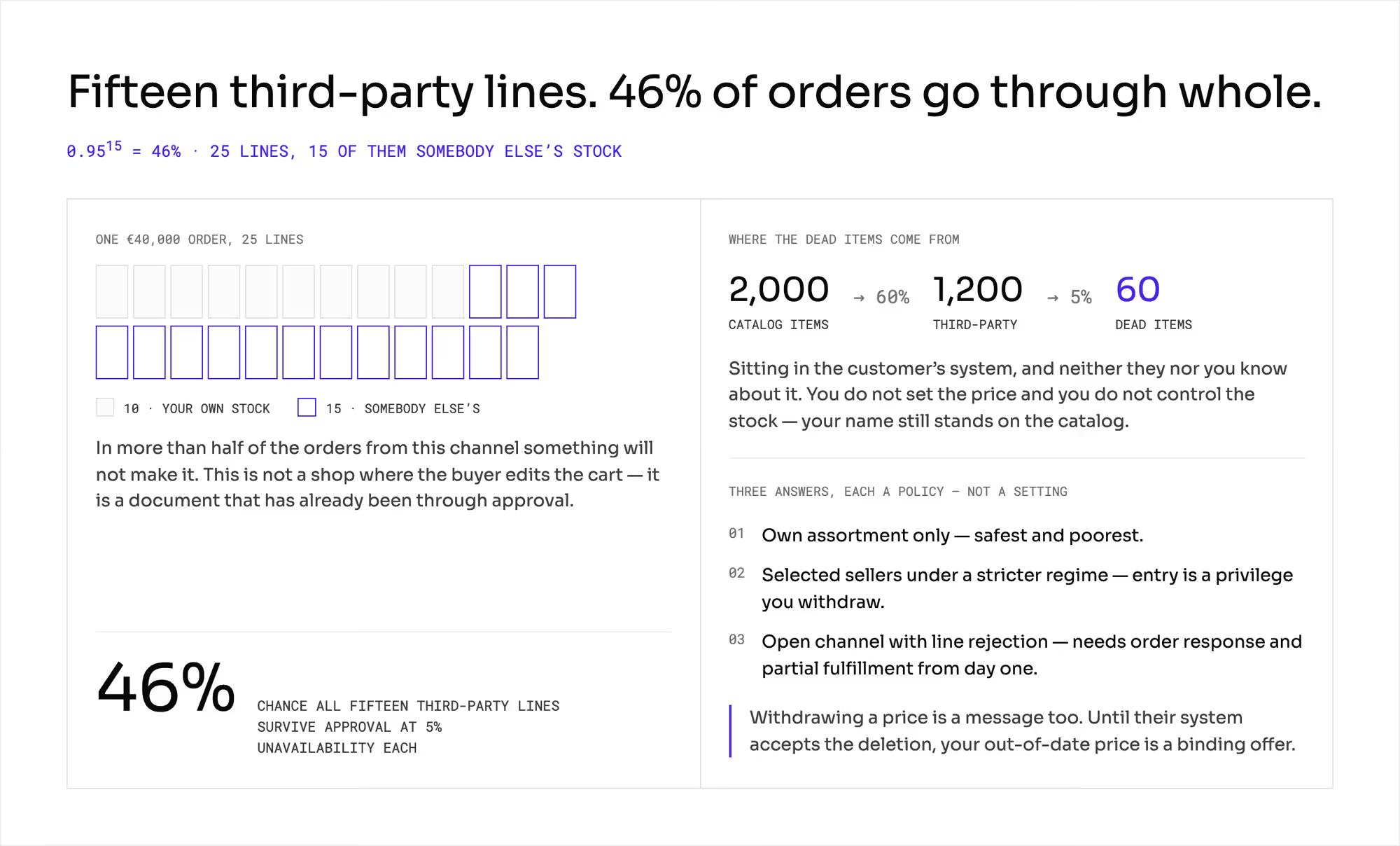
Part of your catalog belongs to other companies. You don't set their price or control their stock, and your name is still on the catalog in the customer's system. The chapter on inventory synchronization covers the stock side.
Take a contract catalog of 2,000 items, with 60% of them from sellers. That's 1,200 items. If 5% of them are out of stock at any moment, 60 dead items sit in the customer's system.
Neither you nor the customer knows about them. A €40,000 order has 25 lines, and 15 of them come from sellers.
The chance that all fifteen go through is 0.95 to the power of 15. That's 46%. More than half of the orders from this channel will hit at least one missing line.
The buyer can't simply edit a cart, because the document has already been through approval. You have three answers, and each one is a policy you set.
1. Your own assortment only
It's the safest choice, but it's also the poorest. It takes away the reason you built a marketplace in the first place.
2. Selected sellers under stricter rules
Sellers who keep stock levels current and accept hard fulfillment terms get in. If their results are poor, you take their access away.
3. Open channel with line rejection
It gives buyers the widest assortment. The order response and partial fulfillment have to work from day one.
The chapters on multi-vendor checkout and accepting and rejecting orders cover both.
What does a punchout catalog change in your marketplace?
The procurement channel is a second sales path with its own order lifecycle. The order comes in as a document, and the last step is a document in someone else's format too. The obligation starts at a different moment, and the order goes through different states.
Adding it to a finished checkout later means reworking the order model, the customer model and the document model at once. This series keeps coming back to these three as the hardest things to change.
The customer model also stops being a model of a person. The organization has units, roles, and permissions.
It also carries contract prices and B2B payment terms. If you build it for this channel, build it once.
You also see less of the demand. In two of the three ways in, searches and abandoned carts happen on the customer's side. You don't see them.
Measure this channel by the share of items covered by a contract and the share of orders accepted without a change. Add the age of the catalog in days.
How do you check a punchout catalog with a vendor?
Ask these eight questions, and ask to see each answer on screen:
- Which of the three ways do you support in production today, and for how many customers? Which one is on the roadmap?
- Can you show me a session on a third-party seller's offer, from the buyer's system through to the returned cart?
- Does the order have a field for the customer's document number, and can your support team search by it?
- Can the ordering party be an organization with units and roles?
- Can you answer an order with "accepted with a change", and what does the seller see then?
- How do I withdraw an item from a catalog loaded on the customer's side, and how do I know they accepted the withdrawal?
- In how many outgoing formats can you issue an invoice, and who maintains the mapping after the customer changes versions?
- What happens when one line out of fifteen is unavailable? Does the whole document wait, come back, or get fulfilled in part?
All eight come down to one question: can third-party offers enter this channel, and who vouches for their price and stock when the order arrives?
Which mistakes do operators make with procurement integration?
Each of these mistakes shows up in a negotiation or after an approval. Both are expensive moments.
1. Treating it as an integration for later
Your first large buyer asks about it during negotiations. The answer means changing the order model and the customer model. That takes quarters of work.
2. Catalog loaded once
The catalog has no refresh cycle and no confirmed withdrawals. You sell at last month's prices and learn about it from a complaint about the settlement.
3. Third-party offers without a rule on price and stock
Lines get rejected in a document that has already passed approval. Bad news costs the most at that moment.
4. Promising "an invoice in your format"
No one counted the formats first. Every new customer means a new mapping and new maintenance work that never made it into the TCO.
5. Assuming the person who built the cart can order
Your cart funnel looks like a disaster, but the process works fine. The requisitions are waiting for approval.
What do you still have to settle about procurement integration?
This chapter doesn't cover prices, payment terms, or the content of documents. Each of those has its own chapter, and the links are above.
This chapter isn't legal advice. Before your first customer of this kind, write down three areas for your lawyer:
- Public procurement rules, if your buyer is a public body.
- The rules on electronic invoicing and the structure of documents.
- The rules on naming the seller when someone other than the company on the document fulfills the order. The chapters on marketplace seller identity and marketplace liability cover the marketplace side.
All the numbers above are hypothetical. Put in your own item count, your own share of third-party assortment, and your own approval time. Then calculate how many of your orders from this channel will go through in full.
Summary: How does your catalog enter the buyer's procurement system?
Your catalog enters the buyer's procurement system in one of three ways. A punchout catalog keeps price and stock live on your side. A loaded catalog ages from the day it arrives, and document exchange costs the most to maintain per customer.
Each way turns the order into a document with someone else's number on it. Your order, customer, and document models have to carry that before launch.
Third-party offers need a policy before they enter the channel. With 15 seller lines on an order, the chance of a complete order is 46%.
Ask a vendor to show you a punchout session on a third-party offer, all the way back to the requisition. Building a marketplace your largest buyers can order from inside their own systems?
Frequently asked questions on punchout catalogs
What is a punchout catalog?
A punchout catalog is a supplier's online catalog that a buyer opens from inside their own procurement system. The buyer builds a cart on the supplier's site. The cart then returns to the procurement system as a requisition for approval.
How does a punchout catalog work?
In a punchout catalog, the buyer's procurement application opens a session on the supplier's site. The two systems exchange the cart through a standard such as cXML or OCI. After approval, the requisition becomes a purchase order to the supplier.
What is the difference between punchout and a static catalog?
A punchout catalog shows live price and stock from the supplier's site, and a static catalog is a file loaded into the buyer's system. The static catalog starts aging on the day it's loaded. Punchout carries a different risk, because the price can change between the cart and the approved order.
Ready to build?
We build marketplaces that take a purchase order from your buyer's system and answer it line by line, seller by seller.