
Accepting and Rejecting Orders on a Marketplace: What a Seller's Silence Costs

Marketplace order acceptance is the seller's decision to confirm or reject an order the buyer has already paid for, and the rule that matters most is what your clock does when the seller says nothing at all.
Between the buyer's click and the parcel being packed sits a seller decision nobody plans for: confirm the order or reject it. If you do not settle what happens when that decision never gets made, your default setting will settle it for you.
This article breaks down:
- What happens when a seller never answers?
- When should acceptance be manual?
- What does a day of delay cost?
- What does partial acceptance save?
Key insights
- When a seller never answers, your clock answers for them, and there are only three defaults: cancel the order, accept it automatically, or hold it for an operator, and each one decides whose money pays for the silence.
- Acceptance should be manual at named gates rather than across the platform: a new seller's first weeks, a fulfillment model with no warehouse of its own, a cart above a value threshold, and categories with a long preparation time.
- A day of delay costs on three lines: orders expiring unanswered at 3% is €21,600 of commission a month, the buyers who wait produce about 24 hours of contacts, and every day of waiting eats into the delivery promise.
- Partial acceptance saves more than six times the loss on each event: letting €850 of a €1,000 order through costs you €18 of commission, while an all-or-nothing rule costs the full €120.
What happens when a seller never answers an order?
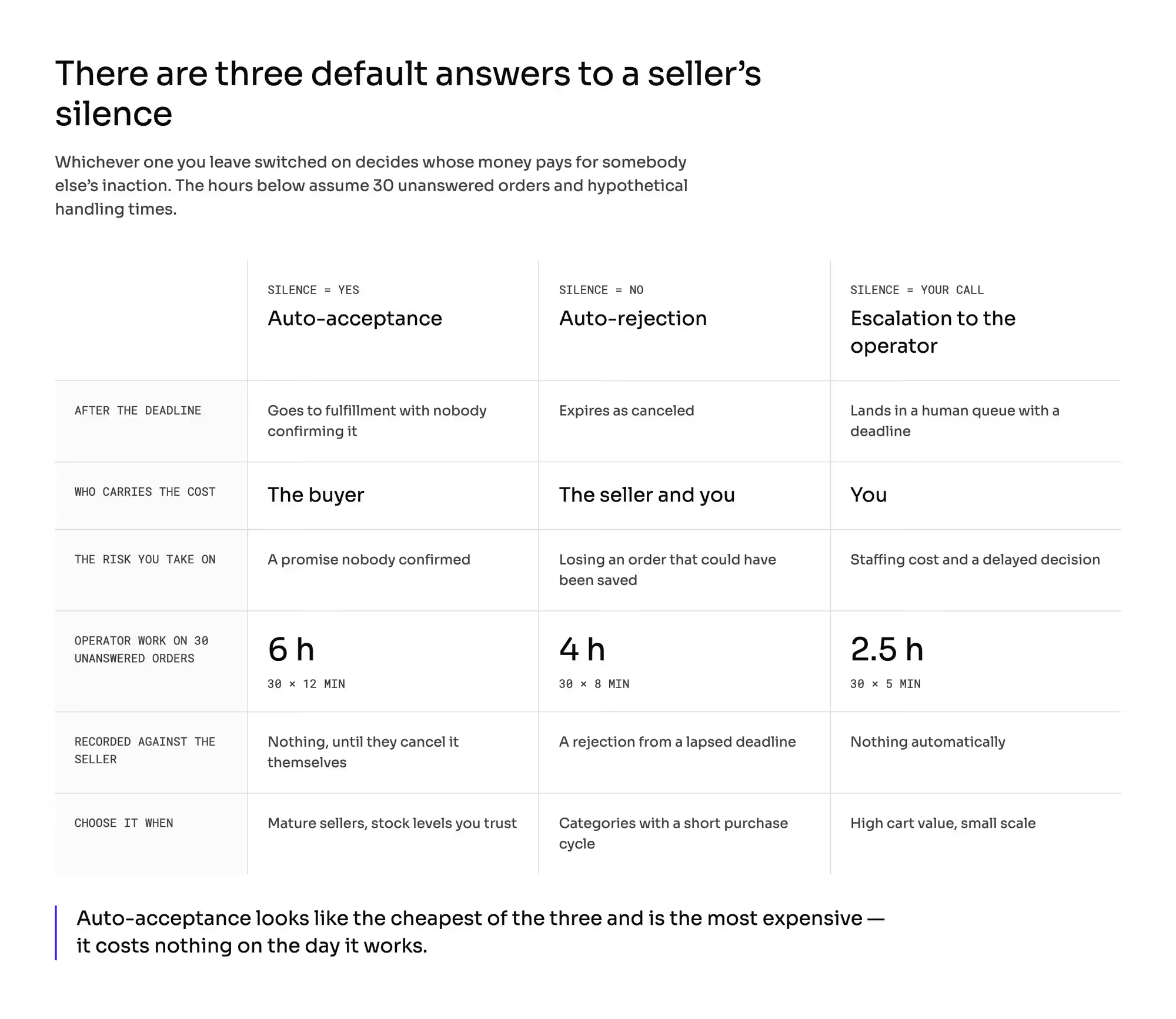
The question is not whether sellers should accept orders. It is this: which answer will your clock pick on their behalf when the seller does nothing?
No response is the most common scenario in this layer and the only one you never see in a demo. The seller is on vacation, the integration stopped pulling orders, the warehouse hand called in sick.
What the system does at that moment is a commercial decision rather than a technical setting, because it decides whose money pays for somebody else's inaction.
There are three default answers, and only three.
The arithmetic in the fourth row is out in the open and hypothetical: 30 unanswered orders at 12 minutes of handling each is 360 minutes, which is 6 hours. At 8 minutes, it comes to 4 hours, at 5 minutes, to 2.5 hours.
Auto-acceptance looks like the cheapest of the three and is the most expensive. It costs nothing on the day it works, and you pay for it later, when the order gets canceled anyway, only this time by a disappointed buyer.
The line to carry into the committee meeting: we are not choosing whether sellers accept orders, we are choosing whose money pays for their silence.
When should order acceptance be manual?
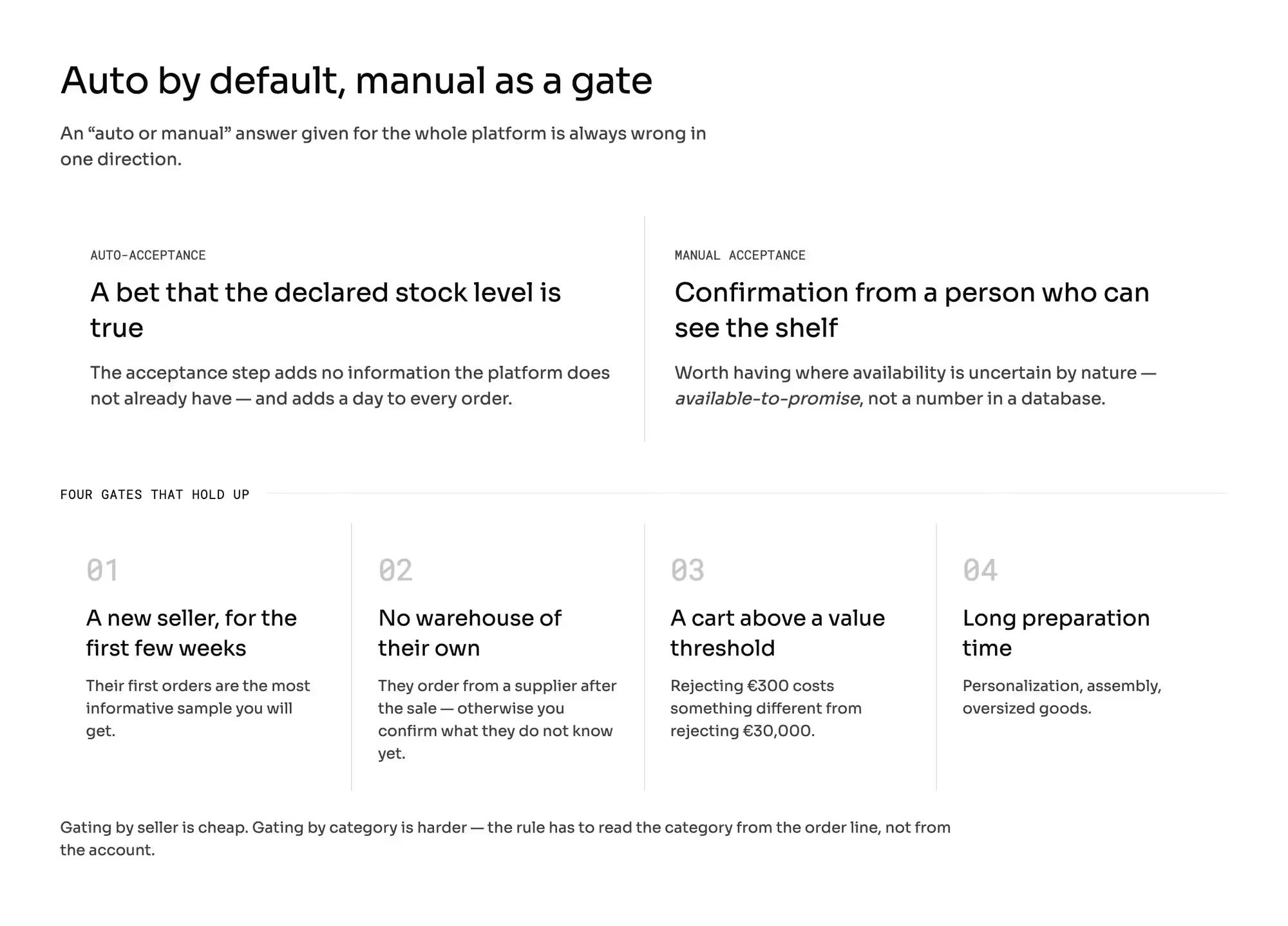
Auto-acceptance is a bet that the declared stock level is true. Since the seller posted a price and an availability, the platform assumes the goods are there.
Practitioners from large rollouts work mostly in this mode today, and they say why in plain terms: the acceptance step adds no information the platform does not already have, and adds a day to every order.
Manual acceptance buys one thing: confirmation from a person who can see the shelf. It is worth having where the stock level is uncertain by nature: one-of-a-kind goods, goods sold in several channels at once, made to order, or coming from a further supplier down the chain.
In those setups, the ability to take an order is an answer to the question of whether it can be done at all rather than a number in a database. Logistics has a name for it: available-to-promise, meaning how much I can genuinely promise after subtracting what I have already promised.
An "auto or manual" answer given for the whole platform is always wrong in one direction. The recommendation: auto-acceptance by default, manual acceptance as a gate for named cases.
Four gates hold up:
- A new seller, for the first few weeks. Their first orders are the most informative sample you will get.
- A fulfillment model with no warehouse of its own. A seller who orders the goods from a supplier after the sale needs a confirmation step, because otherwise you are confirming on their behalf something they do not know yet.
- A cart above a value threshold. Rejecting an order worth €300 costs something different from rejecting one worth €30,000.
- Categories with a long preparation time. Personalization, assembly, oversized goods.
Gating by seller is cheap. Gating by category can be harder, because it requires the rule to read the category from the order line rather than from the account.
That is one of the vendor questions below.
What does one day of acceptance delay cost?
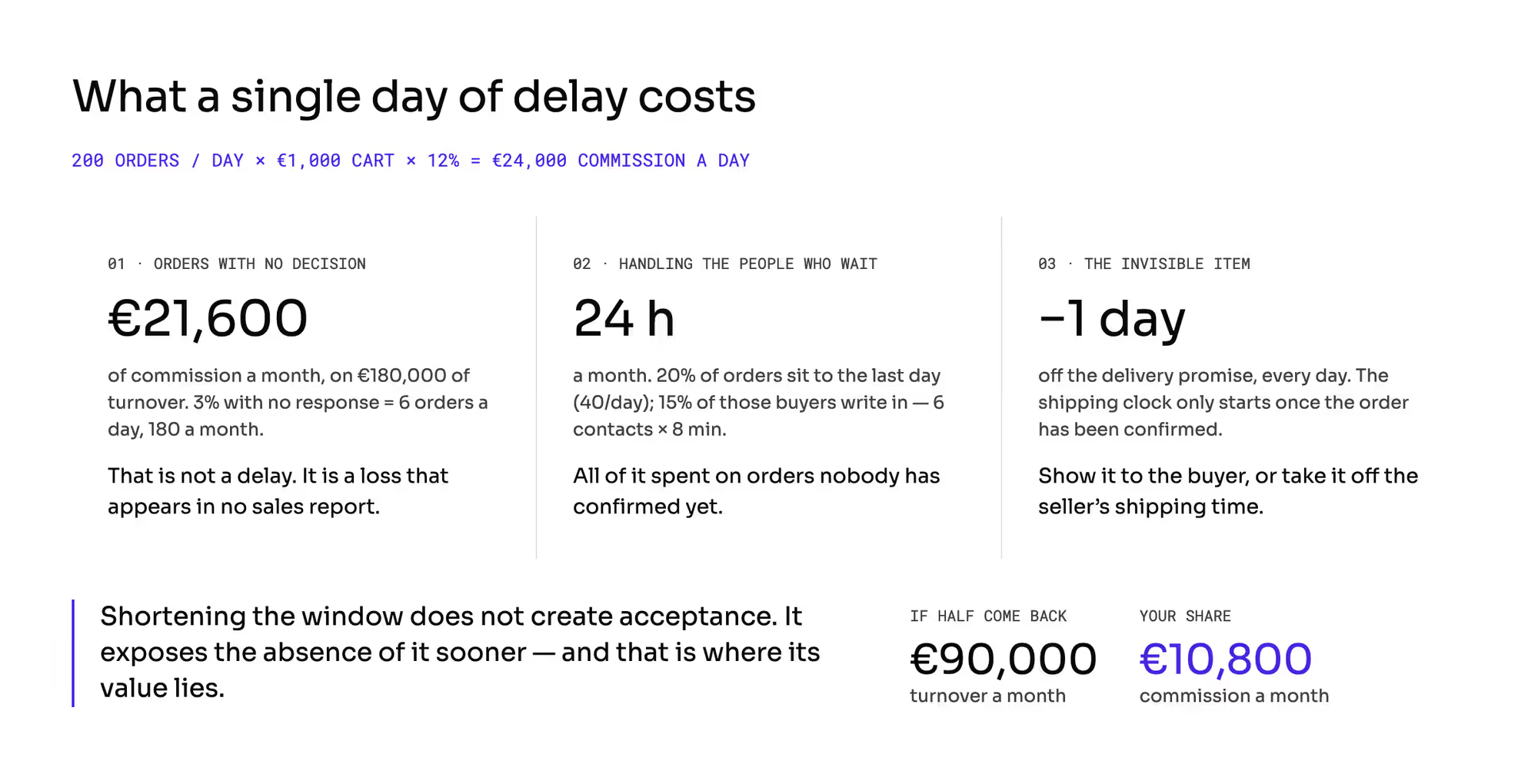
Do this math once, on your own numbers. The example is hypothetical, and the arithmetic travels.
The platform takes in 200 orders from sellers a day, the canonical cart of this series is €1,000, and the commission is 12%, so the seller keeps €880. Daily GMV is €200,000, and the commission is €24,000.
Monthly, that is 6,000 orders, €6 million of turnover, and €720,000 of commission.
1. Orders that never got a decision
At 3% with no response within the window, you lose 6 orders a day, so 180 a month: €180,000 of turnover and €21,600 of commission.
That is a loss rather than a delay. Those orders appear in no sales report, because they never became sales.
2. Handling the people who wait
If 20% of orders sit until the last day of the window, that is 40 a day; if 15% of those buyers write in with a question, you have 6 contacts a day at 8 minutes each, which is 48 minutes a day and 24 hours a month spent on questions about orders nobody has confirmed yet.
3. The day taken off the delivery promise
Every day of acceptance eats into the delivery promise, because the shipping clock only starts once the order has been confirmed. How to count it and how to communicate it: the delivery date you promise.
Shortening the window does not create acceptance, it only exposes the absence of it sooner. That is exactly where its value lies.
A buyer who finds out on day one that the order will not happen still wants the product and will buy it from another seller. By day four, they no longer want it.
If even half of those 6 daily losses came back into a cart, that is €3,000 of turnover a day, €90,000 a month and €10,800 of commission.
Why does a working-day window differ between countries?
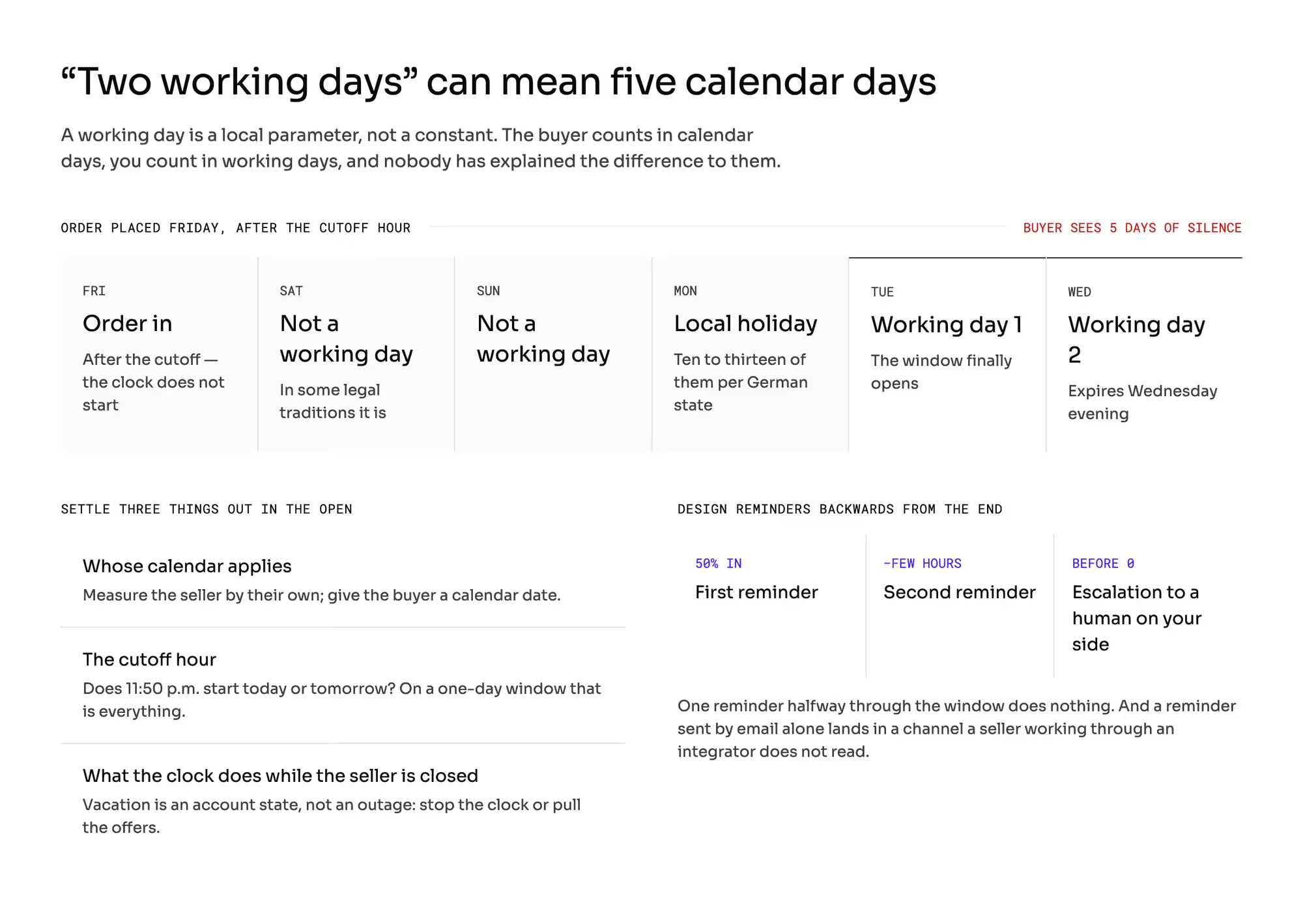
Acceptance timeouts are counted in working days, because otherwise they punish the seller for the weekend. The problem is that a working day is a local parameter rather than a constant.
In some legal traditions Saturday is a working day, in others it is not. The number of public holidays also varies inside a single country: in Germany only one holiday was established at the federal level, and the states have anywhere from ten to thirteen.
The consequence is arithmetic. A window of "2 working days" can mean anything from two to five calendar days, and more when holidays fall close together.
An order placed on Friday after the cutoff hour, with Monday off at the seller's end, expires on Wednesday evening. The buyer sees five days of silence: they are counting in calendar days, you are counting in working days, and nobody has explained the difference to them.
Three things have to be settled out in the open here:
- Whose calendar applies: the platform's, the seller's, or the buyer's. The recommendation: measure the seller by their own calendar and give the buyer a calendar date.
- The cutoff hour. Does an order placed at 11:50 in the evening start today or tomorrow? On a one-day window, that is the difference between a real deadline and a fictional one.
- What the clock does while the seller is closed. Vacation is an account state rather than an outage, and it either stops the clock or takes the offers off the storefront.
Design your reminders backwards from the end rather than forwards from the start. One reminder halfway through the window does nothing; a pair works: the first once half the deadline has passed, the second a few hours before the end, plus an escalation to a human on your side before the clock does anything.
Some products let you set several reminders for certain timeouts and only one for a pending acceptance. That is a question for your vendor rather than a detail.
And a reminder sent by email alone lands in a channel that a seller working through an integrator does not read (the seller panel).
What does partial acceptance save on one order?
An order has three lines totaling €1,000. One item, worth €150, the seller does not have.
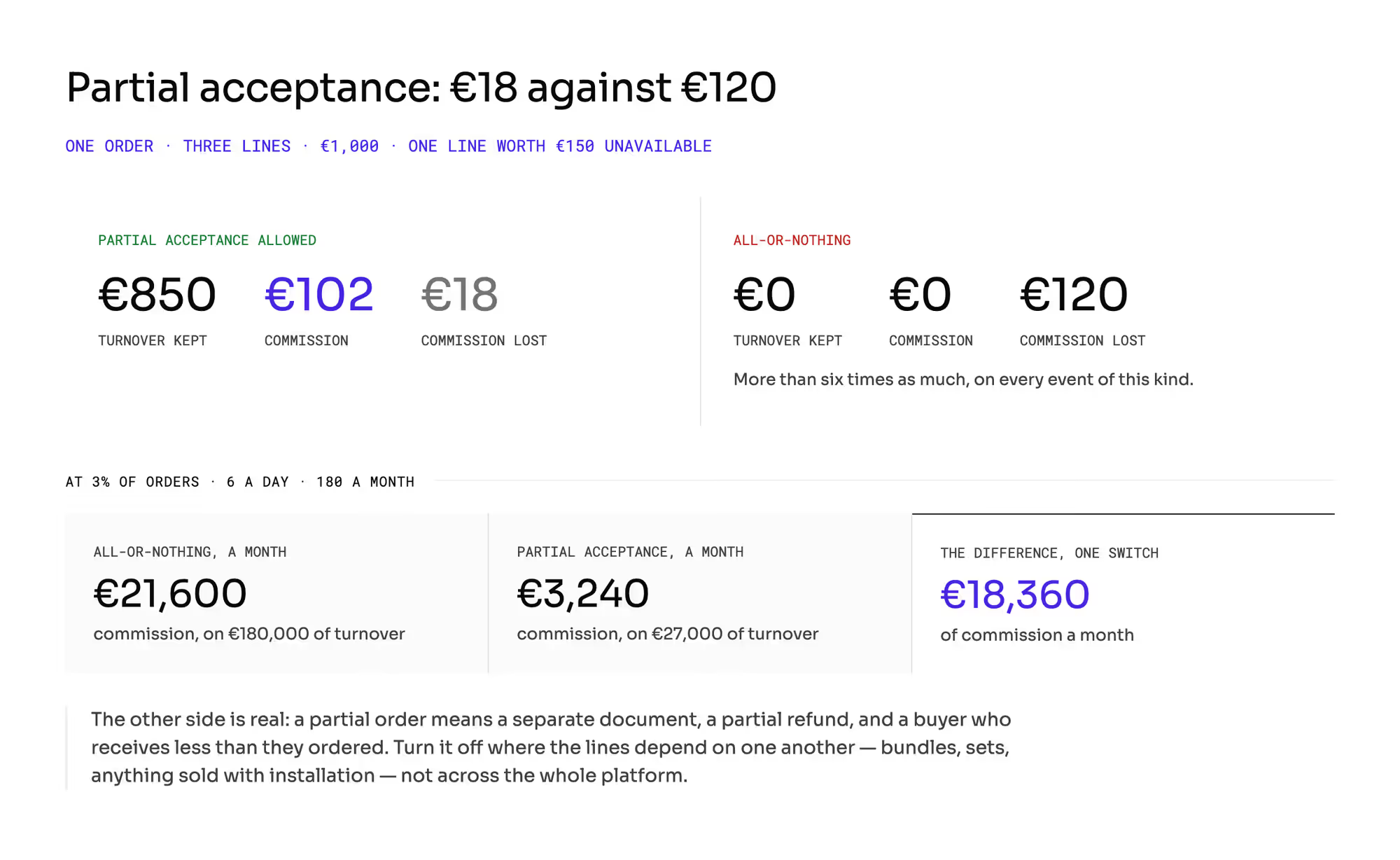
With partial acceptance allowed, you keep €850 of turnover and €102 of commission; you lose €18. Under an all-or-nothing rule, the whole order dies: €1,000 of turnover and €120 of commission, more than six times as much on every event of this kind.
At the scale of the previous section: if 3% of orders have one unavailable line, that is 6 a day and 180 a month. All-or-nothing costs €180,000 of turnover and €21,600 of commission; partial acceptance costs €27,000 of turnover and €3,240 of commission.
The difference is €18,360 of commission a month, on one switch.
The other side of the ledger is real, and that is why this is a decision rather than an obvious call. Partial acceptance produces a partial order: a separate document, a partial refund for the line that fell away (who pays for a refund), and a buyer who receives less than they ordered (checkout with several sellers).
Turn it off where the lines depend on one another rather than across the whole platform. That means bundles, sets, and anything sold with installation.
What does a rejection do to the seller's offer?
This is where a well-designed acceptance policy most often falls apart.
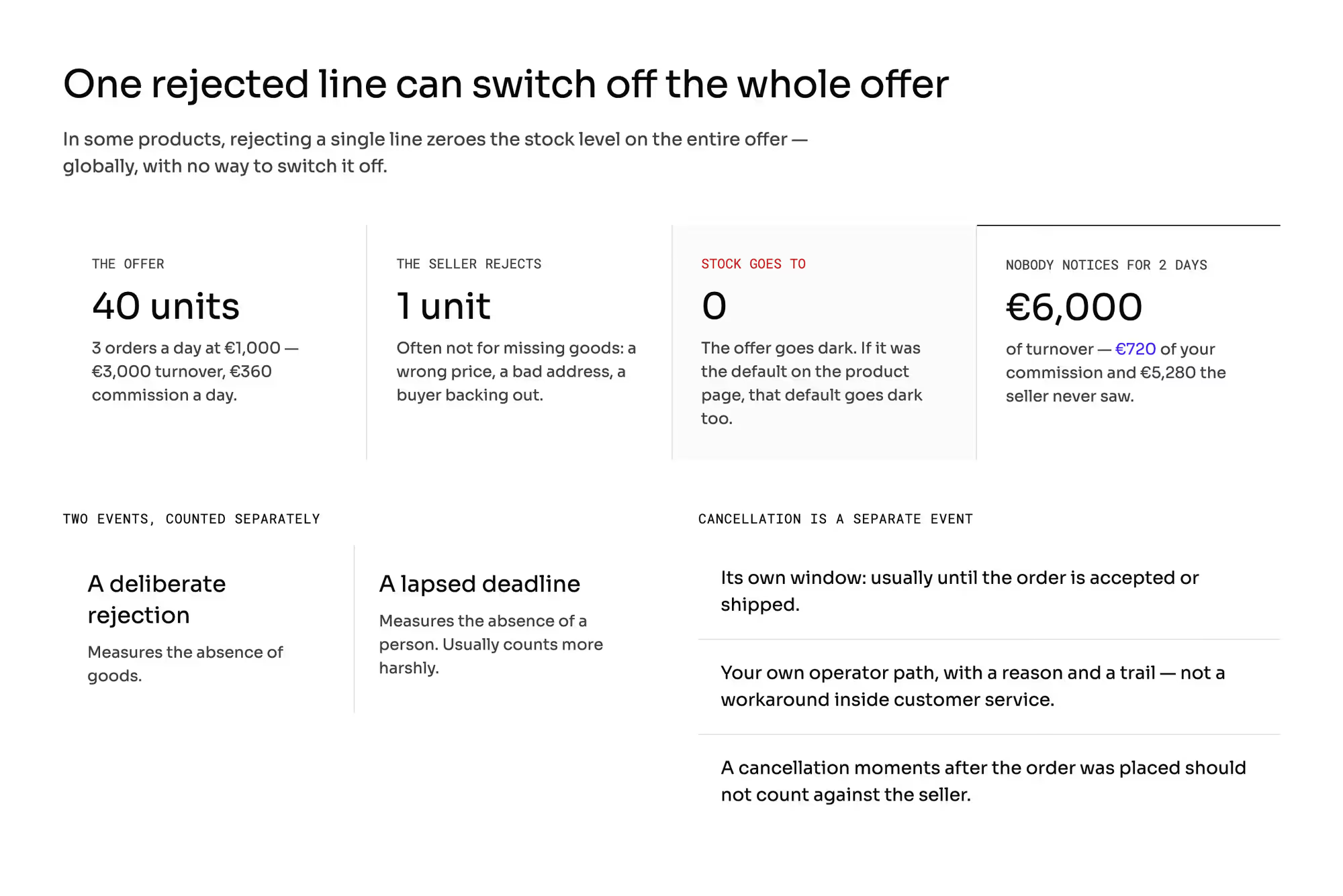
In some products, rejecting a single line zeroes out the stock level on the entire offer. It does so globally, and there is no way to switch it off.
The logic is consistent: if the only reason for a rejection is missing goods, the offer should stop selling. The real reasons are often different: a wrong price, an error in the address, a buyer who has already written to say they are backing out.
Count it. An offer holds 40 units and sells 3 orders a day at €1,000, so €3,000 of turnover and €360 of commission a day.
The seller rejects one order for one unit, the offer goes dark, and nobody notices for two days: €6,000 of turnover, €720 of your commission, and €5,280 the seller never saw. If that offer was the default one on the product page, the buyer's default choice goes dark with it (the rule that picks the winning offer).
The second effect is soft, but it lasts. A deliberate rejection and a rejection from a lapsed deadline are two different events, and mature platforms count them separately.
The second one usually counts more harshly, because it measures not the absence of goods but the absence of a person. We do not set thresholds here: that is seller quality thresholds.
Cancellation is a separate event with a separate window. A buyer can usually cancel until the order has been accepted or shipped; you need your own operator cancellation path (for a price error, a suspicion of fraud, or a seller nobody can reach).
It has to be an action with a reason and a trail rather than a workaround inside customer service. A cancellation made moments after the order was placed should not count against the seller; some products exclude such events from a seller's statistics.
Acceptance is also, sometimes, the moment the card gets charged.
Money going back to the buyer, and what happens to the commission on it, are settled in their own chapters.
What does order acceptance change about the rest of your build?
1. The acceptance window is part of the delivery promise rather than a prologue to it
Every day eaten by confirmation has to be either shown to the buyer or taken off the seller's shipping time.
2. The rejection rate is an input to your quality system rather than an HR policy
You collect the number here; the thresholds and the sanctions are set in their own chapter.
3. Buyer data before acceptance is a separate decision
A seller who is about to reject an order does not need the address; who controls the personal data carries the scope of what you share.
4. The status model these events live in is a separate subject
What "awaiting acceptance" means and who is the source of truth is described by who is the source of truth for a status.
How do you check order acceptance with a vendor?
Every one of them needs to be shown on screen rather than answered with the word "yes".
- Can acceptance be turned on for selected sellers rather than for everyone at once? And can the rule be based on category and order value?
- What exactly does the system do once the deadline passes, and can I choose between the three answers in the table above?
- Whose calendar counts working days, and where do I set days off for a seller in another country?
- How many reminders can I set for a pending acceptance, and do they go out on a channel other than email?
- Does rejecting a line change the stock level of the offer? If it does, can I switch that off?
- Can partial acceptance be allowed selectively, outside bundles, for example?
- Can I exclude a single order from a seller's statistics when my own system was at fault, and does that leave a trail with a reason?
Which mistakes do operators make about order acceptance?
1. An acceptance window set without anyone counting what its length costs
Three days instead of one looks like courtesy toward the seller. It is a loss of orders the buyer will not place again.
2. Auto-acceptance treated as the absence of a decision
It is a decision: you are moving the cost of somebody else's inaction onto the buyer, who will find out about the problem later, and from you.
3. A timeout in working days with no agreed calendar
A seller in another country gets a deadline counted with your holidays and loses a metric over a day their office was closed.
4. No escalation before the deadline passes
The order dies on its own when one phone call would have saved it. In the report, it reads like the seller's fault.
5. Rejection with no closed list of reasons
A year later, you do not know whether they come from missing goods, a price error, or plain inattention. Without that statistic, you will improve neither the window nor the rule.
What do you still have to settle about your own acceptance rule?
This article does not describe the order status model or event propagation, and it does not touch stock synchronization, reservations, or overselling. What is here is only the effect of a rejection on the state of an offer.
This article does not set quality thresholds or sanctions against a seller who rejects too much. That is seller quality thresholds.
This article settles nothing about what happens to the money after a cancellation: the refund to the buyer is carried by who pays for a refund, the fate of the commission by the commission on a refunded order, and the moment of the charge by when to take the buyer's money.
This article does not answer what rights the buyer has when their order is rejected or canceled, or what you have to tell them at that point. That is who delivers the buyer's rights, and you confirm the details with a lawyer.
All the numbers above are openly hypothetical. Substitute your own volume, your own share of orders with no response, and your own cart value.
Summary: What does a seller's silence cost you?
Whatever your default was set to on the day nobody was looking. The seller on holiday, the integration that stopped pulling orders, the warehouse hand who called in sick: none of those is a technical failure, and all of them end at the same question, which is what your clock does next.
Cancel, accept, or escalate are the only three answers, and the cheapest-looking one is the most expensive, because an order accepted automatically and cancelled a week later is paid for by a buyer who will not come back. Around that sit two numbers worth having before the meeting: what a day of waiting costs in commission, and what an all-or-nothing rule throws away on orders where one line out of three is missing.
Ask a vendor what happens to an order nobody accepts, and who can change that for one seller rather than for all of them. Building a marketplace where the acceptance clock is a commercial decision with gates, reminders, and an escalation to a person?
Frequently asked questions on marketplace order acceptance
Should sellers accept orders on a marketplace?
Sellers should accept orders where the stock level is uncertain by nature, and nowhere else. One-of-a-kind goods, goods sold across several channels, made-to-order items, and anything coming from a supplier further down the chain all need a person who can see the shelf.
Everywhere else, the step adds a day and no information you did not already have.
What happens if a seller does not accept an order?
If a seller does not accept an order, your default decides, and there are three: cancel it, accept it on their behalf, or route it to an operator. The arithmetic is the honest way to choose between them.
Thirty unanswered orders a month at twelve minutes of handling each is six hours; an order auto-accepted and cancelled later costs a buyer.
Should a marketplace allow partial acceptance?
A marketplace should allow partial acceptance everywhere the lines do not depend on one another. On an order of €1,000 where one €150 line is missing, partial acceptance keeps €850 of turnover and costs you €18 of commission; refusing the whole order costs €120.
Turn it off for bundles, sets, and anything sold with installation.
Ready to build?
We build marketplaces where an unanswered order has a named default, reminders before the deadline, and an escalation to a person rather than to a clock.