
How to Move B2B Buyers From Email Orders to a Marketplace: Quotes, Assisted Orders, and Reorders
Migrating B2B buyers from email orders means getting company customers to place their orders in your marketplace instead of sending them by email or phone. It starts with the rules inside the customer's company.
A B2B sales channel rarely stalls because of price or assortment. More often, the person on the other side isn't allowed to use it.
If you miss that before launch, you'll spend a year fixing screens. Meanwhile, the customer picks the goods in your store and places the order somewhere else.
This article breaks down:
- What happens when a B2B buyer prints the cart?
- Which 5 barriers keep B2B buyers on email?
- Which 3 intermediate paths bring B2B buyers into your marketplace?
- What does migrating one B2B buyer cost?
Key insights
- When a B2B buyer prints the cart, they can only order your own goods from you. On an €8,000 cart with €5,000 from sellers, they can't order the seller part at all. At a 12% commission, you lose €600 on that cart.
- The 5 barriers that keep B2B buyers on email are no authority to order online, an approval flow before the order, no authority to pay, the habit of email and phone, and a document required before payment. Each one limits authority or a process. Your interface can't remove any of them.
- The 3 intermediate paths that bring B2B buyers into your marketplace are a cart turned into a quote, an order your salesperson places, and a repeat of the previous order. An assisted order costs about €19 in staff time. That's 2% of the commission on an €8,000 cart and 15.8% on a €1,000 cart.
- Migrating one B2B buyer takes about six hours of work. 240 buyers take 1,440 hours. That's close to one full-time person for a year.
What happens when a B2B buyer prints the cart?
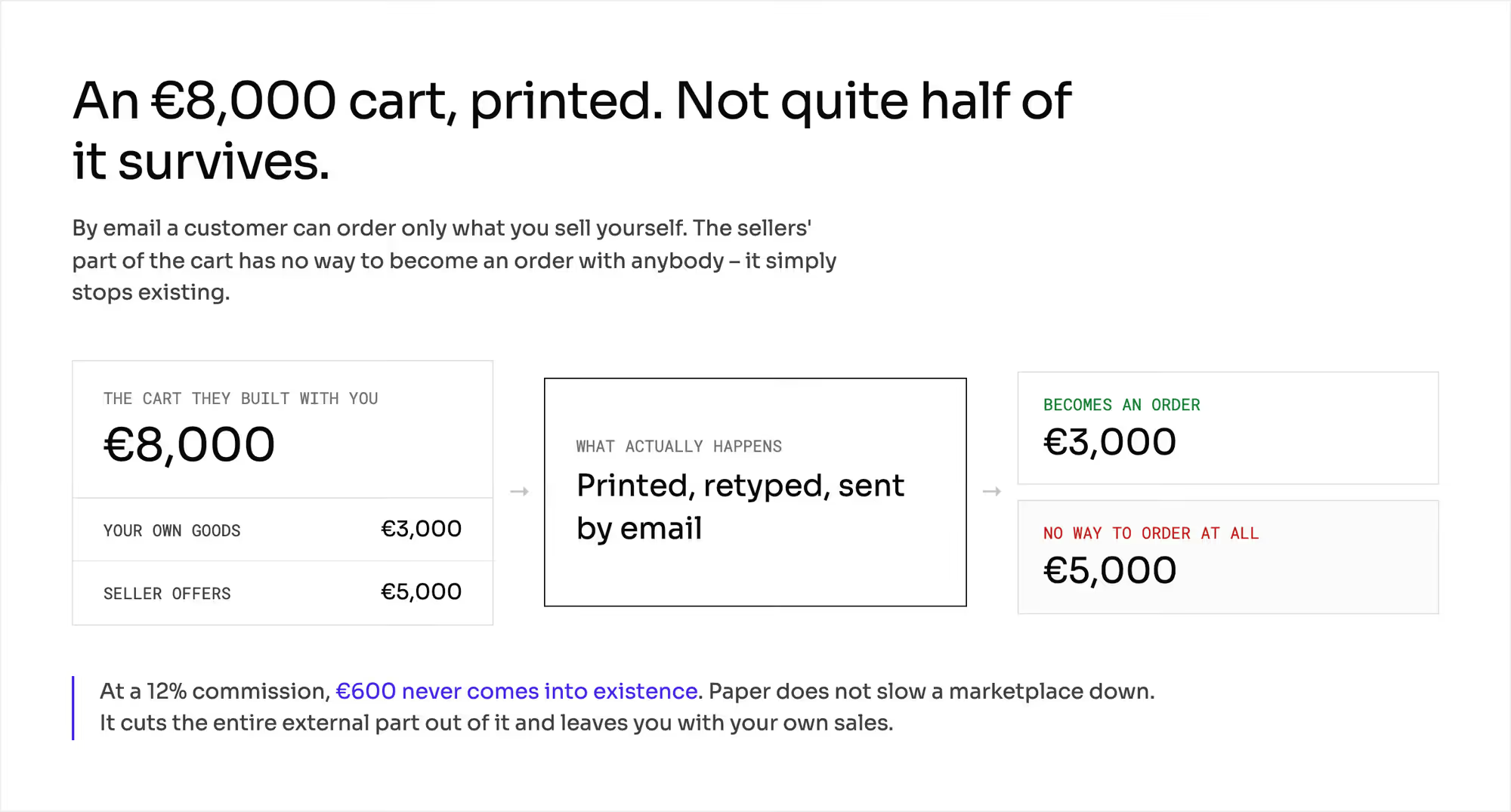
The customer's team picks everything in your store. They open product pages, compare offers, and build a cart worth €8,000.
Then they print the cart or export it to a file and pass it up the chain. The order reaches you by email. Their company either bans online purchasing or requires a signature your cart can't collect.
In your analytics, the cart counts as abandoned, but the sale still reaches your warehouse.
By email, a customer can order only what you sell yourself.
Take that €8,000 cart with €3,000 of your own goods and €5,000 of seller offers. Less than half of it can be ordered on paper. The €5,000 of seller offers can't be ordered from anyone.
At a 12% commission, you lose €600 on that cart. When customers order on paper, you lose the seller part and keep only your own sales.
You can't ask a customer base to change how it works overnight. You can design an intermediate path that works for them, even if it's less convenient for you.
Research on how new practices spread backs this up. Adoption speed depends on how well the new thing fits current practice and whether people can try it without commitment.
This series uses a €1,000 cart and a 12% commission as its standard example. That cart is too small for company purchasing, so this chapter uses one that's eight times larger.
An €8,000 cart brings you €960 of commission and leaves the seller €7,040. Every number below is hypothetical. You can reuse the arithmetic with your own numbers.
Which 5 barriers keep B2B buyers on email?
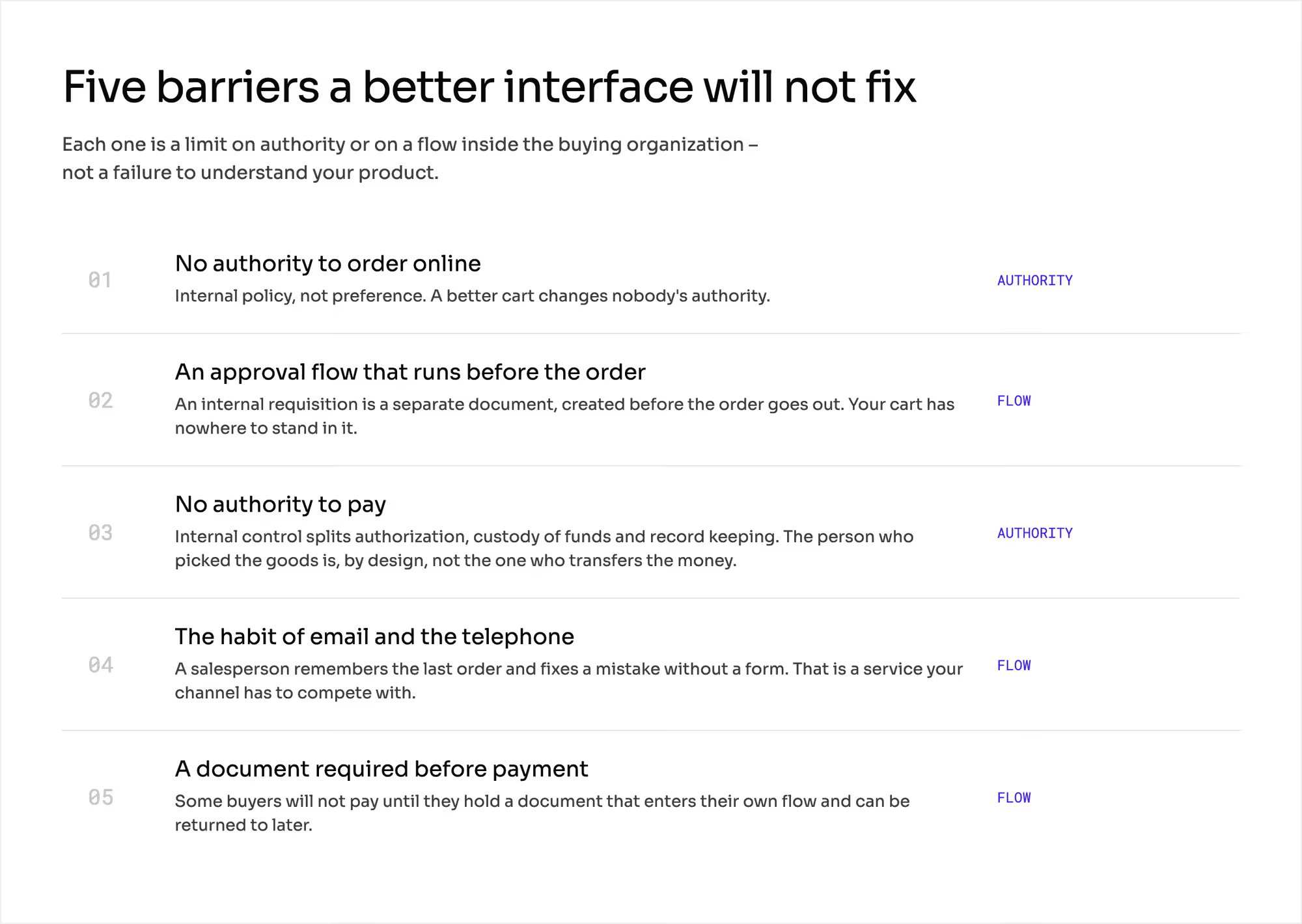
Each of these barriers limits authority or a process. A better interface won't fix any of them.
1. No authority to order online
This is internal policy. The people who choose the goods have no right to place the order, and a better cart doesn't change anyone's authority.
2. Approval flow before the order
Companies with a procurement department treat an internal requisition as a separate document. It comes before the order to the supplier.
It describes what the company buys and at what price. A manager approves it, and someone checks the budget. Your cart has no place in that flow, and someone retypes it into the requisition.
3. No authority to pay
Under internal control rules, different people approve, hold the money, keep the records, and reconcile them. In a well-built setup, one person holds only one of these jobs.
The employee who picked the goods isn't the one who makes the transfer.
4. Habit of email and phone
A salesperson remembers what the customer bought last time and fixes a mistake without a form. That's a service, and your channel has to compete with it.
5. Document required before payment
Some buyers won't pay until they get a document they can put through their own process. The chapters on marketplace invoicing and marketplace e-invoicing cover which documents those are and who issues them.
The chapter on the B2B buyer journey covers who these people are and how the roles split inside the buying company.
How can your payment model block a whole sales channel?
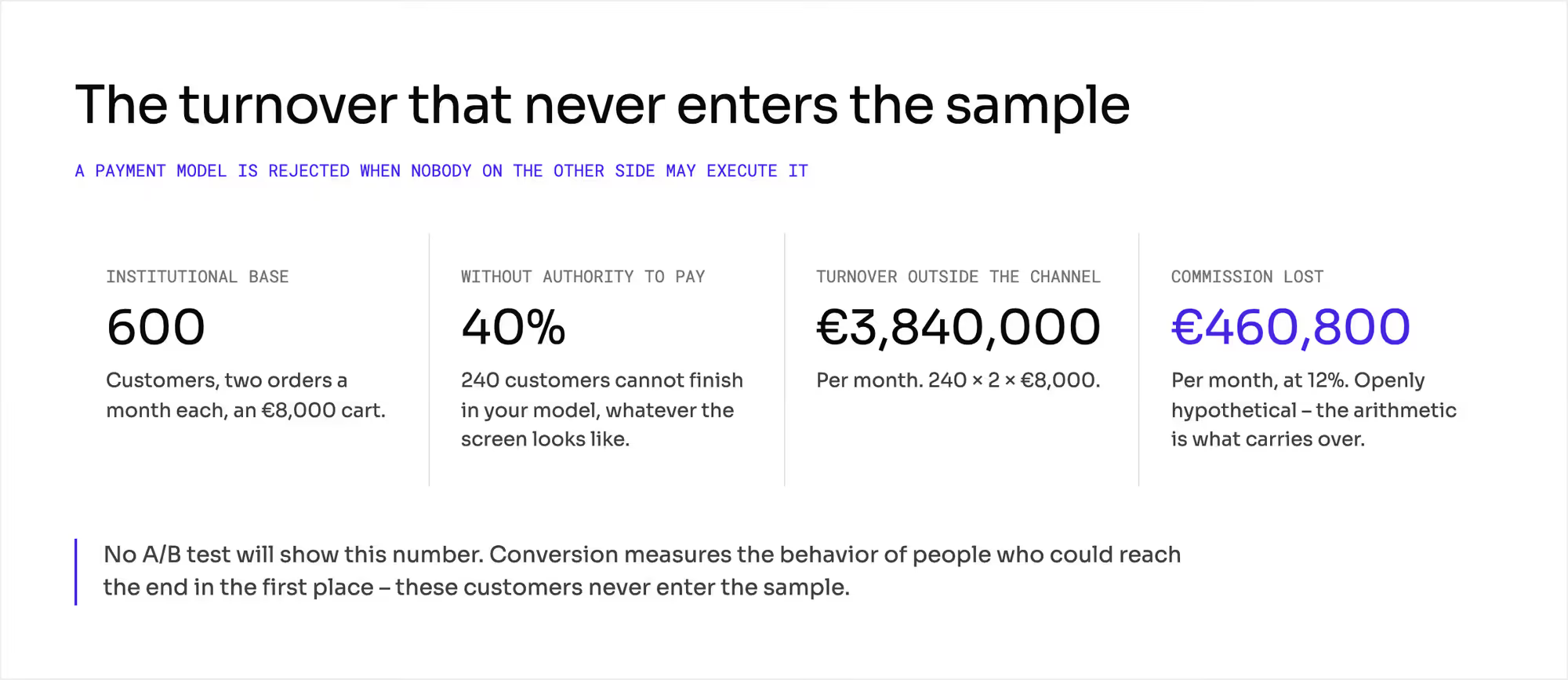
A payment model gets rejected when the employee on the other side has no authority to use it. Its quality doesn't matter at that point.
A checkout that assumes one person chooses and pays works for companies where someone holds a card or can send transfers. In other companies, it doesn't work at all.
Your conversion rate won't show this. It measures people who could reach the end of the checkout in the first place.
Take 600 company customers who place two orders a month on an €8,000 cart. In 40% of them, no one has the authority to pay in your model.
That's 240 customers × 2 × €8,000 = €3,840,000 of turnover a month outside the channel. It's €460,800 of commission a month. No A/B test will show it, because these customers never enter the sample.
The chapters on payment capture and split payments cover the moment of the charge and the split. The chapter on B2B payment terms covers terms, limits, and credit risk.
Which 3 intermediate paths bring B2B buyers into your marketplace?
Each path removes a different barrier and costs you something different. The table compares them on the same €8,000 cart.
What does each path change? | Cart as a document for approval | Order placed by your salesperson | Repeat of the previous order |
|---|---|---|---|
Barrier it removes | approval flow, document before payment | no authority to order online | the habit of email and the telephone |
Who takes the last step (role) | the approver at the customer | your salesperson | the requisitioner at the customer |
Work on your side (minutes per order) | 0 | 12 | 0 |
Cost on your side (EUR per order, at €95/h) | 0 | 19 | 0 |
Share of the commission on an €8,000 cart (%) | 0 | 2.0 | 0 |
What you have to build (unit) | a document object with a validity and a return to the cart | a mode for placing an order for the customer, with a trace | a history that covers orders placed outside the channel |
Main risk | the price changes inside the validity window | the cost grows in line with the number of orders | you repeat the previous order's mistakes too |
1. Cart turned into a quote for approval
The buyer builds a cart and generates a document from it instead of paying. The document lists the items, the prices, a validity date, and the buyer's own reference number.
The document goes through the buyer's approval flow. After approval, it turns back into a cart in one step.
Several platforms of this kind have a quote feature like this. The document is valid for a set number of days and expires if no one acts on it.
The layer is sometimes off by default, and it doesn't work in every platform model. Check it while you choose a platform.
You can calculate what this convenience costs. A quote valid for 14 days fixes a price that the seller can still change.
If the seller raises the price by 3% inside that window, the difference on an €8,000 cart is €240. That's 25% of your €960 commission.
Someone has to cover it. Either you pay, the seller pays, or the customer gets a price that differs from the approved one. The chapter on the multi-vendor shopping cart covers what changes between adding to the cart and paying.
2. Orders your salesperson places for the buyer
A €12,000 monthly salary spread over 126 working hours is €95 an hour. Twelve minutes on an order at that rate costs €19.
That's 2.0% of the €960 commission on an €8,000 cart. On the standard €1,000 cart with €120 of commission, the same work costs 15.8%.
An assisted order pays off only on a large company cart. The chapters on marketplace seller identity and marketplace liability cover who is party to the contract and whose name goes on the confirmation.
3. Repeat of the previous order
This is the cheapest first step of a migration. The customer doesn't have to learn anything new. They just order the same things again.
Retyping eight lines from an email takes about 12 minutes on your side. A repeat order takes the customer one click.
The history has to include orders placed outside the channel. Otherwise, the customer has no order to repeat.
The fourth option is to wait for the customer to get used to the channel. It's what you get if you don't choose.
It doesn't cost anything in the budget. In the example above, you lose €460,800 of commission a month.
What does migrating one B2B buyer cost?
Often no one in the company owns demand. Sales has a revenue target, and marketing has campaigns. No one answers for whether a particular customer placed a first order in the new channel.
The chapter on announcing a marketplace launch covers the marketing side.
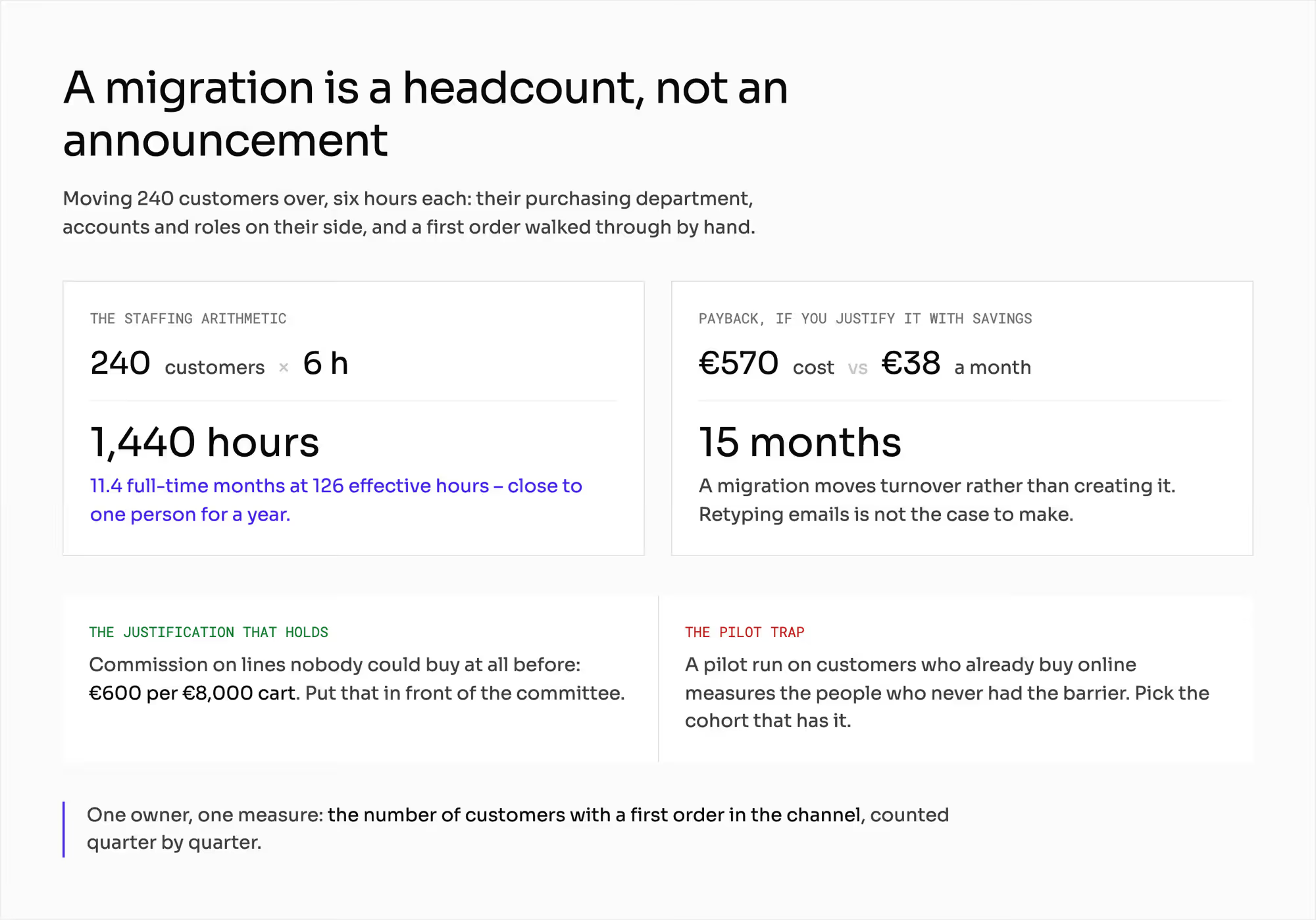
Some companies set up demand adoption as a separate function with its own plan. That works if the function has one measure. Count the customers who placed a first order in the channel each quarter.
Take 240 customers to migrate at six hours each. That's 1,440 hours. At 126 working hours a month, it's 11.4 months of one person's time.
In those six hours, you meet the customer's purchasing team, set up their accounts and roles, and walk them through a first order manually.
A migration shifts existing turnover into the channel. It doesn't create new turnover, so it pays back more slowly than you'd expect.
If you handle two orders a month manually at 12 minutes each, that's 0.4 hours. That saves €38 a month. Six hours of migration cost €570, and they pay back after 15 months.
A migration pays off because it unblocks the seller lines that paper orders lose. That's the €600 from the first example. Put that number in front of your committee, and leave the savings on retyping out of it.
If you pilot with customers who already buy online, you test people who never had the barrier. The result looks good, and it tells you little about migration. Pick the pilot group from customers who have the barrier.
What does a buyer migration change in your marketplace?
A buyer migration touches three parts of your build.
1. Approval flow
You can solve the approval barrier on the technical side too. The chapter on the punchout catalog covers how your catalog and orders connect to the customer's procurement system.
Some large buyers won't work with you without that connection.
2. Checkout and service
The chapter on multi-vendor checkout covers the checkout side. The chapter on marketplace customer service covers who talks to the customer after the sale.
3. Prices and personal data
Showing different prices to different organizations has its own consequences. Ask a lawyer before you give different buyers different terms. The chapter on whether a marketplace can control seller prices covers price parity.
The chapter on marketplace GDPR covers the data you keep on the customer's employees, including their roles and consents.
How do you count your own base of email orders?
Start with the orders you already receive:
- Count how many orders from company customers arrive by email and phone today and what they're worth. That's your real base for a migration. Your site traffic tells you less.
- Ask ten customers who in their company is allowed to click "order" and who is allowed to pay. The answers tell you which path to build first.
- Split a typical cart into your own part and the sellers' part. The second number is the commission you lose on every order that leaves the channel.
- Count the cost of an assisted order as a share of commission. Do it for a typical cart and for the smallest cart you plan to serve.
- Name an owner for demand adoption and give them one measure. If no one owns the task and it has no measure, it doesn't get done.
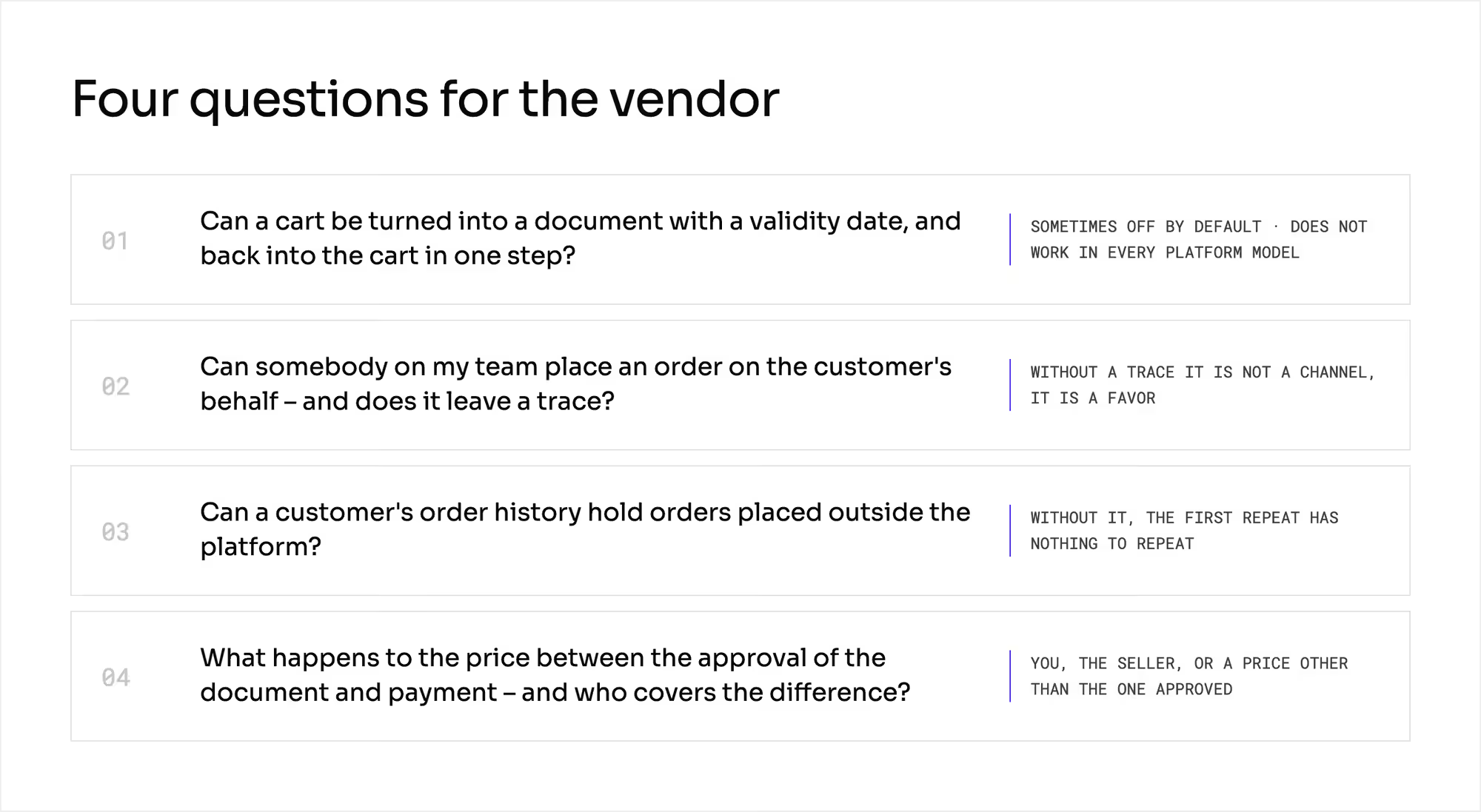
Ask your vendor four questions, and ask to see each answer on screen:
- Can a cart become a document with a validity date, and can it turn back into a cart in one step?
- Can someone on my team place an order for the customer, and does it leave a trace?
- Can a customer's order history include orders placed outside the platform?
- What happens to the price between the approval of the document and payment, and who covers the difference?
Which mistakes do operators make with B2B buyer habits?
Each of these mistakes starts on the customer's side.
1. Blaming a weak interface before asking about authority
You spend a year on screens that no one on the other side had the right to use for an order.
2. One payment model for every customer
Some customers drop out for a reason unrelated to your offer. In your funnel, it looks like they lost interest.
3. Pilot on the easiest customers
The result is green. Then you roll out to customers where completely different people have the authority to order.
4. Quote with no rule on price changes
Two weeks later, at the first approval, the customer asks why the amount differs from the approved one.
5. Migration as an announcement instead of a project
You send an email to the base and see a one-time spike in visits. By the third week, orders arrive by email again.
What do you still have to settle about your buyers' habits?
This chapter doesn't describe the buyer, the procurement integration, payment terms, or your communication. Each has its own chapter, linked above.
It isn't legal advice, and it gives no thresholds or deadlines. Before you switch on any intermediate path, ask your lawyer about these areas:
- Information duties toward the buyer when you place an order on their behalf.
- Payment terms between businesses, if the quote leads to deferred payment.
- Competition law on different terms for different buyers.
- Personal data protection, when you store the roles and authorities of the customer's employees.
- Electronic invoicing, if the document from your cart enters the customer's accounting.
How much of this applies to you depends on one number. That's the share of your company's customers who have a ban or an approval flow on online purchasing.
If it's 10%, this is a niche problem for you. If it's 60%, it decides whether the channel works at all.
You won't find that number in your analytics. You'll get it from ten phone calls.
Summary: How do you bring B2B buyers from email orders into your marketplace?
Start with authority. Company buyers keep ordering by email when the person who picks the goods can't order or pay. Paper orders then cut the seller lines out of your marketplace.
Build one intermediate path first: a cart that becomes a quote, an order your salesperson places, or a repeat of the last order. Give demand adoption an owner and measure first orders per quarter.
Ask a vendor to turn a cart into a quote and back again on screen. Building a marketplace your company customers can order from without breaking their own rules?
Frequently asked questions on migrating B2B buyers from email orders
Why do B2B buyers still order by email?
B2B buyers still order by email because the person who picks the goods often has no authority to order or pay online. Many companies require approval before the order or a document before payment. Email works within those rules, but a standard checkout often doesn't.
How do you get B2B customers to order online?
To get B2B customers to order online, build a path that fits their approval rules. Let the buyer turn a cart into a quote for approval, let your salesperson place orders for them, or offer a one-click repeat of the last order. Start the pilot with customers who still order by email.
What is a request for quote in B2B eCommerce?
A request for quote turns a B2B cart into a document the buyer's company can approve before it pays. The quote lists the items, the prices, and a validity date. After approval, it turns back into a cart in one step.
Ready to build?
We build marketplaces where a cart can become a quote for approval and come back as an order in one step.