
What Is Included in a Marketplace Platform, and What Do You Have to Build Yourself?

Almost every marketplace project gets priced on the license fee and paid for based on the total amount of work. The gap between those two numbers is where most of the blown budgets and slipped dates in this industry come from.
This article is not about vendors being dishonest. It is about something simpler.
A marketplace platform is a very good back office and a very good API. That is exactly what you are buying.
The rest of the project exists too. It just is not on the invoice.
This article breaks down:
- Which 7 layers make up a marketplace project?
- What does a marketplace platform include out of the box?
- What is almost never included?
- What do you have to integrate yourself?
For the step-by-step version of getting a marketplace off the ground, see our guide to creating your own marketplace. This article answers a narrower question: which layers the licence covers.
Key insights
- A marketplace platform is a back office and an API. Layers 1 to 4 are what you buy; layers 5 to 7 are what you sign up to build.
- The storefront, the movement of money, tracking, product data management, analytics, and local compliance are almost never in the box.
- A feature can be in the base price, in a higher plan, available on request, or off by default per seller. Only the first is what a buyer means.
- Price the project on the total work rather than on the licence fee.
Which 7 layers make up a marketplace project?
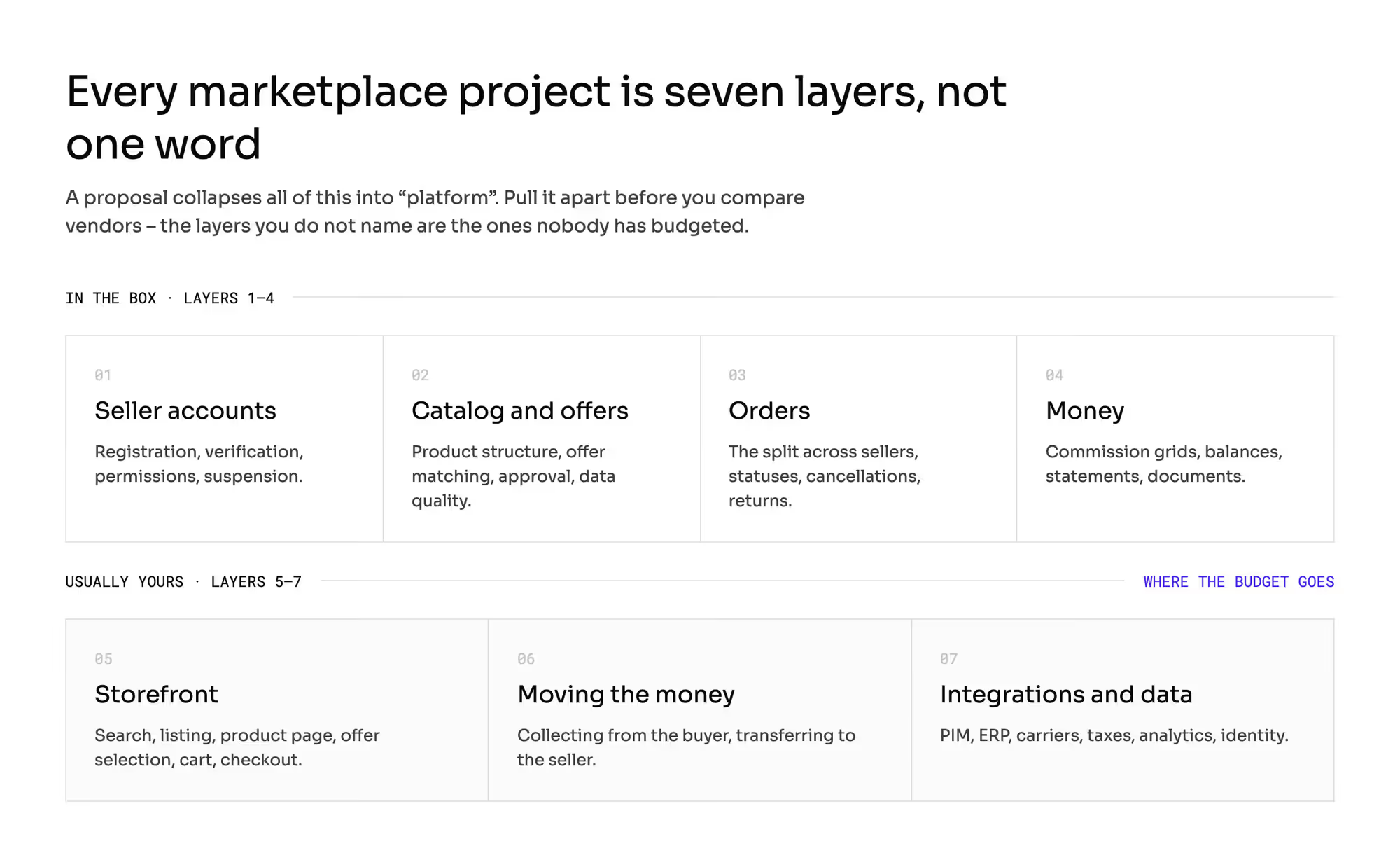
A marketplace implementation consists of layers that a proposal collapses into one word: "platform". Pulled apart, they look like this:
- Seller accounts: registration, verification, permissions, statuses, suspension.
- Catalog and offers: product structure, matching an offer to a product, approval, data quality.
- Orders: the split across sellers, statuses, acceptance, cancellations, returns.
- Money: commission calculation, balances, statements, settlement documents.
- Storefront: search, listing, product page, offer selection, cart, checkout.
- Moving the money: collecting payment from the buyer and making the transfer to the seller.
- Integrations and data: PIM, ERP, carriers, taxes, analytics, identity.
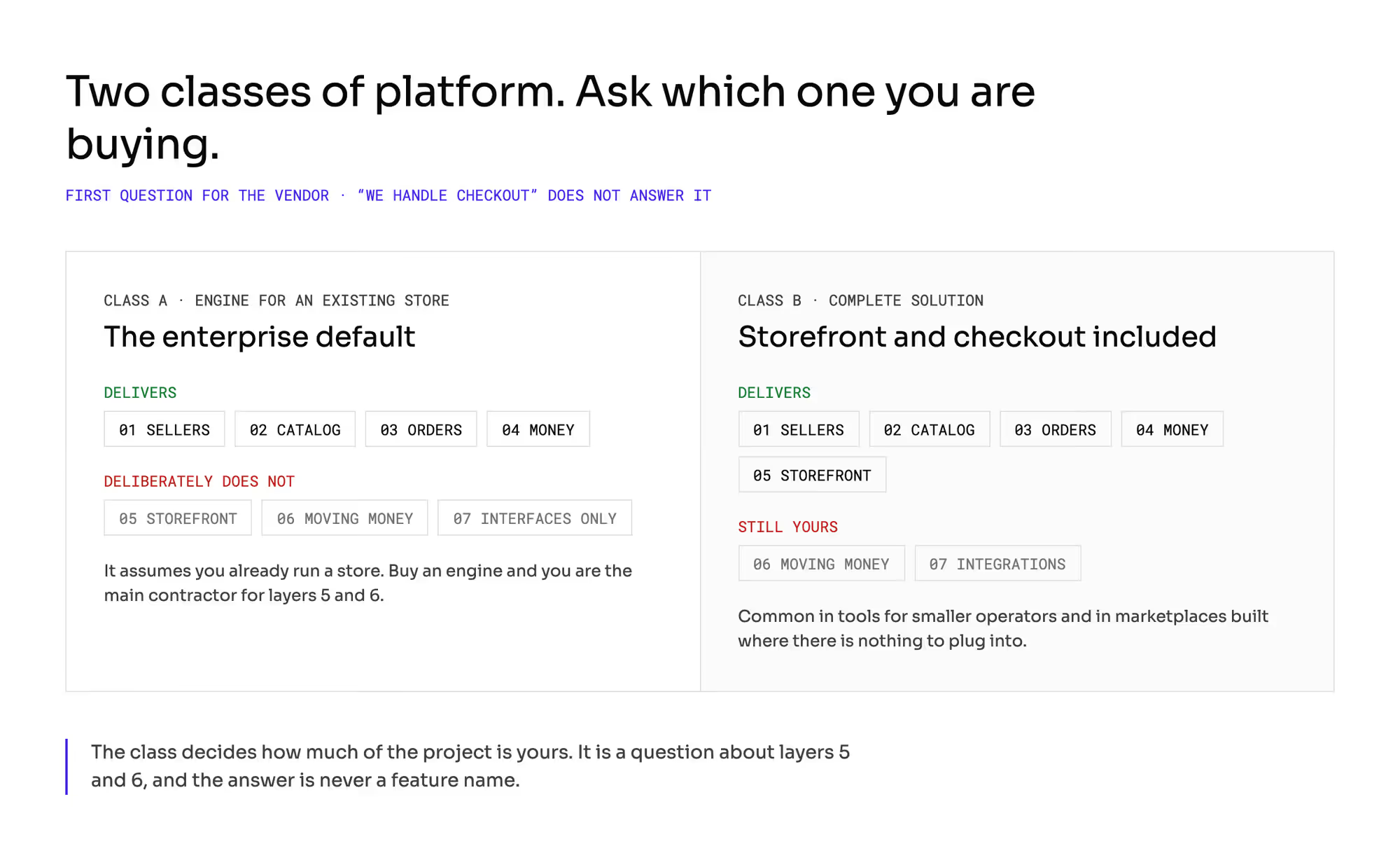
Here comes the distinction that the whole rest of the conversation depends on, and that proposals often leave invisible. Marketplace platforms come in two classes:
- An engine that plugs into an existing store. It delivers layers 1 through 4 and deliberately does not deliver the storefront or the movement of money. It assumes you already have a store or that you will build one. That is how most solutions aimed at large retailers work, because their clients have run e-commerce for years and have no intention of replacing it.
- A complete solution. It delivers the storefront and the checkout as well. You see this mostly in tools for smaller operators and in marketplaces built from scratch, where there is nothing to plug into.
The first class is the default in the enterprise segment. This article is about that class, because that is where the budget surprises happen.
If you buy an engine, you are the main contractor for layers 5 and 6, and in layer 7 you get interfaces that somebody else has to connect to.
So the first question for the vendor is: which class are you? The answer "we handle checkout" does not settle that question.
More on that in a moment.
What does a marketplace platform include out of the box?

This is not a small thing: layers 1 through 4 are a lot of work, and you really do not want to write them yourself.
You get the seller lifecycle: the account, company data, users with roles, statuses including suspension, and measurement of service quality. You get a catalog model. Most often that means a split between a shared product page and the seller's offer, with matching rules based on an identifier and an approval path for new products.
You get an order state machine, together with the order split across as many sellers as the cart contains, plus handling of returns and cases. And you get commission calculation: grids per category and per seller, thresholds, caps, statements, and documents for the seller. On top of that, you usually get a seller panel, file import and export, an API for integrators, a notification mechanism, and email templates.
Priced as a build from scratch, all of this comes to years of teamwork. The license is a cheap way to avoid doing it.
What is almost never included in a marketplace platform?
This is where the surprises start, because the missing layers are exactly the ones your end customer and your accounting team see.
1. The storefront
This is the biggest surprise and the most common one. A marketplace engine does not give you a store.
That is usually deliberate rather than an oversight. It does not give you search across offers, a listing, a product page, a mechanism for picking the winning offer, or a cart.
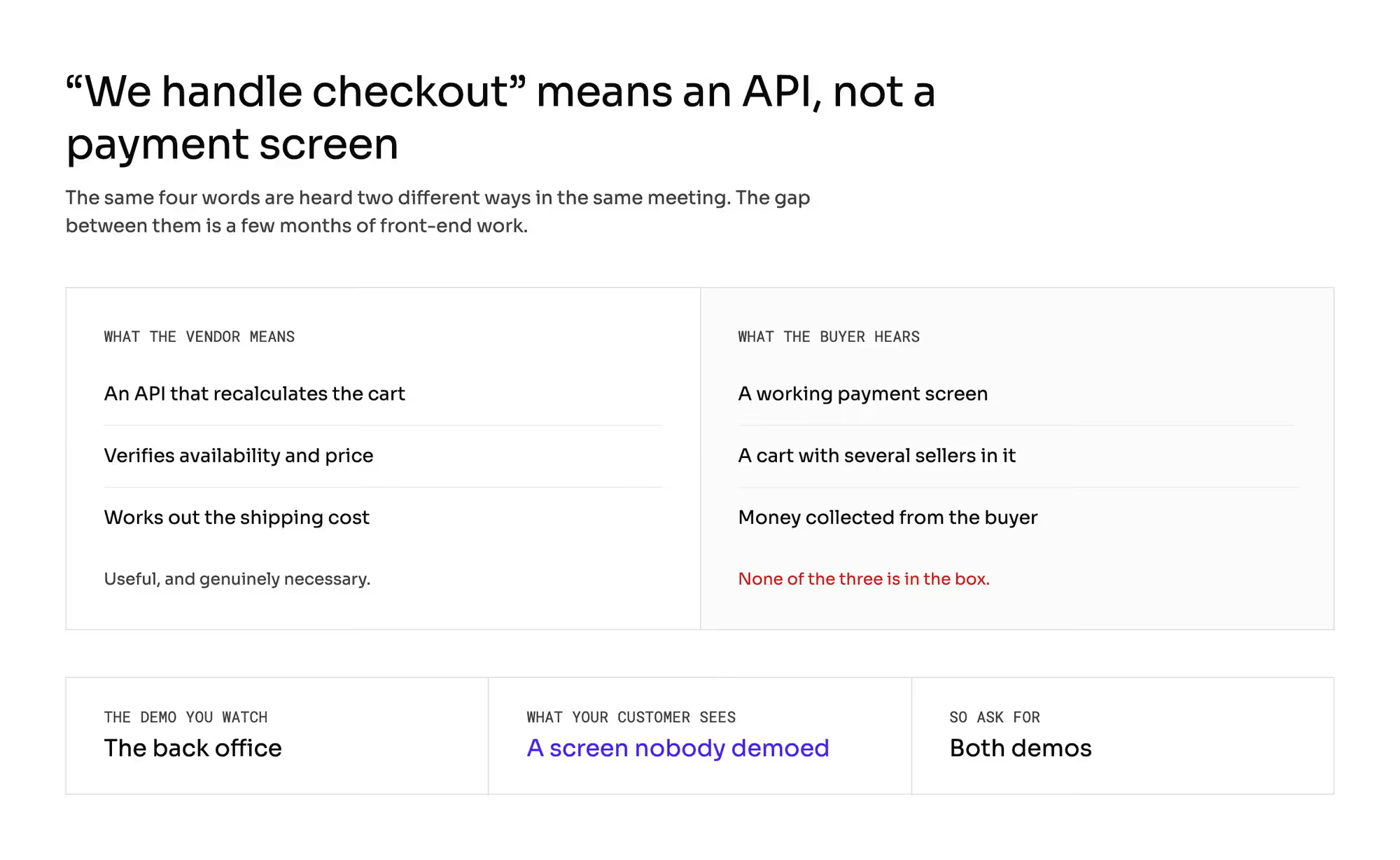
The sentence "we handle checkout" is worth disarming on its own, because it comes up often and it means something other than what the person buying hears. It usually means: we expose an API that recalculates the cart, verifies availability and price, and works out the shipping cost.
That is useful and genuinely necessary. It is still not a working payment screen.
The difference between the two is a few months of work for a front-end team, and that is precisely the line item projects underestimate most often.
The demo you watch while choosing a vendor shows the back office. Your end customer will never see it.
2. Moving the money
The platform will tell you how much to pay out and to whom. It will not make the transfer.
Collecting payment from the buyer sits with your payment provider, and the payout to the seller is a separate process that you either buy as an add-on module or build yourself on top of the settlement file the platform produces.
3. Shipment tracking
The platform will accept a waybill number, but it usually does not check what happens to the parcel. Without an integration with carriers or a broker, the status "delivered" is produced by the passage of time rather than by fact: the system waits a set period after dispatch and flips the order to "received" on its own.
That has three consequences, and every one of them costs you. The buyer sees less on your site than on the carrier's.
The seller gets the money later than they could, because settlement only starts after that status. And you do not know whether the parcel actually arrived, so a complaint that says "I never got it" enters your process with no hard evidence on either side.
4. Product data management
The platform validates whether the seller filled in the required attributes. It will not replace a PIM and it will not keep the quality of your descriptions up.
5. Analytics
You get basic statements and exports. At scale, practically every operator builds their own reporting, because they need cuts of the data the panel does not have, and they have to combine them with data from their own first-party sales.
6. Compliance with local law
This is the category that surprises people most painfully, because it looks obvious. Price history, attributes required by new product rules, the format of accounting documents, assigning a correction to the right period: a global platform adapts to all of that slowly, because your country is one of many.
I come back to this in the last section, because it is a question you have to ask at the start.
What exists in the marketplace platform but is not in the price?
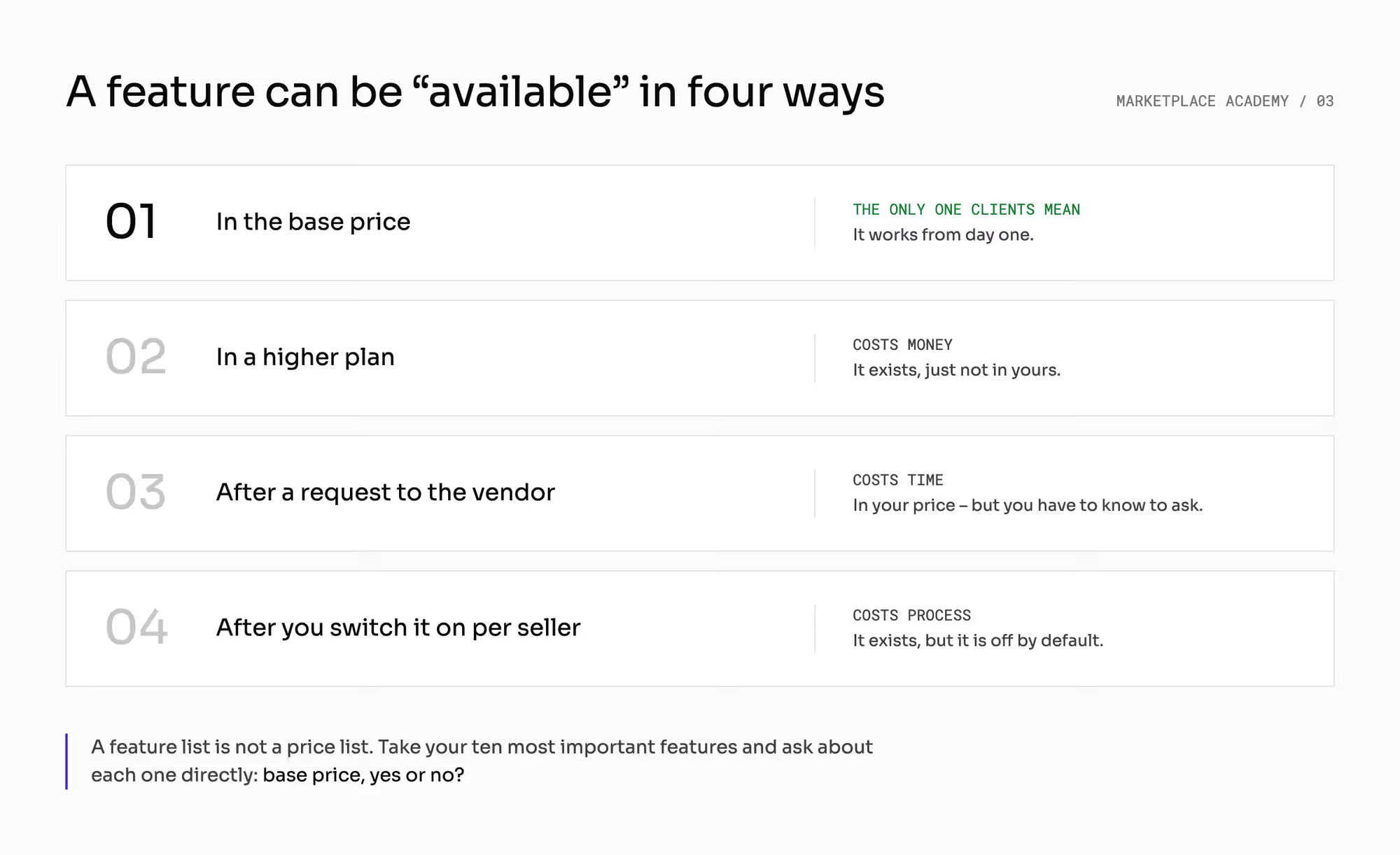
Between "it is there" and "it is not there" sits a middle category worth learning to recognize. A feature can be available in four different ways, and only the first one is what a client means by "the platform has it":
- In the base price: it works from day one.
- In a higher plan: it exists, just not in yours.
- After a request to the vendor: it exists, and it is in your price, but somebody has to switch it on, and you have to know to ask.
- After you activate it for a specific seller: it exists, but it is off by default.
A feature list is not a price list. The same line can mean any of those four things, and the difference between them is sometimes a quarter in your schedule.
When you compare proposals, take your ten most important features and ask about each one directly: base price, yes or no?
What do you have to integrate yourself?
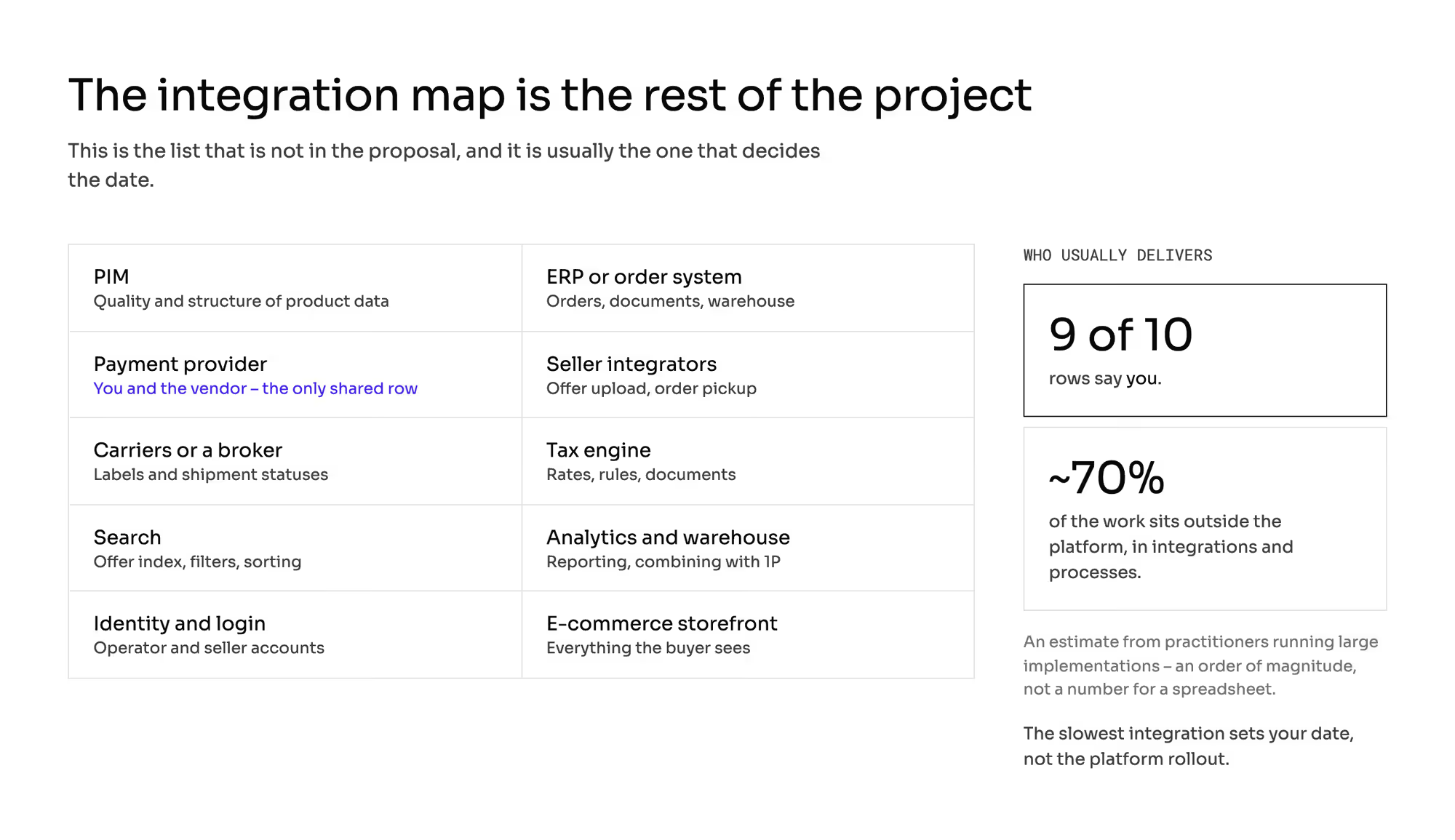
This is the list that is not in the proposal and that usually decides the date:
System | What for | Who usually delivers it |
|---|---|---|
PIM | quality and structure of product data | you |
ERP or order system | orders, documents, warehouse | you |
Payment provider | collecting the money and splitting it | you and the vendor |
Seller integrators | how a seller uploads offers and picks up orders | you |
Carriers or a broker | labels and shipment statuses | you |
Tax engine | rates, rules, documents | you |
Search | offer index, filters, sorting | you |
Analytics and data warehouse | reporting and combining with 1P | you |
Identity and login | operator and seller accounts | you |
E-commerce storefront | everything the buyer sees | you |
Practitioners who run large implementations estimate that about 70% of the work sits outside the platform itself: in the integrations and in the processes. That is an estimate from experience rather than a measured quantity, so treat it as an order of magnitude.
But the direction is consistent across every account we know of: rolling out the technology is usually the easiest part of the project.
What that means in money. Say the license costs €200,000 a year and the implementation costs €500,000.
The money splits roughly the way the work does: the line you negotiate hardest is under a third of what you spend in the first year. Negotiate a 20% discount on that line, and you win €40,000, which is under 6% of the first-year budget.
The same attention spent on settling who delivers the storefront and who executes the payouts can move your schedule by a quarter. It pays to know where the money sits before you start negotiating.
Which parts come from the platform and which from your team?
Layer | Usually in the platform | What happens if you do not plan for it |
|---|---|---|
Seller accounts and lifecycle | yes |
|
Catalog and offer matching | yes |
|
Orders and the order split | yes |
|
Commissions and statements | yes |
|
Offer search and listing | no (Included in Mercur standalone option) | the catalog is there, but the buyer will not find it |
Picking the winning offer | rarely (Included in Mercur) | with two offers on one product, nobody knows which one to show |
Cart and checkout | no (Included in Mercur standalone option) | the most expensive surprise in the whole project |
Collecting payment | no (sometimes ready integrations) | no sales |
Payout to the seller | partly | you have a settlement file and nobody to make the transfer |
Shipment statuses | rarely | "delivered" from the passage of time, delayed payouts |
Quality of product data | partly | catalog debt from the first month |
Reporting | basic | the team works in Excel |
Compliance with local law | partly | a change in the rules is a project rather than an update |
What does the scope of the platform decide?
The budget has two parts, and only one of them is in the proposal. Plan the second part before you compare vendors, because otherwise you are comparing the parts that do not decide anything.
Choosing a vendor stops being a choice of features and becomes a choice of what stays on your side. Two platforms with the same feature list can leave you with a very different remainder.
The slowest integration sets your date. Usually that is the PIM or the payment provider.
The team that will run all this afterwards is part of the buying decision. If 70% of the work sits outside the platform, then most of the maintenance sits outside it too.
Which mistakes do buyers make when comparing marketplace platforms?
1. Comparing vendors by feature list
A feature list does not tell you what is in the price, what needs a request to the vendor, and what is sample code for you to extend. Three different things in one row of a table.
2. Taking a back-office demo for a product demo
What impresses the buying team and what your customer will see are two different screens. Ask for both.
3. Putting the storefront in the budget as an adjustment to the store
Search across offers, picking the winning offer, and a cart with several sellers are new functionality rather than a change of template.
4. Postponing the integration that holds your product data
This is most often the longest element of the project, and it is practically never shorter than it looks at the start.
5. Assuming the seller panel does not matter because sellers use an integrator
Integrators do not cover everything. Returns, cases, and some of the settings still send someone into the panel.
A seller who cannot do something calls your team.
What should you still ask the vendor?
It does not tell you which platform to choose, and it does not tell you whether buying or building is better in your case. That depends on how many of the seven layers you already have and how unusual your processes are.
It carries no prices either, because in this industry prices are negotiated case by case, and comparing them without costing the whole project leads to bad conclusions.
The split into layers, on the other hand, is universal, and you can hold it up against any proposal. It works just as well when you build everything yourself.
Then the answer "you" appears in all seven rows, and at least everyone knows what the conversation is about.
Summary: What should you price before you sign?
Pull the project into layers before you compare proposals, and ask of every line whether it is in the base price, in a higher plan, available on request, or something you switch on per seller.
Then price the layers the platform does not deliver, because that is where the budget goes. See what Mercur covers, or talk to a marketplace expert about the rest of the map.
Frequently asked questions on marketplace platform scope
What is included in a marketplace platform?
A marketplace platform gives you the seller lifecycle, the catalog and offer model, order handling across sellers, and commission and settlement. Priced as a build from scratch that takes years of teamwork, which is why the licence is a cheap way to avoid writing it.
What is not included in a marketplace platform?
Usually the storefront, the movement of money, shipment tracking, product data management, analytics, and compliance with local law. A marketplace engine is deliberately not a store: it exposes an API and expects your front end to call it
Ready to build?
If you want to work out what really stays on your side in your project, let's talk.