
Best Enterprise Marketplace Platforms in 2026: 7 Software Compared by Cost, Ownership & Features
Which enterprise marketplace platform do most large companies use?
Should this answer decide which one you choose? No!
A platform that works for a global retailer can be the wrong one for your company. First decide what your marketplace has to do – then choose the platform that meets your requirements.
An enterprise marketplace platform is the software a large company uses to let third-party sellers sell next to its own products.
A traditional eCommerce store has one seller. An enterprise marketplace has multiple vendors and one large base of buyers. In practice, your team gets work that a single-vendor store doesn't have:
- You onboard hundreds of vendors and check each one before they sell.
- You keep large catalogs from many sellers consistent.
- You split one order between several sellers and pay each of them.
- You connect all of it to your ERP and your other existing systems.
Does every platform do this work for you? No.
On some platforms, your team still does much of it manually. Platforms also differ in what you pay as the marketplace grows and in who owns the code and the customer data.
If right now you're choosing operational infrastructure that your business will depend on for years – FOCUS! It's a strategic decision, and it's hard to reverse.
You're in the right place because in this guide I will compare 7 enterprise marketplace platforms by cost, ownership, and features + show you how to choose one.
The 7 platforms at a glance:
Platform | What do you get? | Cost model |
|---|---|---|
Mercur | Marketplace platform, or a marketplace layer for your store | Enterprise licence quoted, no GMV fee |
Mirakl | Marketplace layer for your store | Licence + share of GMV, + separate commerce platform |
Marketplacer | Marketplace layer for your store | Contract pricing + separate commerce platform |
Spryker | Marketplace platform | Contract pricing |
Virto Commerce | Marketplace platform | Contract pricing |
VTEX | Marketplace platform | Contract pricing |
OroCommerce | Marketplace platform | Fixed licence fee, no GMV fee |
This article breaks down:
- What is an enterprise marketplace platform?
- How do large organizations grow their business with an enterprise marketplace?
- Which 10 capabilities must an enterprise marketplace platform provide?
- Which are the best enterprise marketplace platforms in 2026?
- How to choose an enterprise marketplace platform for your business?
Key insights
- An enterprise marketplace lets third-party vendors sell products on a platform that a large company owns. The operator earns revenue from the fees it charges those vendors.
- Large organizations add a marketplace to grow their range and their revenue without buying more stock.
- An enterprise marketplace platform must provide 10 capabilities. They include vendor onboarding, pricing logic, split orders and payments, and integrations with your ERP.
- Choose the architecture model before you compare products. Then ask each provider what you'll pay at 10x your volume, and test your shortlist in a demo or a proof of concept.
What is an enterprise marketplace platform?
An enterprise marketplace platform is a system that lets a large company operate a marketplace with third-party sellers on its own store.
Marketplace software includes a storefront with multi-vendor checkout and a seller portal. The operator also gets an admin panel in which the team approves vendors and sets commissions.
In comparison, in a single-vendor store, one company sells its own stock. In an enterprise marketplace, third-party sellers list their own offers next to yours. They hold the stock and deliver the orders – you take a commission on each sale.
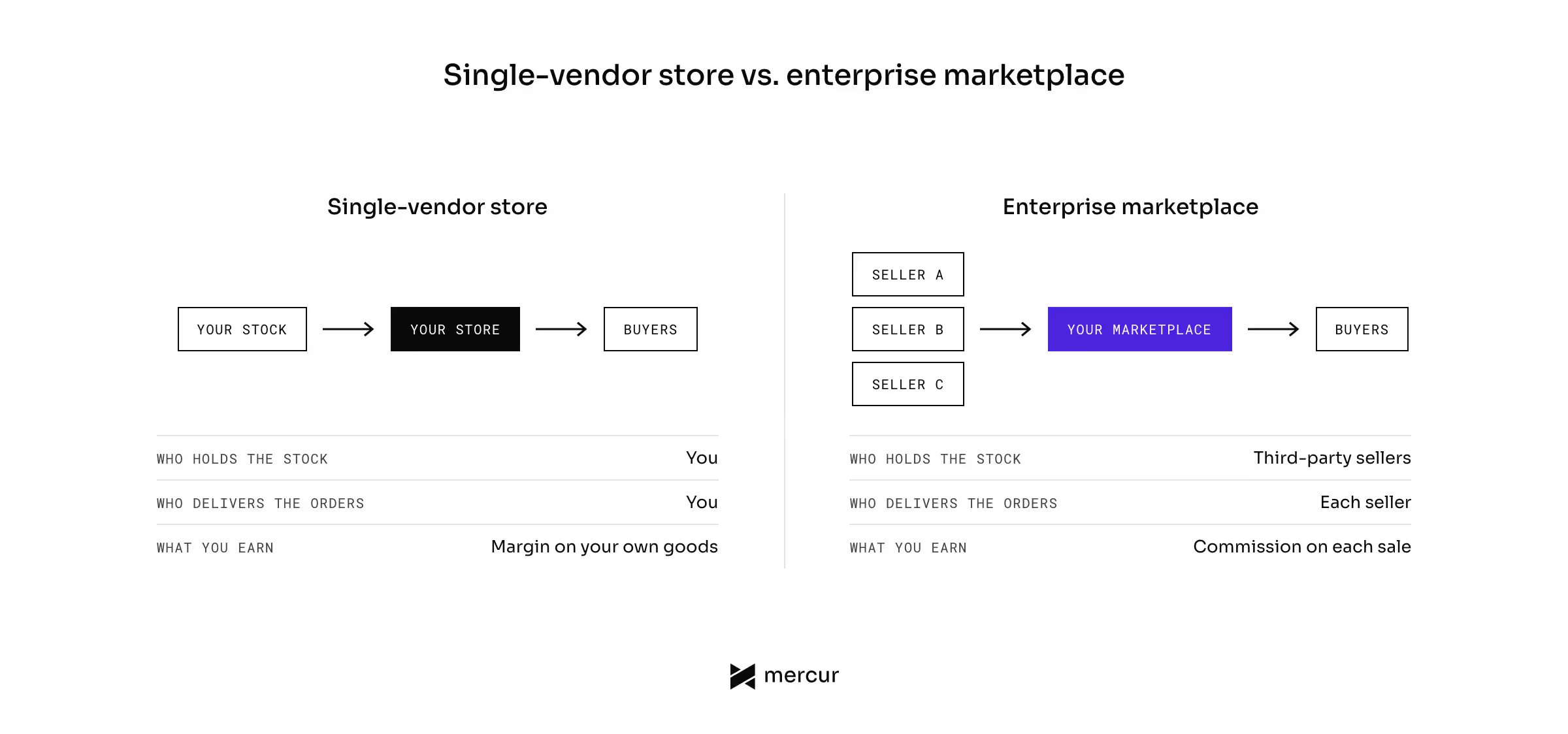
Many retailers and brands choose hybrid models. They keep selling their own products and add vendors in the categories they don't want to stock. Our guide to marketplace business models describes each model in detail.
An enterprise marketplace can be external or internal:
- An external marketplace is open to your customers. Retailers and global brands use it to offer a wider range. Distributors use it to sell directly to business buyers.
- An internal marketplace is open to your own employees and business units. They purchase from approved suppliers in one place and pay the prices the company negotiated.
Both marketplace models need the same software functions.
How do large organizations grow their business with an enterprise marketplace?
Large organizations add a marketplace to grow their range and their revenue without buying more stock.
Digital Commerce 360 estimates that B2B marketplaces in distribution and manufacturing reached $351 billion in sales in 2024. That is 35% more than in 2023. The same article counts about 500 vertical B2B marketplaces in the US. Five years earlier, there were only 75.
Eurostat reports that 45% of EU enterprises with web sales sold through an online marketplace in 2024. Those sales produced 1.30% of total enterprise turnover. Sales through the companies' own websites and apps produced 7.08%.
Almost half of these companies already sell on someone else's marketplace. Their own channels still bring in more turnover. An enterprise marketplace is your own channel, and other companies sell their products on it.
The clients I work with usually want to grow in one of the 5 ways below.
1. Catalog expansion without warehousing costs
Third-party sellers hold the stock and deliver the orders, so you add products without buying them. You don't pay for warehousing, and you don't carry the risk of unsold inventory.
A retailer can test a new category with a few vendors before it invests in it. You keep the category if it sells. If it doesn't, you close it without a write-off.
2. New revenue from vendor fees
The operator earns a commission on every order a vendor sells. You can also charge a subscription and fees for advertising on the marketplace.
This revenue doesn't depend on your own margin on goods. Our article on marketplace commission structure explains how to set each fee.
3. One place for your customers to buy
Customers find more products and more offers on one site.
When they find everything on your site, they don't need to buy from a competitor = you get more orders from buyers you've already paid to acquire.
4. Faster procurement in B2B
In a multi-vendor marketplace, a business buyer logs in once and orders from many suppliers. They compare offers in one place instead of asking each supplier for a quote.
The suppliers reach buyers they couldn't reach alone. Buyers and suppliers from the whole market segment trade on your site.
5. Data on demand and pricing
You see what buyers search for and which offers they choose. This data shows you demand in categories you don't sell in yourself.
You can use it to decide which vendors to invite next and which products to stock yourself.
Top 10 capabilities an enterprise marketplace platform must provide
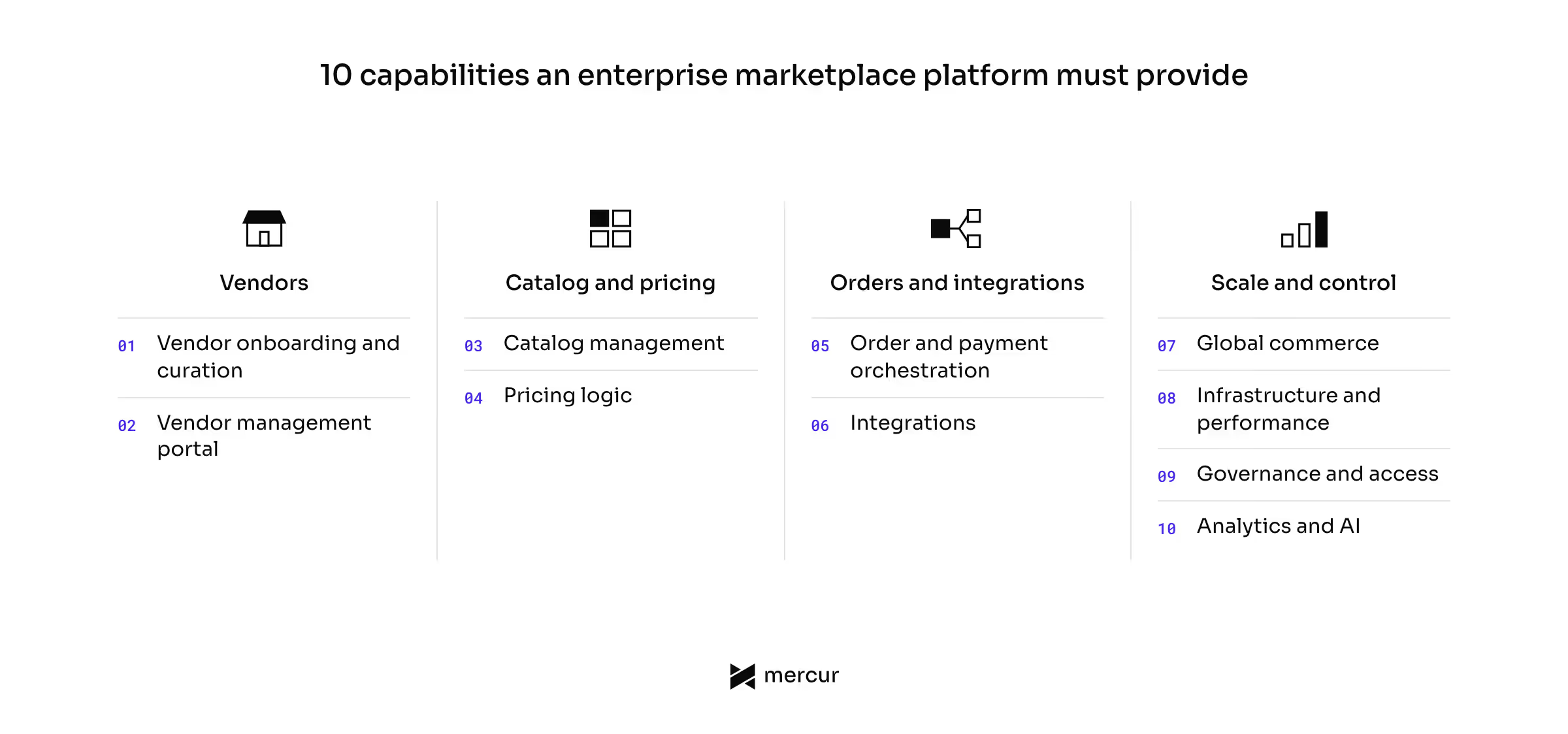
An enterprise marketplace has more daily operations than a store with one seller, and the platform has to handle that operational complexity.
The table shows the 10 marketplace capabilities I check first when I review a platform with a client.
Capability | What do you do in it? | Why do you need it? |
|---|---|---|
Vendor onboarding and curation | Verify each vendor and approve their products | To keep quality and compliance standards on your marketplace |
Vendor management portal | Give each vendor a panel for offers, stock, and orders | To let vendors do their own work without your team |
Catalog management | Keep products from many sellers in one structure | To show buyers one clear product page per item |
Pricing logic | Set contract pricing, pricing tiers, and currencies | To sell to business buyers on their agreed terms |
Order and payment orchestration | Split orders, shipments, and payments between sellers | To deliver one basket from several sellers and pay each one |
Integrations | Connect the ERP, CRM, PIM, and logistics systems | To keep one set of data across all your systems |
Global commerce | Add markets, currencies, languages, and taxes | To sell in a new country without a new platform |
Infrastructure and performance | Handle high-volume traffic and fast transaction growth | To stay online during your busiest days |
Governance and access | Set roles, permissions, and audit logs | To manage risk and prove who changed what |
Analytics and AI | Track KPIs and automate repeated tasks | To measure the marketplace and lower manual work |
1. Vendor onboarding and governed curation
Every third-party supplier has to pass onboarding before they can sell on your marketplace. The vendor registers and sends company documents, and your team approves or rejects them.
You should be able to set which documents each vendor type must provide. You should also be able to review every new product before buyers see it.
This is called governed curation. Every third-party offer meets your quality and compliance standards before it goes live, so a bad listing can't reach your buyers.
2. Vendor management portal
Each vendor needs their own portal, where they add offers, manage their inventory, track orders, and check payouts.
Check that a vendor can add team members with different roles. Large suppliers have separate people for the catalog and for finance.
Good vendor management tools mean fewer questions for your team. If the portal doesn't show a payout date, the vendor will email you to ask for it.
3. Catalog management for large catalogs
Multiple vendors often sell the same product, and the buyer should see one product page with several offers. The platform needs a buy box and master product that vendors attach their offers to.
Ask how the platform handles large catalogs. Check bulk imports and search speed with millions of offers.
4. Pricing logic for B2B and B2C
Business buyers expect contract pricing, and consumers expect one public price. A platform that stores one price per product can't serve both.
You should be able to set:
- Contract pricing for a specific company account.
- Pricing tiers that depend on the quantity ordered.
- Price lists per market and per currency.
- Promotions funded by the vendor or by the operator.
If the platform doesn't have this pricing logic, your developers have to build each contract price as custom code.
5. Order and payment orchestration
One basket can hold products from several sellers. The platform has to split it into separate orders, and each seller delivers their part.
Check these functions in a demo:
- Split shipments with separate tracking for each seller.
- Split payments, in which the buyer pays once and each seller receives their share.
- Automated invoicing for the buyer, the seller, and your commission.
- Returns and refunds that go back to the right seller.
I spend the most time on this part of every scope. The order flow is different for every payment provider and every set of tax rules.
6. Integrations with your existing systems
An enterprise marketplace has to exchange data with the systems you already operate. Most companies connect the ERP, the CRM, a PIM, and a payment provider.
Ask which native integrations the platform includes and which ones you have to build. For each missing one, check that the API gives your developers access to the data they need.
A deep integration with an ERP takes more time than any single feature. Plan it in the first phase of the project.
7. Global commerce and multi-currency support
To sell in a new country, you need a translated site and also:
- Multi-currency support.
- Local tax settings.
- Local payment methods.
- Carriers for local logistics.
Check that vendors can set prices per market and that you can pay a vendor in their own currency.
8. Scalable infrastructure and high uptime
The platform has to handle high-volume traffic and a fast rise in orders. A scalable cloud architecture adds capacity on the days when most of your buyers visit at once.
Ask each provider for their uptime commitment and for the size of their largest customer. If you host the platform yourself, your team sets these targets and is responsible for them.
9. Governance, access, and compliance
Write down who decides what on your marketplace. This governance framework sets the rules for vendors and says who can see customer data. It also names the person who approves commission changes and settles disputes.
The platform should support it with role-based access and an audit log.
10. Analytics, KPIs, and AI automation
You need KPIs to measure whether the marketplace works. The usual ones are:
- GMV.
- Commission revenue.
- Number of active sellers.
- Delivery time.
- Refund rate.
The platform's analytics should show these numbers per vendor and per category. You can then compare the performance of your vendors and see which ones deliver late.
AI can do some of the manual work. On a marketplace, it can:
- Map vendor products to your categories.
- Recommend suppliers for a category.
- Forecast demand.
Your team then checks only the cases the AI can't handle. Automated workflows like these improve operational efficiency on a large marketplace.
Top 7 enterprise marketplace platforms compared by cost, ownership, and features
These are the 7 platforms that come up most often in my conversations with enterprise clients. I read every fact below on the providers' own pages in November 2026.
Platform | What do you get? | Who owns the platform? | Cost model | Best for |
|---|---|---|---|---|
Mercur | Marketplace platform, or a marketplace layer for your store | You, with no vendor lock-in | Enterprise licence quoted, no GMV fee | Companies that want to own the platform and keep costs flat |
Mirakl | Marketplace layer for your store | The provider, and you rent it | Licence + share of GMV + separate commerce platform | Enterprise programmes with a large budget |
Marketplacer | Marketplace layer for your store | The provider, and you rent it | Contract pricing + separate commerce platform | Retailers adding sellers to an existing store |
Spryker | Marketplace platform | The provider, and you own what you build on it | Contract pricing | Engineering teams with complex B2B models |
Virto Commerce | Marketplace platform | The provider, and you own what you build on it | Contract pricing | .NET organizations with B2B marketplaces |
VTEX | Marketplace platform | The provider, and you rent it | Contract pricing | Retailers replacing eCommerce and marketplace together |
OroCommerce | Marketplace platform | The provider, and you own what you build on it | Fixed licence fee, no GMV fee | Manufacturers and distributors |
1. Mercur
Mercur Enterprise is the licensed edition of Mercur, an open-source marketplace platform. It includes a storefront for buyers, a vendor panel, an admin panel, and integrations into your stack.
You can build the whole marketplace platform on it or add the marketplace layer to your existing eCommerce.
Cost
Mercur Enterprise is a paid licence, and Mercur quotes the price for each project. The licence covers the Enterprise features, maintenance, support, and architectural guidance. It contains no development hours. Building, configuring, and launching your marketplace is a separate engagement.
The licence has zero GMV-based fees. Your platform costs stay the same when your sales grow. Implementation is a separate project with its own cost.
Ownership
You can run Mercur on your own infrastructure, or add Mercur Cloud for managed hosting. The Enterprise license includes the same platform support in either case.
You get full source access to the platform. A designated Platform Specialist works with your team for the full licence term. The licence also includes an SLA for the code that Mercur maintains.
Features
The features page lists every Enterprise module.
Capability | Included? |
|---|---|
Vendor onboarding and curation | Included |
Vendor management portal | Included |
Catalog management | Included |
Pricing logic | Included |
Order and payment orchestration | Included |
Integrations | Included |
Global commerce | Included |
Infrastructure and performance | Included |
Governance and access | Included |
Analytics and AI | Included |
2. Mirakl
Mirakl is the largest enterprise marketplace overlay available on the market. This means that you add it to the commerce platform you already have = 2 platforms to pay for. It also has the largest partner ecosystem in this category.
Cost
Mirakl uses contract pricing and doesn't publish a figure. You pay a licence and a share of marketplace GMV. The commerce platform underneath is a separate cost.
Calculate what the GMV share will cost you over three years. Our Mercur vs Mirakl comparison shows the difference in detail.
Ownership
Mirakl owns the platform and hosts it in its cloud. You rent it for the length of your contract.
You change the platform through its settings and its API. If you need a change that they don't cover, you wait for Mirakl to build it. Our list of Mirakl alternatives covers platforms that give you more ownership.
Features
Capability | Included? |
|---|---|
Vendor onboarding and curation | Included |
Vendor management portal | Included |
Catalog management | Included |
Pricing logic | Included |
Order and payment orchestration | Included |
Integrations | Included |
Global commerce | Included |
Infrastructure and performance | No information |
Governance and access | Included |
Analytics and AI | Included |
3. Marketplacer
Marketplacer is also a SaaS overlay that adds third-party sellers to the eCommerce site you already have. Its page says the platform is for mid-sized and enterprise companies.
Cost
Marketplacer doesn't publish its pricing. Its page names three options: a subscription, pay-as-you-go, and a custom pricing model.
You still pay for the commerce platform underneath. Ask for the total for both systems. Our guide to Marketplacer alternatives covers the costs in full.
Ownership
Marketplacer owns the platform and hosts it. You rent it and connect it to your store through its connectors or its API. If you leave Marketplacer, you rebuild the marketplace on another platform.
Features
Marketplacer's public pages describe only some of the 10 capabilities. Ask for a live example of every capability you need.
Capability | Included? |
|---|---|
Vendor onboarding and curation | Included |
Vendor management portal | No information |
Catalog management | Included |
Pricing logic | No information |
Order and payment orchestration | No information |
Integrations | Included |
Global commerce | No information |
Infrastructure and performance | No information |
Governance and access | Included |
Analytics and AI | Included |
4. Spryker
Spryker is a commercial platform for complex B2B and enterprise marketplaces. Its marketplace is called Spryker Enterprise Marketplace. It includes a merchant portal for sellers and a back office for the operator.
Cost
Spryker's pricing page shows no figure. The only public price is on AWS Marketplace – it's $900,000 for a 12-month contract. The same listing says that custom pricing is available from Spryker.
Ownership
Spryker owns the platform and hosts it. You own what your developers build on it under Spryker's licence.
It allows deep customization, but you need a large engineering team for it. Ask which of your requirements are settings and which are custom development.
Features
Capability | Included? |
|---|---|
Vendor onboarding and curation | Included |
Vendor management portal | Included |
Catalog management | Included |
Pricing logic | No information |
Order and payment orchestration | Included |
Integrations | Included |
Global commerce | Included |
Infrastructure and performance | Included |
Governance and access | Included |
Analytics and AI | Included |
5. Virto Commerce
Virto Commerce is a .NET eCommerce platform for B2B. Its marketplace module lets third-party vendors sell in your store. The module works only inside Virto Commerce, and you don't pay for a second platform.
Cost
Virto Commerce doesn't publish a price for the platform. Ask for a quote based on your number of vendors and orders.
Ownership
Virto Commerce owns the platform, and you build on it under its licence. You host it yourself or in Virto's cloud. Ask what you keep if you stop paying for the licence.
Features
Capability | Included? |
|---|---|
Vendor onboarding and curation | Included |
Vendor management portal | Included |
Catalog management | Included |
Pricing logic | Included |
Order and payment orchestration | Included |
Integrations | Included |
Global commerce | Included |
Infrastructure and performance | Included |
Governance and access | Included |
Analytics and AI | Included |
6. VTEX
VTEX is a full-stack SaaS platform that includes eCommerce and a marketplace in one product.
Cost
VTEX doesn't publish its pricing. Ask whether you pay per order or a fixed fee.
Ownership
VTEX owns the platform and stores your data in its cloud. You change the platform through settings and APIs. It is responsible for high uptime, and your team doesn't manage it.
If you leave VTEX, you rebuild both the store and the marketplace.
Features
Capability | Included? |
|---|---|
Vendor onboarding and curation | Included |
Vendor management portal | Included |
Catalog management | Included |
Pricing logic | No information |
Order and payment orchestration | Included |
Integrations | Included |
Global commerce | Included |
Infrastructure and performance | Included |
Governance and access | Included |
Analytics and AI | Included |
7. OroCommerce
OroCommerce is a B2B eCommerce platform. Its marketplace module, OroCommerce Marketplace, lets third-party vendors sell in the same store. The module works only inside OroCommerce, and you don't pay for a second platform.
It suits manufacturers and distributors with long sales processes + a CRM comes with it.
Cost
Oro states that its licence fees are fixed and include no transaction or GMV charges. It doesn't publish the amount.
Ownership
Oro describes the platform as open source. You can deploy it on-premise, in a private or public cloud, or in OroCloud. Oro matches you with a certified partner for the implementation.
Features
Capability | Included? |
|---|---|
Vendor onboarding and curation | Included |
Vendor management portal | Included |
Catalog management | Included |
Pricing logic | Included |
Order and payment orchestration | Included |
Integrations | Included |
Global commerce | Included |
Infrastructure and performance | Included |
Governance and access | Included |
Analytics and AI | Included |
How to choose an enterprise marketplace platform for your business?
Prepare your own requirements before you book the first demo. In a demo, the provider shows what the product does well. With your own list, you can ask about everything else.
1. Choose the platform's architecture model
Marketplace software comes in 5 architecture models. Choose one before you compare software. In each model, you own a different part of the platform and pay in a different way.
- SaaS overlay. The provider hosts a marketplace layer that you add to your existing eCommerce. It needs a second commerce platform underneath. You pay for two systems.
- Full-stack SaaS. The provider hosts one product that handles both the marketplace and the commerce logic. Most SaaS solutions charge a subscription and transaction fees. You can't change the code.
- Licensed self-hosted platform. You buy a licence and host the software on your own infrastructure. You decide where the data is stored and how the platform is configured.
- E-commerce platform with a marketplace extension. You add a marketplace to your store through an extension or third-party apps. It's the cheapest way to start.
- Open-source platform. The code is public, and the licence is free. You own everything you build on it. Your developers or a partner are responsible for hosting, upgrades, and security patches.
Decide who should own the code, who should host the platform, and decide whether you accept a fee on your sales. With these answers, you can narrow the choice to one or two models.
The comparison of 13 marketplace platforms covers all five models with more examples.
2. Write down your business logic
Your business logic is the set of rules that make your company different from a standard store. List those rules. A provider can't tell you if the platform fits until they see them.
Examples I see most often:
- Contract pricing and credit limits per company account.
- Approval workflows for orders above a set amount.
- Vendor tiers with different commissions.
- Services sold next to products, such as installation or repair.
- Product rules for regulated categories.
For each rule, ask if it's available in the product or requires custom development.
3. List your integration requirements
Write down every system the marketplace has to exchange data with, for example:
- ERP: products, stock, orders, and invoices.
- CRM: company accounts and contacts.
- PIM: product attributes and images.
- Logistics: shipments, tracking, and returns.
- Payment provider: payments, payouts, and refunds.
Ask each provider which of these are native integrations. Then ask how your developers build the missing ones.
4. Calculate the long-term total cost of ownership
The first-year price shows only part of what you'll pay. Ask each provider which of these costs apply to you:
- Licence or subscription.
- Share of GMV or transaction fees on each order.
- Usage fees that depend on vendors, orders, or API calls.
- Commerce platform underneath, when the product is an overlay.
- Implementation and integrations.
- Hosting and infrastructure.
- Ongoing maintenance, upgrades, and support.
- Price increase at renewal.
Ask for the total at 10x your current volume. A fee on sales gets bigger as your business grows.
Clients often show me two offers with a similar first-year price. I ask them to calculate both for the third year with their planned sales. In the third year, one offer is usually much more expensive.
5. Test the platform in a demo or a proof of concept
Give each provider three of your must-have requirements and ask to see them working. You'll learn more from a short proof of concept with your own data than from a presentation.
Test both sides. Register as a vendor and add a product. Then log in as the operator, approve that vendor, and change a commission.
Summary: Which enterprise marketplace platform fits your company?
Choose a platform that gives you the ownership you want + check that you can still afford it at 10x your volume.
- Retailers that want one hosted product for eCommerce and marketplace should look at VTEX.
- Companies that keep their eCommerce platform and have the budget for two systems should look at Mirakl and Marketplacer.
- B2B companies with large engineering teams should compare Spryker, Virto Commerce, and OroCommerce.
- Companies that want to own the code and don't want to pay a fee on their sales should look at an open-source platform such as Mercur.
Talk to a marketplace expert and bring your requirements. I'll go through them with you and tell you which platform will be best for your business.
FAQ on enterprise marketplace platforms
What is the enterprise platform?
An enterprise platform is software built for large organizations. It handles high transaction volumes and many users with different roles. It also integrates with systems such as the ERP and the CRM. In eCommerce, an enterprise marketplace platform also lets third-party sellers sell on the company's own channel.
What is a marketplace platform?
A marketplace platform is software that lets many sellers sell to many buyers on one site. It includes a storefront, a checkout, a seller portal, and an admin panel for the operator. The platform splits each order between sellers, calculates the operator's commission, and pays each seller their share.
What is the best marketplace platform?
The best marketplace platform depends on the architecture model your company needs. Mirakl and Marketplacer suit companies that keep their eCommerce platform and accept a second system. Mercur suits companies that want to own the code and don't want to pay a fee on their sales.
More articles
Ready to build?
See the product – open the demo, or book a walkthrough with our experts.