
Multi Vendor eCommerce Platform: How to Choose Between Plugin, SaaS, and Open-Source Software
If you want other sellers to sell through your online store, you have three realistic ways to get there.
In short, you want to extend your eCommerce into a multi-vendor marketplace platform, and that takes software your current store does not have.
You can add a plugin to your existing eCommerce store, you can rent a hosted marketplace and configure it, or you can run an open-source platform on your own infrastructure.
They cost different amounts of money, they break in different places, and the right one depends far more on your team and your business than on any comparison table.
So instead of ranking fifty products and letting you work out which one applies to you, this guide walks you through the choice itself.
You will find out what a multi-vendor marketplace has to do that a normal online store never does, what each type of software gives you and takes away, which popular platforms belong to which type, and how to choose your perfect one.
I have spent over seven years in commerce, and these days most of my conversations are with retailers who want other sellers on a shop that was built for one. This guide is what those years taught me: what each of the three types of software costs, and where each one stopped being enough for the operator who picked it.
Type of software | What you get | What you pay | Who it suits |
|---|---|---|---|
Plugin on your eCommerce store | Your store, and a multi-vendor plugin | One-off or yearly licence for the plugin | Small catalog and a handful of vendors |
SaaS marketplace | The vendor's software, on the vendor's servers | Monthly subscription, usually with extra paid usage caps | Teams with no developers |
Open-source marketplace platform | The platform on your own infrastructure | Only implementation and hosting: there is no licence fee | Teams with developers, and marketplace rules no standard platform covers |
Key insights
- Multi-vendor marketplace has to handle four things your eCommerce won't: register sellers, split one basket into several orders, hold the right commission, and pay each seller what they are owed.
- Each type has a limit you will meet eventually. With a plugin, it is the data model of the store underneath it. With hosted SaaS, it is whatever the vendor lets you configure. With open source, it is how much time your team can maintain it.
- The question that removes most candidates from your list of vendors is whether multi-vendor is in the product itself or added by somebody else, because that decides who controls the part that pays your sellers.
What is a multi-vendor marketplace?
A multi-vendor marketplace is an online store you own, where multiple sellers list and sell their own products. Your customers see one marketplace storefront with one brand, one catalog, and one checkout. Behind that, each vendor manages their own listings, prices, and stock, and each one gets paid for what they sell.
As the marketplace owner, you manage the platform, decide who is allowed to sell on it, and take a commission on every order.
Your vendors buy their own stock, store it, ship it, and carry the loss when it does not sell, so inventory management and the capital tied up in it stay on their side.
That is why operators reach for an online marketplace in the first place: you can list products you never bought, and you can test a new category without paying to fill a warehouse.
How is a multi-vendor marketplace different from an online store?
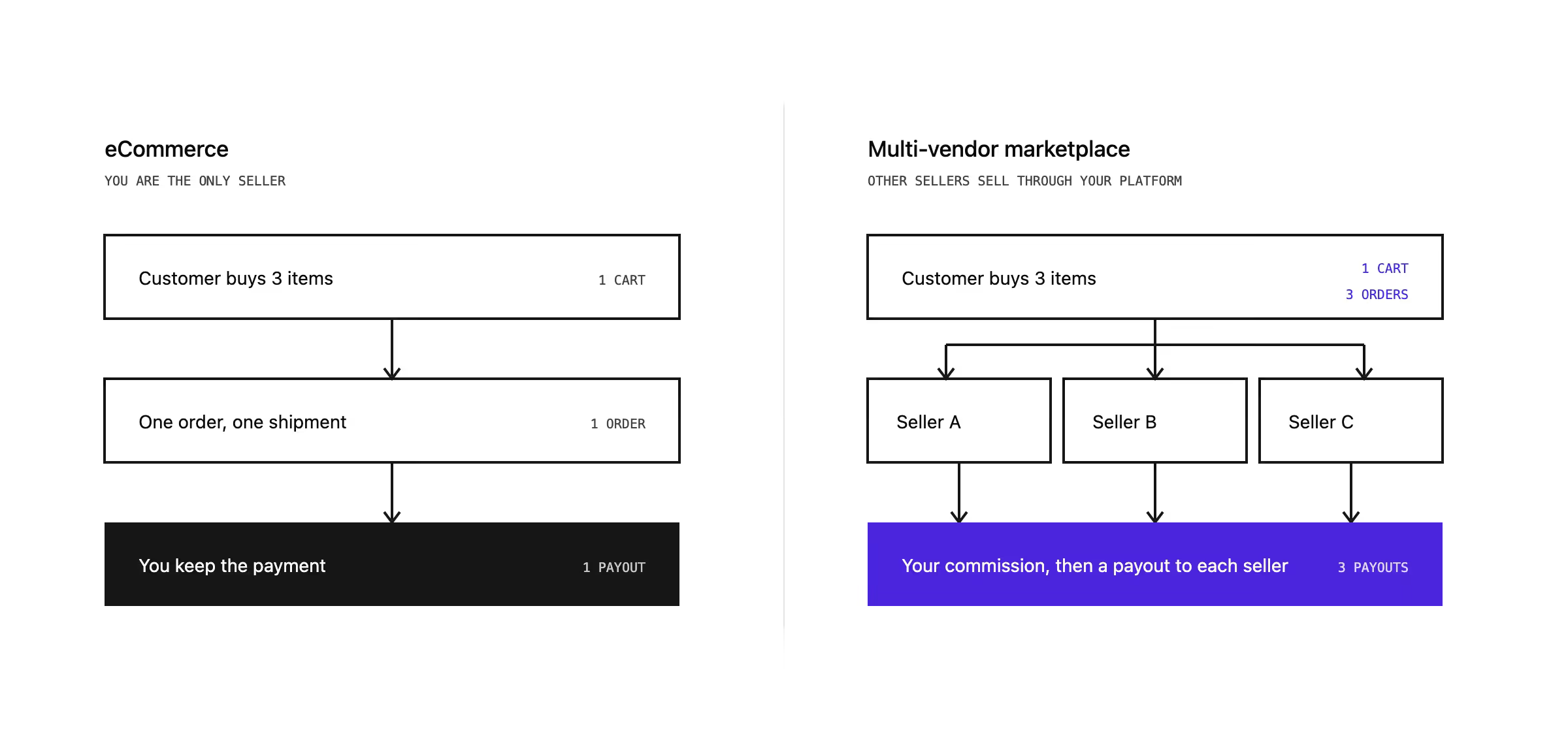
Your current eCommerce platform sells your own products. A marketplace adds sellers who do not work for you. They set their own prices and carry their own stock, they want to be paid on time, and your existing commerce has to change in four places to enable that.
- Sellers register and get onboarded. Someone who does not work for you signs up, gets verified, and manages their own catalog from a vendor panel. Vendor onboarding becomes a workflow with approvals, documents, and a point where you can say no.
- One cart becomes several orders. Customer can put items from three different sellers into one basket and need to pay once. Orders that span multiple vendors then have to become a separate fulfilment for each seller, with its own shipping cost and its own tracking, while the customer still sees one order and one payment in their account.
- You take one payment from the customer and pay every seller separately. The buyer pays you, you hold your commission, and every vendor gets the rest with a statement they can reconcile.
- You decide what the customer sees. Several vendors will list the same product. Which offer wins, and on what rule, becomes a product decision that belongs to you.
How does a marketplace make money?
Most marketplace owners start with a commission on every sale, which is a percentage of the order value you keep before the rest goes to the seller. Sellers don't pay to join your platform, you earn when they sell something, and the income grows with order volume.
Vendor subscriptions come next, usually a monthly fee for better placement or a higher listing limit, and some operators add advertising once enough sellers are competing for the same customers.
Those three revenue streams decide what your chosen software has to support.
What functionalities will your sellers and team need every day?
Vendor management is the part of marketplace software that sellers and your team operate every day, and it decides if approving a new seller, correcting a wrong price, or chasing a late shipment takes one click or an email thread.
These are the key features you need to test in a demo. If the software doesn't cover one of these features, your team will have to build it separately, spending their time on work the system should be doing for them.
- Vendor dashboards. Every seller needs their own view of products, orders, and earnings. Work that vendors cannot do themselves lands on your team instead.
- Vendor performance. Fulfilment times, cancellations, and ratings per seller. A late shipment is your store's reputation, so you need the evidence to act on it.
- Commission rules. One flat rate across everything is rare. Most operators end up needing different rates per category, per vendor, or per deal.
- Sales analytics. View of what sells, and at what margin. Needed in your admin panel as well as in the vendor portal.
- Payments. The payment gateways your market expects, and vendor payouts.
- Marketing tools. Promotions, vouchers, and campaign rules that work across sellers.
What kinds of multi-vendor software can you choose from?
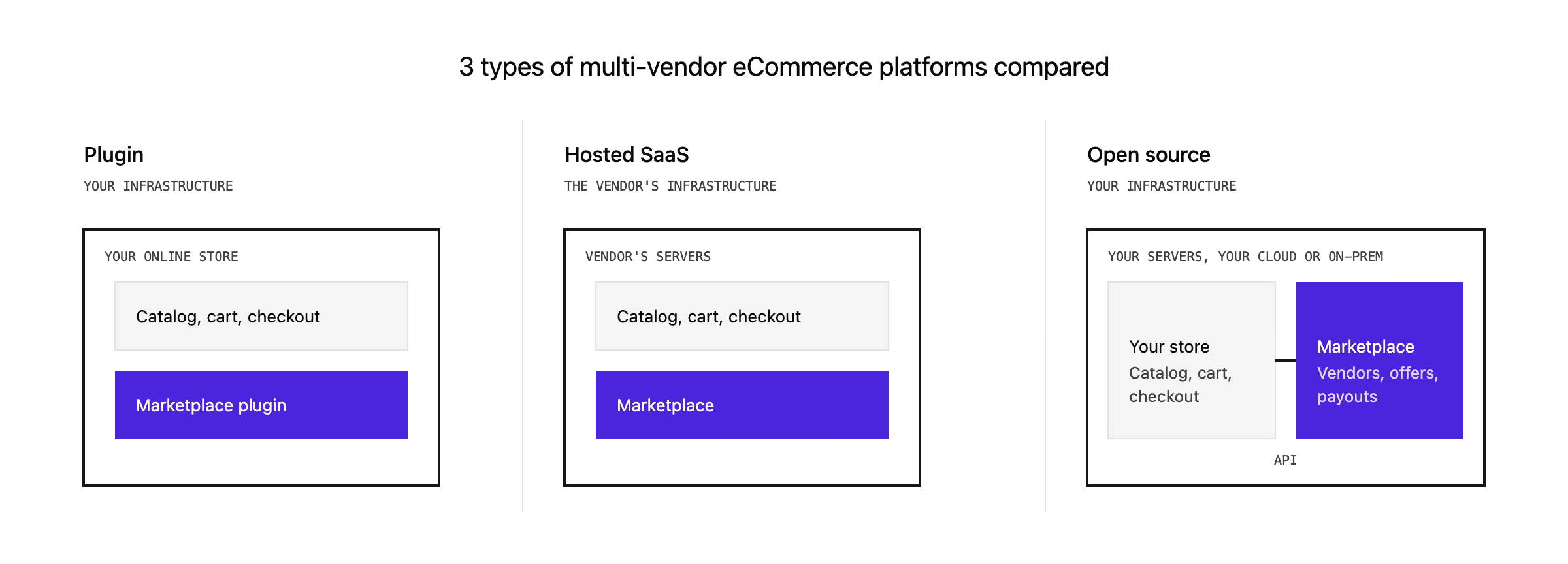
Plugin | Hosted SaaS | Open source | |
|---|---|---|---|
Hosting | You, inside your current store | The vendor, on their servers | You, on infrastructure you choose |
Customization | Whatever the plugin exposes | Whatever the vendor made configurable | Anything, because you have the source |
Pricing structure | Flat, until you need more plugins | Usage or a share of GMV on top of the subscription | The licence is $0 |
Limits | The data model of the store underneath it | The vendor's roadmap | Your team's time |
Examples | Dokan, Webkul modules, Bagisto extension | Sharetribe, Mirakl, Marketplacer | Mercur, Spree Commerce |
Plugin on your existing eCommerce store
Your eCommerce platform stays exactly where it is, and a plugin adds the marketplace on top of it.
Vendors become a new kind of user inside the same admin panel, their products land in the same catalog, and their orders sit in the same order table as yours, with a seller attached to each line.
Everything shares one database and one login, which is what makes this type quick to install and what sets its ceiling later.
You buy the plugin once or by the year from a third-party developer, so your marketplace follows two roadmaps: the one for your eCommerce platform and the one for the plugin.
What it costs
You pay a third-party developer for the plugin, either once or by the year, and you keep paying for the eCommerce platform underneath it. Wallets, dropshipping, and shipping carriers usually arrive as separate add-ons with their own price. A yearly licence can cost from $0 to $745, and a one-off module costs between $99 and $449.
What you get
This is the shortest route from a working store to a working marketplace, on a stack your team understands, with the whole plugin library of that platform behind you. Marketplace functionality arrives as a configuration job instead of custom development.
Where it runs out
The plugin is adding sellers to software that was built for one seller, and the limits show up in the parts that make a marketplace a marketplace. Commission rules are usually simple, so a different rate per category or per vendor turns into custom work. Payouts often go out by hand, or through the single payment provider the plugin supports, which also decides which countries you can pay sellers in.
Updates are the second problem. Your shop, the marketplace plugin, your theme, and every other plugin all update on their own schedules, and they have to stay compatible with each other.
Speed is the third. Vendor accounts, their products, and their orders sit in the same database as yours, so search, filters, and the admin panel get slower as sellers and listings pile up.
Support is the fourth: the plugin usually comes from a small company, and if they stop maintaining it, the part that pays your sellers stops with them.
For a small catalog and a few vendors, none of that is worth worrying about. At a few hundred vendors, it is usually the thing people replatform away from.
Examples
Dokan for WooCommerce, Webkul's modules for Magento, PrestaShop and Shopware, and Bagisto's extension for its own shop.
Hosted SaaS marketplace
The vendor owns the software and the servers, and you rent access to a marketplace you configure through a settings panel. Nothing is installed on your side, updates arrive whether you want them or not, and your catalog, vendors, and transaction history live in the vendor's systems.
This type splits into two.
- A full-stack product gives you the marketplace and the shop in one subscription, which suits a business starting from nothing.
- An overlay gives you only the marketplace layer, so vendors, offers, and payouts sit with the overlay vendor while your own eCommerce platform keeps serving the storefront, and you pay for both.
What it costs
A monthly or yearly subscription buys the software and hosting together, and usage is billed on top of it: credits, transactions, or a share of GMV at the enterprise end. Overlays quote per customer and sit on top of the bill for your existing commerce platform.
Published prices run from $39 to $259 a month. Nobody publishes an enterprise price, and counting the overlay together with the commerce platform underneath it, this is usually the most expensive type a large retailer can choose, and the one where the cost grows fastest as the marketplace works.
What you get
A marketplace in front of customers in weeks, with no developers and no servers to patch. The marketplace features you get are the ones the vendor built.
Where it runs out
Configuration ends where the vendor decided it ends. Everything the settings panel does not cover becomes a feature request that may not be met in years.
The bill is the second problem, because it follows your success. Usage credits, transaction counts, and a share of GMV all mean the same thing: your best month is also your most expensive one.
Your data is the third. It sits on the vendor's servers in the vendor's format, so what you can take with you depends on the export they built.
Integrations are the fourth. Your ERP, PIM, and warehouse system connect if the vendor built a connector for them, and if not, you are paying somebody to build middleware around a platform you cannot change.
Examples
Sharetribe, for small teams launching without developers, and Mirakl or Marketplacer are the two overlays you will meet most often in enterprise retail.
Open-source marketplace platform
You get the source code and deploy it on infrastructure you choose. The marketplace model is in the product itself, so vendors, offers, commissions, and payouts are objects in the data model instead of fields bolted onto a shop.
The licence decides what you may do with that code afterwards. An open-source licence such as MIT is free and puts no conditions on what you build. But a commercial licence on self-hosted code looks the same in operation and is bought yearly or once, which the industry calls source-available, so read the terms before you plan anything on top of it.
What it costs
There is no licence fee. Your budget goes to implementation, integrations, and hosting, which you pay for on every other type too. The difference is that the total cost doesn't grow when your sales do.
What you get
Full code access, so your team changes what your business needs. How you onboard vendors, price them, and pay them is yours to model. Data residency becomes your decision. And there is no vendor lock-in, because what you build stays yours.
What it needs from your team
Technical expertise in-house, or an implementation partner. Platform management is yours: upgrades, dependencies, hosting, and somebody whose job it is to apply security patches.
An open-source licence on a stack you cannot hire for will not help you, which is why the technology matters as much as the terms.
Our comparison of open source marketplace platforms walks through the licences, the total cost, and the security.
Examples
Spree Commerce and Mercur, where multi-vendor sits in the core, the public core is MIT, and no edition takes a share of your sales.
Comparison of best multi-vendor eCommerce platforms cost by type
Our comparison of 13 marketplace platforms adds five more platforms (including VTEX, Nautical Commerce and Yo!Kart) and compares all of them on hosting, pricing model, and the kind of business each one suits.
Every price in this section was read from the vendor's own pricing page in November 2026.
Platform | Type | Entry price (checked Nov 2026) |
|---|---|---|
Mercur | Open source, self-hosted | $0 licence on the open-source edition |
Spree Commerce | Open source, self-hosted | $0 licence |
Sharetribe | Hosted SaaS | $39/mo Build for testing; $259/mo Live, or $199/mo paid yearly |
Mirakl | SaaS overlay | Not published; a licence plus a share of GMV, on top of your own commerce platform |
Marketplacer | SaaS overlay | Not published |
Dokan for WooCommerce | Plugin on WordPress | Lite free; paid plans from $745/year |
Webkul modules | Plugin on Magento, PrestaShop, Shopware | $99 to $349 one-off, depending on the platform |
Bagisto | Shop, with the marketplace sold separately | Shop free, marketplace extension $449 |
How to choose a multi-vendor eCommerce platform
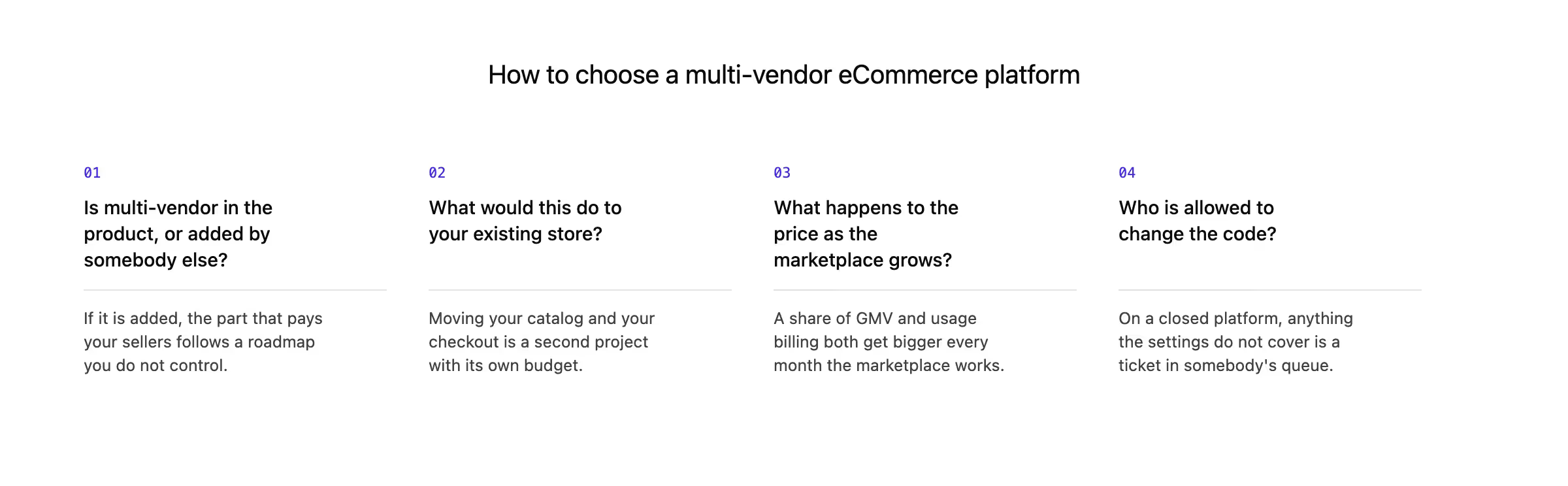
These are the four questions I ask before telling anyone whether Mercur is the right fit. Ask them of every vendor on your shortlist, including us.
- Is multi-vendor logic in the product, or added by somebody else? If a third party maintains the part that pays your sellers, their release schedule becomes yours, and so does their decision to stop. This one removes more candidates than anything else you can ask.
- What would this do to your existing store? Some answers mean moving your catalog and your checkout onto a new platform, which is a second project with its own budget and its own timeline. Write down your integration requirements first, and ask what happens to your current stack.
- What happens to the price as the marketplace grows? A licence is one number you can put in next year's budget. A percentage of GMV and usage-based billing both get bigger every month the marketplace works, which is a strange thing to agree to at the exact moment you are hoping to succeed.
- Who is allowed to change the code? On a closed platform, you get the settings the vendor exposed, and everything else is a ticket in their queue. With full source, your team can change whatever your business needs.
One more thing is worth settling early, because it is cheap to check now and expensive to discover later: can you get your vendor list, your catalog, and your order history out in a format you can use?
Which software type fits your kind of marketplace?
The type of marketplace you are building rules out whole categories of software, so it is the fastest filter you have when selecting marketplace software. Here is how the three types land against the models I see most often.
B2C product marketplaces
This is the model every type supports, so the decision comes down to your catalog size and your team.
- A plugin is enough while you have a few dozen sellers.
- Hosted SaaS gets you live without developers.
- A multi-vendor platform you host yourself makes sense when the catalog is large, the margins are thin enough that a percentage of GMV hurts, or your merchandising rules are your own.
B2B and wholesale marketplaces
Business buyers break most of the shortlist. You need company accounts, negotiated pricing, quotes and approval chains, and tax that changes per customer, and SaaS products mostly do not model any of it. Plugins rarely do either, because the host platform was built for consumer checkout.
What is left is a licensed self-hosted platform, a SaaS that sells B2B explicitly, or an open-source platform where your team can model your own trading rules.
Our comparison of B2B marketplace platforms ranks 10 that handle business buyers.
C2C and peer-to-peer marketplaces
When your sellers are private individuals, the work moves to trust: identity checks at registration, ratings, and a way to settle disputes between two people who both feel wronged. Volume of small sellers matters more than catalog depth.
Service, rental, and booking marketplaces
If what you sell is time, availability and scheduling sit where stock would normally be, and a platform built around products will need work in every part of that flow. Calendars, booking windows, deposits and cancellation rules belong in the core of the product, and bolting them on later rarely ends well.
Enterprise retail adding third-party sellers
Enterprise operators and mid-market retail teams come to this with an eCommerce platform that works, an ERP, a PIM, and a procurement process, so the question becomes how to add sellers without disturbing any of it.
Two types survive that conversation: a SaaS overlay on top of your current platform, and an open-source marketplace platform running beside it. The difference is who owns the code and what the bill does at scale.
Summary
Pick the type first and the product second. Each type has a situation where it is the wrong answer, and recognising yours saves you a rebuild.
Do not choose a plugin if you are planning for hundreds of sellers. It will work for the first fifty, and then every limit you meet will belong to a data model built for one seller. Teams usually discover this during the first busy season, which is the worst time to migrate.
Do not choose hosted SaaS if your model is unusual. Configuration stops where the vendor decided it stops, and a niche marketplace whose rules are its competitive advantage runs into that wall early.
Do not choose open source if no one from your team will maintain it. Somebody has to apply security patches, upgrade dependencies, and answer for the deployment. Without that person, or a technology partner, you will spend more on incidents than any subscription would have cost.
If you would rather start from your own situation than from a list, talk to our marketplace experts about scope, timeline, and cost.
FAQ on multi-vendor eCommerce platforms
Which platform is best for a multi-vendor marketplace?
The best multi-vendor marketplace is the one whose type matches your team and your business model. A plugin suits a small catalog on a store your team maintains. Hosted SaaS suits teams without developers. An open-source eCommerce marketplace platform, such as Mercur, suits teams that want customization, ownership, and low cost of the platform.
What is a multi-vendor eCommerce?
A multi-vendor eCommerce is one online store where several independent sellers list their own products. Customers browse a single catalog and pay once, which is what separates an eCommerce marketplace from a shop with a supplier list. Behind the scenes, each vendor manages their own listings and stock, and you hold a commission and pay every seller for what they sold.
How much does a multi-vendor eCommerce platform cost?
A multi-vendor eCommerce platform can cost from $0 to several thousand dollars a year. The price of a marketplace solution is mostly the work around it. For example, Mercur's open-source edition has no licence fee at all, Dokan Lite is also free, Webkul's modules run $99 to $349 once, and Sharetribe's Live plan is $259 a month. On each, you also pay for implementation, integrations, and hosting.
Can I add a marketplace to my existing eCommerce store?
Yes, you can add a marketplace to your existing eCommerce store, either with a plugin inside it or with a marketplace platform that runs beside it. A plugin keeps everything in one system. A separate platform leaves your catalog and checkout where they are and handles sellers, offers, and payouts next to them. Our guide to adding a marketplace to your store covers both routes.
What is the difference between a multi-vendor marketplace and eCommerce store?
An eCommerce store sells your own products, and a multi-vendor marketplace sells other people's products through your online store. The marketplace adds seller registration, order splitting across multiple vendors in one basket, commissions, and a payout to each seller. Those four jobs are what multi-vendor marketplace software exists to do.
More articles
Ready to build?
See the product – open the demo, or book a walkthrough with our experts.