
Reviews & Reputation Management
Collect, manage, and act on buyer feedback with a built-in reviews engine for your marketplace. Mercur’s Reviews module lets customers rate and review sellers (and optionally products), while giving vendors and admins the tools they need to respond, moderate, and turn feedback into better experiences. Reviews are fully integrated with seller dashboards and admin tools, so reputation becomes a first-class part of your marketplace.
How do you manage reviews in Mercur
Give buyers a voice, sellers a fair way to respond, and admins full control over reputation signals.
With the Reviews module, you can:
- Let buyers rate and review sellers (and, if you choose, products) after completed orders.
- Store ratings, comments, timestamps, and relationships to orders, sellers, and customers.
- Show average ratings and review counts on seller profiles and other surfaces.
- Allow sellers to manage and respond to reviews directly in their dashboard.
- Enable reporting of inappropriate or unfair reviews by sellers and admins.
- Provide moderation workflows for admins to approve, hide, or escalate reviews.
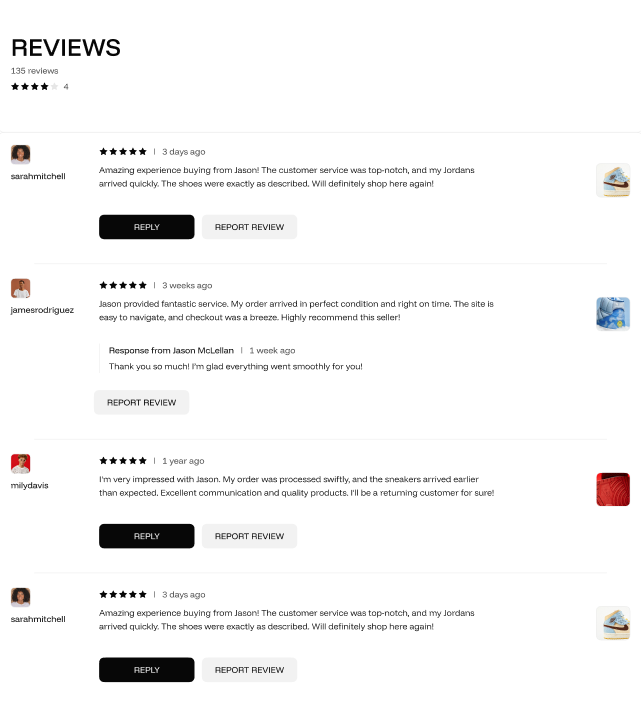
Reviews & Reputation Management
video overview

Build custom marketplace with Mercur
Create your unique multi-vendor platform with our powerful, flexible marketplace solution that adapts to your business needs.
What the Reviews module delivers for your business
Trust and transparency for buyers
Real reviews and ratings help new customers decide who to buy from, especially in multi-vendor marketplaces.
Actionable feedback for sellers
Vendors can see what buyers think, respond publicly, and improve their service based on real, structured feedback.
Reputation as a first-class signal
Use review data to influence search ranking, recommendations, and internal performance dashboards.
Controlled moderation and fairness
Admins can step in when reviews are abusive, spammy, or clearly unfair - keeping the system trustworthy for both buyers and sellers.
Fully integrated with the marketplace stack
Reviews connect to orders, sellers, and notifications, so you can automate asking for reviews and notifying sellers when new feedback arrives.
Core capabilities
1. Review data model
A structured model for trustworthy feedback:
- Rating (e.g., 1–5 stars) stored as a numeric score.
- Text review/comment with optional length limits.
- Links to the seller being reviewed (and optionally product/listing if enabled).
- Links to the customer and order that triggered the review (to prevent fake/anonymous spam).
- Timestamps for creation and updates.
- Status fields for moderation (pending, published, hidden, flagged).
- Optional metadata (e.g., reason codes, internal tags, review source).
This structure gives you all you need to build both public views and internal analytics.
2. Buyer review flows
Let real customers leave real feedback, safely:
- Option to ask for a review only after an order is fulfilled or completed, so reviews are tied to real purchases.
- Simple rating + comment flow exposed via your storefront or post-purchase emails.
- Validation to prevent duplicate reviews for the same order/seller pair (or configurable rules, e.g., one review per order).
- Support for editing or updating reviews by the buyer (optional, depending on your policy).
- Integration hooks for Notifications so you can send “please rate your order” emails after fulfillment.
Buyers get a straightforward way to share their experience; your marketplace gets structured feedback tied to actual transactions.
3. Seller review management (vendor dashboard)
Empower sellers to actively manage their reputation.
From their dashboard, sellers can:
- View all reviews
- Access a list of all reviews related to their seller account.
- Filter by rating, date, and status (new, replied, flagged).
- See review details: rating, comment, buyer (or anonymized label), related order, and date.
- Access a list of all reviews related to their seller account.
- Reply to reviews
- Post public responses to customer reviews directly from the seller dashboard.
- Address complaints, clarify context, or simply thank customers for positive feedback.
- Use replies to show professionalism, reduce churn, and increase trust.
- Post public responses to customer reviews directly from the seller dashboard.
- Report inappropriate reviews
- Flag reviews they consider unfair, abusive, or spammy.
- Provide a reason for the report (e.g., offensive language, not related to actual transaction, competitor attack).
- Send flags to the admin moderation queue, where operators can review and decide to keep, hide, or edit the status.
- Flag reviews they consider unfair, abusive, or spammy.
This combination keeps sellers involved and accountable, without giving them full control to censor feedback.
4. Admin moderation & governance
Keep the review system healthy and trustworthy:
- Moderation queue
- Admins see newly created reviews and reviews flagged by sellers or automated rules.
- Filter by rating, status, date, or flag reason.
- Admins see newly created reviews and reviews flagged by sellers or automated rules.
- Moderation actions
- Approve and publish reviews.
- Hide or remove reviews that violate policy (while keeping internal records).
- Add internal notes for edge cases.
- Approve and publish reviews.
- Policy & enforcement hooks
- Define rules for what’s acceptable (e.g., profanity, personal data, hate speech).
- Optionally wire in automatic checks or external tools (e.g., content moderation APIs).
- Define rules for what’s acceptable (e.g., profanity, personal data, hate speech).
Admins maintain the balance between openness and protection against abuse.
5. Display & aggregation
Turn raw reviews into meaningful signals:
- Average rating per seller (and optionally product), calculated from published reviews.
- Review count to show how much feedback a seller has gathered.
- Ready-to-use data for displaying ratings on:
- Seller profile pages,
- Product or listing pages (if product reviews are enabled),
- Search and category pages,
- Internal admin and seller dashboards.
- Seller profile pages,
You decide where to surface reputation: Mercur provides the data, your frontends decide the UX.
6. Marketplace integration & ranking signals
Make reviews part of how your marketplace behaves:
- Use ratings and review counts as ranking signals in search and discovery (e.g., boosting high-rated sellers).
- Combine review data with order volume and fulfillment performance to build internal quality scores.
- Highlight well-rated sellers with visual badges or labels (e.g. “Top-rated seller”, “Trusted partner”).
- Identify low-rated sellers early for proactive support or intervention.
This turns reviews from a passive feature into an active lever for marketplace quality.
7. Notifications & event integration
Ensure the right people know when reviews happen:
- Trigger notifications to sellers when new reviews are created or when existing ones are updated.
- Notify admins when reviews are flagged, or when certain thresholds are crossed (e.g., multiple 1-star reviews in a short time).
- Use buyer notifications (optional) to confirm that their review was received and published.
By connecting Reviews to Mercur’s Notifications module, you make feedback loops automatic instead of manual.

Build custom marketplace with Mercur
Schedule a guided tour of Mercur Marketplace tailored to your specific marketplace requirements. Connect with our team to discuss how we can help bring your marketplace vision to life.