
Cart & Checkout
Power flexible, headless carts and checkouts for your marketplace with a Medusa-based cart engine extended in Mercur. Mercur’s Cart module is where browsing turns into buying. It holds selected items, applies prices, discounts, shipping options, and taxes, and prepares everything that will later become an order. It is fully headless, multi-channel, and marketplace-ready, so one cart model can serve many storefronts and buyer journeys.
How do you manage carts in Mercur
With the Cart module, you can:
- Create carts from any storefront or channel using a clean API.
- Add, update, and remove line items that represent product variants and quantities.
- Attach region, currency, and customer info so the cart always prices correctly.
- Apply discounts, promotions, and gift cards directly on the cart.
- Select shipping options and addresses before checkout.
- Start payment sessions with your PSP, ready to turn carts into orders.
Support multi-vendor carts, where one customer checkout can include items from multiple sellers.
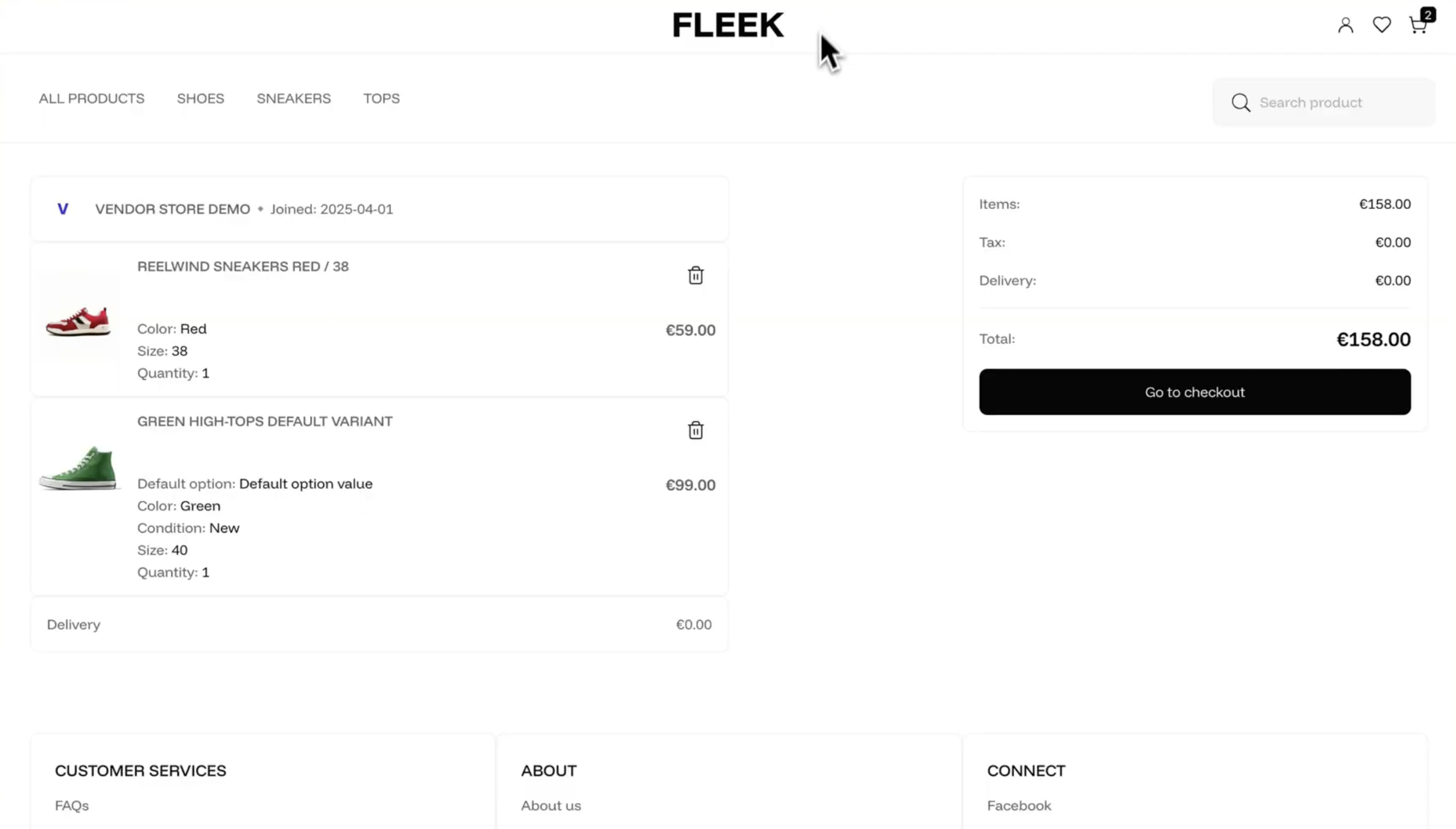
Cart & Checkout
video overview

Build custom marketplace with Mercur
Create your unique multi-vendor platform with our powerful, flexible marketplace solution that adapts to your business needs.
What the Cart module delivers for your business
Consistent checkout logic across channels
All of your frontends, apps, and portals share the same cart and checkout engine instead of rolling their own.
Accurate pricing before order creation
Prices, discounts, shipping fees, and taxes are calculated in the cart so customers see exactly what they will pay before confirming.
Marketplace-friendly checkout
Carts can hold items from multiple vendors, ready to be split into vendor-specific fulfillments later in the order layer.
API first and headless
Carts are entirely API driven, so you can build any checkout UX on top of them - from classic ecommerce to embedded marketplace flows.
Core capabilities
1. Cart data model and lifecycle
A cart in Mercur acts as a staging area before an order is created:
- Holds line items with product variant, quantity, and pricing details.
- Stores region and currency to decide which prices and tax rules to apply.
- Optionally links to a customer for logged-in experiences.
- Tracks shipping and billing addresses as they are added.
- Includes totals such as subtotal, discounts, shipping, tax, and grand total.
- Has a clear lifecycle: created, updated, and finally used to generate an order.
You can create carts anonymously or attach them to a customer account at any point.
2. Line items and adjustments
Model what the customer is actually buying:
- Each line item references a product variant and quantity.
- Line items store unit price, line subtotal, applied discounts, and tax.
- Support for metadata on items to carry custom information or marketplace-specific fields.
- Line-level adjustments keep track of discounts coming from promotions and price overrides.
This structured approach makes it easy to understand and audit how the final price was built.
3. Discounts, promotions, and gift cards
Let commercial logic live where it belongs:
- Apply discount codes or promotions to the cart.
- Have the Promotions module calculate and attach discount adjustments at the cart or line level.
- Redeem gift cards or store credit and see their effect on the cart totals.
- Combine price lists, promotions, and cart adjustments in a predictable way.
All of this happens before order creation, so the resulting order reflects a fully priced and discounted cart.
4. Shipping options and addresses
Prepare for fulfillment while still in the cart:
- Attach the shipping address and billing address to the cart.
- Retrieve available shipping options based on region, items, and configuration.
- Select a shipping method and have its cost included in the cart totals.
- Use this information later in the order and fulfillment modules without duplication.
This helps your checkout remain clear and frictionless, even for complex shipping setups.
5. Taxes and totals
Show the real number before customers confirm:
- Tax calculation uses region, tax configuration, and tax codes from the catalog layer.
- Cart stores net, tax, and gross amounts per line and for the cart as a whole.
- Works with external tax providers (for example, via Stripe Tax) when configured.
- Frontends can display tax breakdown in real time while the cart is being updated.
Totals on the cart mirror what will be stored on the order, so there are no surprises at conversion.
6. Multi-channel and multi-currency carts
Support different markets with one engine:
- Each cart is tied to a region and currency, driven by your Price Lists and Tax configuration.
- Different storefronts and apps can still rely on the same cart APIs, only passing adifferent region or channel context.
- Works equally well for DTC, B2B portals, and white label frontends.
You decide which channels to serve – Mercur keeps the cart model consistent underneath.
7. Marketplace and multi-vendor carts (Mercur specific)
Make multi-seller checkouts feel like one smooth flow:
- A single cart can contain items from multiple sellers or vendors.
- Vendor information is carried on line items, so later in the Order module, you can split fulfillments and settlements per vendor.
- Commission rules, payouts, and vendor-specific logistics can be built on top of the cart and subsequent order data.
Customers experience a unified checkout, while your backend keeps a clear separation of vendor responsibilities.

Build custom marketplace with Mercur
Schedule a guided tour of Mercur Marketplace tailored to your specific marketplace requirements. Connect with our team to discuss how we can help bring your marketplace vision to life.