
Advanced Product Importer
Clean vendor catalogs without manual firefighting. Upload vendor feeds, map once, enforce rules, and keep your marketplace catalog clean - even with hundreds of sellers. Part of Mercur Connect, our enterprise-grade data & integrations layer.
How do you manage product importer in Mercur
Step-by-step flow that protects your catalog from bad data while minimizing the amount of manual work on your side.
Mercur’s Advanced Product Importer is a vendor-facing import engine built into the Mercur Vendor Panel.
With the Product Importer, vendors can:
- upload product files in a CSV format,
- map their own structure to your marketplace taxonomy,
- apply transformation and validation rules,
- and safely push clean, consistent product data into your catalog.
The Advanced Product Importer is part of Mercur Connect, our enterprise feature set for data and integrations.
- Acts as the front door for vendor product data entering your commerce stack.
- Ensures that imports align with your central catalog, ERP, PIM, or other backend systems.
- Gives you a repeatable, auditable process for how product data flows from vendors to your marketplace.
In practice, that means you can scale to more vendors, more assortment, and more markets - without losing control over data quality.
Advanced Product Importer
video overview

Build custom marketplace with Mercur
Create your unique multi-vendor platform with our powerful, flexible marketplace solution that adapts to your business needs.
What the Product Importer delivers for your business
Faster vendor onboarding
Bring new brands and assortment live faster by moving from manual excel wrangling to a guided, self-service import flow. Onboard new vendors and product lines in hours, not weeks.
Lower operational cost
Merchandisers and support stop spending time fixing broken imports. Vendors see and correct their own errors at the source.
Higher catalog quality
Standardized attributes, values, and categories mean better navigation, better filters, and better search, directly impacting conversion and product discovery. Keep categories, attributes, and filters consistent across all vendors.
Reduced risk
Validation guards protect your catalog from duplicates, invalid handles, and incomplete products – so you don’t wake up to broken listings in production. Reduce manual corrections and support tickets caused by bad product data.
Core capabilities
1. Large-scale CSV imports
Give vendors a clear, self-service way to import products - without IT tickets.
- Upload product files in a CSV format directly from the Vendor Panel.
- Drag-and-drop upload, or select files from disk.
- Use previously saved mapping settings to speed up recurring imports from the same vendor.
- Leverage a provided template to ensure the file follows the correct structure from day one.
Vendors can manage their own catalog feed, while you keep tight control over how data enters the system.
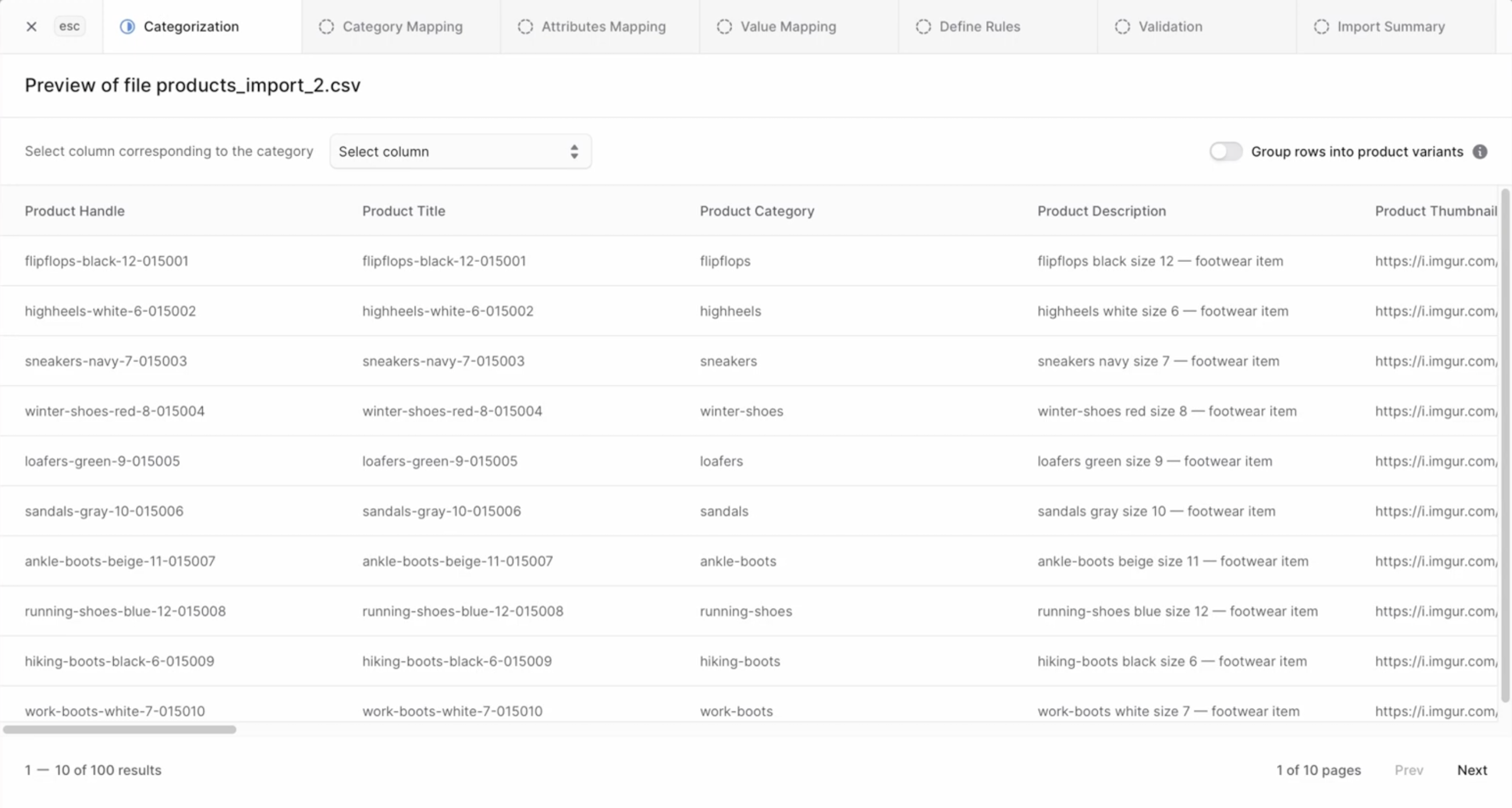
2. Smart categorization and variant grouping
Start by telling the system what’s what.
- Choose which column in the file represents the Category.
- Optionally group rows into product variants (for example, by Product ID or Handle), turning multiple rows into a single product with variants.
- Move through the categorization step in a guided way before touching any advanced mapping.
Products are structured correctly before they ever hit your marketplace catalog.
3. Category Mapping
Align every vendor’s private category tree with your official one.
- Vendors see their own structure in “My Categories” (left panel) and your marketplace taxonomy in “Marketplace Categories” (right panel).
- They drag and drop their categories onto yours to create mappings.
- A clear warning appears if some categories remain unmapped, explaining that affected products may lack category assignment and need follow-up.
You keep one clean global category tree - even if every vendor’s internal structure is different.
4. Attribute Mapping
Make sure all core product details are aligned with your standards.
- Vendors map columns from their file in “My Attributes” to “Marketplace Attributes”.
- Typical examples include: name, description, size, color, brand, material, etc.
- Required attributes are clearly indicated, so vendors know what must be mapped to proceed.
- Non-essential attributes can be safely left unmapped.
5. Value Mapping
Standardize what customers actually see in filters and on product cards.
- Vendors map their raw values in “My Values” (left) to standardized “Marketplace Values” (right).
- Great for aligning size charts (e.g., “36”, “S”, “Small”) and color names (“Midnight Blue” → “Navy”).
- Required values are clearly marked - unmapped required values will block the process until resolved.
You get clean, unified filters and product attributes, even when vendors use their own local naming.
6. Define Rules
Go beyond simple mapping with rules that clean the data for you.
- For mapped attributes, vendors (or admins) can define transformation and validation rules.
- Example use cases:
- Normalize capitalization or remove special characters.
- Enforce specific formats for product handles or SKUs.
- Validate that certain fields are always present or match given patterns.
- Normalize capitalization or remove special characters.
- Rules are configured per attribute in a dedicated Define Rules step, and can be skipped for simpler imports.
Get cleaner input data, fewer manual fixes, and standardized product information across vendors.
7. Validation Results
Before anything is imported, the system runs a full validation pass and surfaces all issues. It highlights:
- Existing product handles - handles must be unique; duplicates will block the import.
- Invalid product handles - handles cannot contain spaces or special characters.
- Mapping problems - missing or incorrect mappings that prevent a safe import.
- Unmapped categories - products that won’t be assigned to any category.
- Unmapped attributes - missing key data that may lead to incomplete product pages.
- Unmapped values - values that haven’t been aligned with marketplace standards.
Vendors see exactly what needs fixing, so problems are resolved at the source, not by your internal team after the fact.
8. Import Summary & full issue report
Once the import passes validation and is executed, the Import Summary gives a clear overview:
- Imported products - total number successfully created/updated.
- Processed rows - how many rows from the file were processed.
- Skipped rows - how many rows were skipped during import.
- Issues - total number of issues detected.
Vendors can inspect a detailed list of issues (including row numbers and reasons) and download the full summary as a CSV to review and fix remaining problems offline.
This turns your import logs into a transparent audit trail instead of a black box.

Build custom marketplace with Mercur
Schedule a guided tour of Mercur Marketplace tailored to your specific marketplace requirements. Connect with our team to discuss how we can help bring your marketplace vision to life.