
Magento 2 Connector for Mercur Marketplace
Today we're releasing the Magento 2 Connector for Mercur, which turns a Magento Open Source or Adobe Commerce store into a multi-vendor marketplace without replatforming.
Sellers list offers in Mercur, and those offers show up on your product pages next to your own stock. One checkout can mix your products with products from several sellers, and the shopper pays once.
The connector is open source under the MIT license. The Magento package is at github.com/mercurjs/magento2-connector, and the full guide is in the Mercur docs.
Why add sellers to a Magento store without replatforming?
Most marketplace projects we see don't start from scratch. They start from a store that already works: a Magento shop selling the operator's own products (1P), with years of work in it.
The store has an ERP that invoices every order, a warehouse integration, a loyalty program, and a theme customers know. These operators want to add third-party sellers (3P) to grow the assortment without buying more stock. What stops them is the migration.
Moving the catalog, checkout, and ERP integration to a new platform just to add sellers is a long and risky project for a feature that should sit next to what they have.
So we built the connector so that nothing has to move. Magento keeps what it already runs, and Mercur adds the marketplace layer:
Features | Magento | Mercur |
|---|---|---|
Storefront, cart, checkout | ✓ | |
Payment, invoices, credit memos | ✓ | |
Your own products, prices, stock, carriers | ✓ | |
Sellers and their onboarding | ✓ | |
Offers: seller SKU, price, stock, shipping | ✓ | |
One order per seller, fulfillment, returns | ✓ | |
Commission and payouts | ✓ |
Magento keeps doing what it does well. Mercur adds what Magento was never built for: seller accounts, offers from many sellers on one product, splitting orders by seller, commission, and paying sellers.
Your product catalog stays in Magento
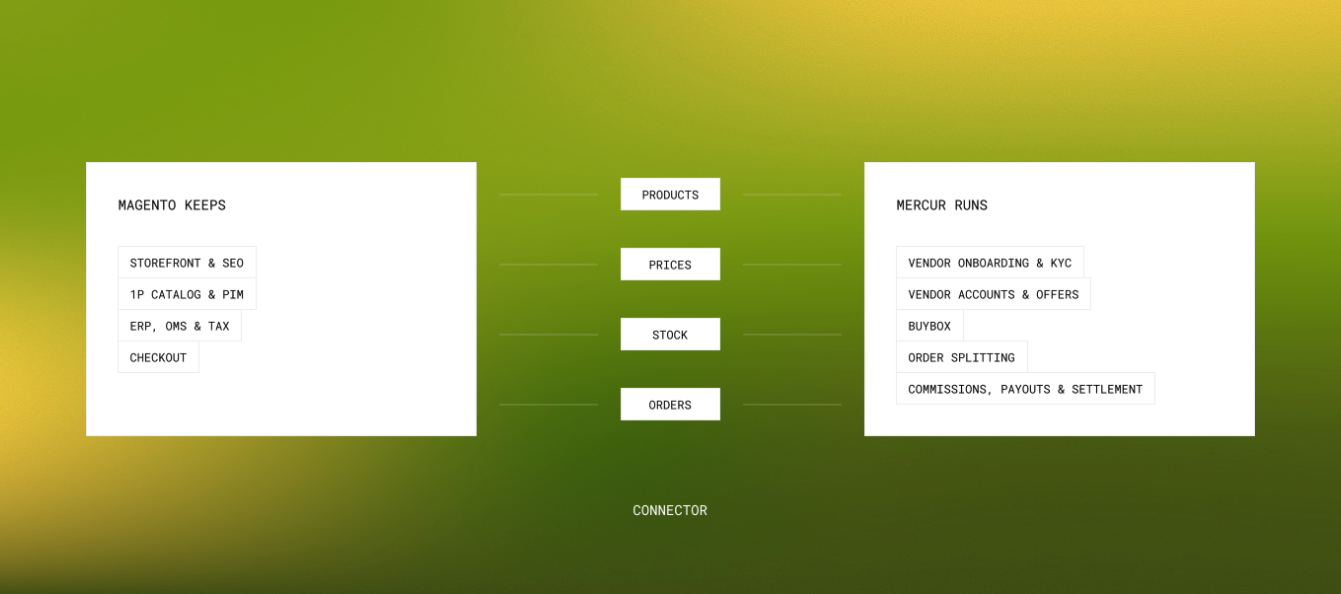
Your own products, prices, stock, carriers, and ERP flow don't move. The connector is a set of standard Composer modules with no core patches. Mercur only talks to Magento through its API and one webhook endpoint, and the two never share a database.
If you want sellers to compete on your products, turn on the Push operator products setting. Your catalog is created in Mercur without prices or stock, and sellers attach their own offers to it. Your own stock stays in Magento and is always a candidate in the buy box.
How does the Magento 2 Connector work?
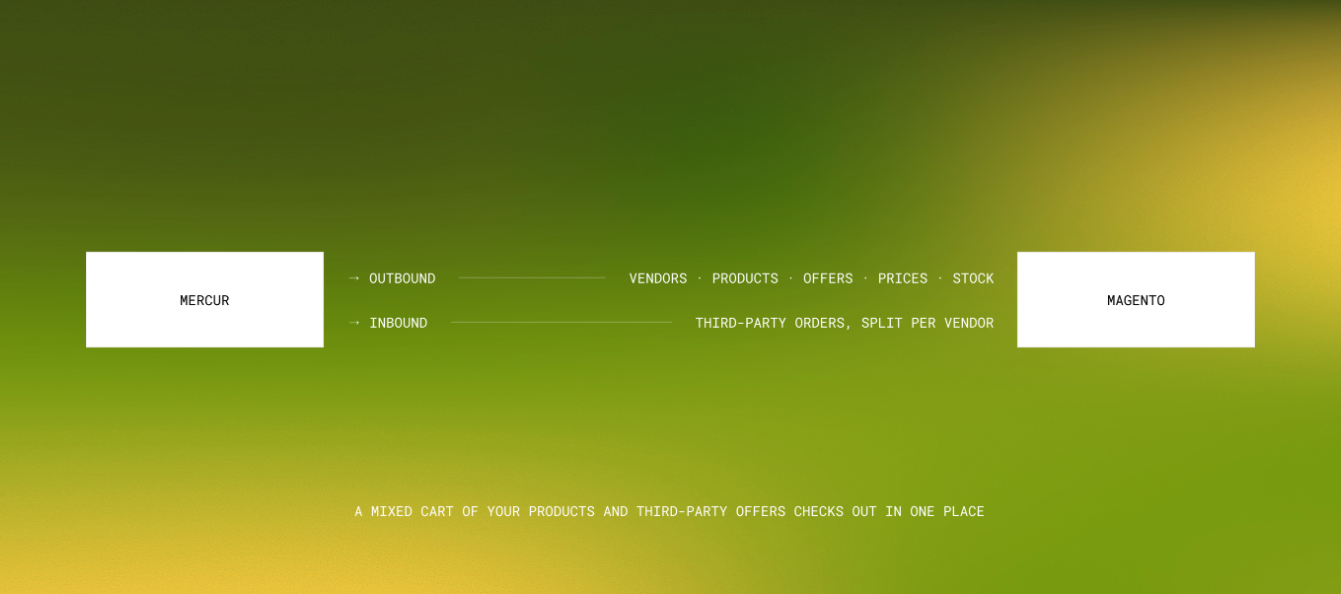
The integration ships as two packages, one on each side:
Package | Installed in | Adds |
|---|---|---|
| Your Mercur API | Signed outbound webhooks, an external payment provider, capture, cancel and refund routes, and a Settings → Magento page |
| Your Magento root | Nine |
The two sides talk over the Admin API, the Store API, and signed webhooks.
Magento calls the Mercur Admin API with a secret key to read sellers, offers, and products and to confirm captures and refunds. It calls the Store API with a publishable key to build the Mercur cart behind each checkout.
Mercur sends signed webhooks (HMAC-SHA256) to Magento whenever something changes.
How does one product page show offers from many sellers?
Three sellers listing the same product get one product page. Offers attach to your product by SKU, or by EAN, UPC, or GTIN when the SKUs differ.
The buy box shows your own stock and every active seller offer side by side. It includes per-website prices, price-list strike-through, quantity tiers, and an estimated delivery date. You pick the rule that chooses the winner:
Rule | Who wins the buy box? |
|---|---|
| The cheapest unit price, yours or a seller's |
| Your own stock whenever it's in stock, then the cheapest seller |
| Premium sellers, then the cheapest |
Sellers can also bring products you don't carry. Those go through Mercur's review pipeline, and only approved ones reach Magento, imported as simple or configurable products with their images.
The connector pushes your category tree and marketplace attributes to Mercur first, so sellers file their products into your taxonomy from the start. Nobody has to map categories afterwards.
How does checkout work with products from several sellers?
A mixed cart stays one cart. Each seller's lines form their own group, with their own shipping choice and delivery estimate.
Your lines keep your normal Magento carriers. Every line shows "Sold by", and the cart, order, invoice, and emails show a separate "Seller shipping" total. The shopper always knows who they're buying from.
Every seller also gets a page at /seller/{handle}. The storefront pieces live in Mercur_Frontend, a reference layer for Luma-based themes that you can restyle like any Magento module. If you run headless, switch it off and use the GraphQL and REST support instead.
How is one payment split between sellers?
The shopper pays once, with your usual Magento payment method. Mercur records that payment, splits it into one order per seller, and writes the commission lines for each one.
Commission rules live in Mercur and can target a seller, category, product type, collection, or product. Every seller order carries its commission lines, so the Mercur admin shows exactly what goes to the seller and what the marketplace keeps.
The payment is split only after Magento captures it, so payouts only ever follow money you collected.
How do seller shipments and refunds reach Magento?
Sellers fulfill from the Mercur vendor panel. Every shipment they create becomes a Magento shipment with tracking, including partial and multi-parcel deliveries, and the customer is notified the usual way.
Refunds work in both directions. A Magento credit memo on seller lines is reported to Mercur, and a refund a seller or operator starts in Mercur becomes a Magento credit memo.
How does Magento keep seller offers up to date?
Your storefront never asks Mercur what a seller sells. Magento keeps a local mirror of sellers, offers, and per-website offer prices, and product pages render from those local tables, with no extra network hop on the way.
Seller lines skip Magento's stock checks and reservations, including Multi-Source Inventory, so seller stock never mixes with yours. The only time Magento talks to Mercur in real time is checkout, when it needs seller shipping prices and creates the seller orders.
Three layers keep the mirror fresh, each one a backstop for the one before it:
1. Webhooks
When an offer, seller, or product changes, Mercur notifies Magento, which queues a delta sync within a minute.
2. Cron
Sellers sync every 15 minutes, offers every 5 minutes, and published products every hour, even if a webhook goes missing.
3. Nightly full resync
A nightly full resync rebuilds every mirror from scratch and removes anything a delta couldn't see.
Anatomy of a checkout
The steps below follow a shopper who buys one of your products and one seller's offer, and pays once.
1. Add to cart
The seller's line carries its offer ID and is priced from the offer for the current website. Your own line is a normal Magento line.
2. Mirror the cart
Magento creates a Mercur cart and copies only the seller lines into it. Your own lines never leave Magento.
3. Quote seller shipping
Mercur returns shipping options grouped by seller. The shopper picks one per seller.
4. Place the order
The shopper pays in Magento.
5. Create the seller orders
Magento authorizes the payment on Mercur's external provider, using the Magento order number as the reference, and completes the cart. Mercur splits it into one order per seller and writes the commission lines.
6. Capture
When Magento invoices the order, it tells Mercur to capture, and Mercur splits the captured payment across the seller orders.
7. Fulfill
Sellers ship from the vendor panel, and each shipment shows up on the Magento order.
Does the connector need middleware?
No, the connector talks to Mercur directly. Retries, deduplication, a durable process queue, and reconciliation polls are built into both sides, so there's no middleware layer to buy, host or keep in step.
Even if Mercur is unreachable, for example during a deploy, you never lose a Magento order:
What fails? | What happens? |
|---|---|
Mercur is unreachable when the order is placed | The Magento order still goes through, and a retry process creates it in Mercur on its next run |
The capture call fails on invoice | The invoice still goes through, and the capture is retried |
Magento is down when Mercur sends a webhook | Mercur retries after 1 minute, 5 minutes, 30 minutes, 2 hours, and 12 hours, and you can redeliver from the admin |
The same webhook arrives twice | Magento recognises the delivery ID and skips it |
A refund webhook never arrives | A poll every 15 minutes picks up any refund it missed |
Every background job runs as a visible process in Mercur → Processes, with its status, attempts, and output log. The order view has "Send to marketplace", "Capture marketplace payment" and "Resync marketplace status" buttons for anything that needs a push by hand.
How to install the Magento 2 Connector?
Add the plugin to your Mercur API:
bun add @mercurjs/magento2-connector-pluginmodule.exports = withMercur({
// ...
plugins: [
{ resolve: "@mercurjs/magento2-connector-plugin", options: {} },
],
modules: [
{
resolve: "@medusajs/medusa/payment",
options: {
providers: [
{
resolve: "@mercurjs/magento2-connector-plugin/providers/payment-external",
id: "external",
},
],
},
},
],
})Then install the package in your Magento root:
composer config repositories.mercur vcs https://github.com/mercurjs/magento2-connector
composer require mercurjs/magento2-connector:dev-main

bin/magento module:enable Mercur_Core Mercur_Process Mercur_Connector \
  Mercur_OfferIndexer Mercur_Catalog Mercur_Settlement Mercur_Frontend Mercur_GraphQl
bin/magento setup:upgrade
bin/magento setup:di:compile
bin/magento cache:flush
Connect the two under Stores → Configuration → Mercur, register the webhook in Settings → Magento, and run the first sync:
bin/magento mercur:sync taxonomy
bin/magento mercur:sync full
The quickstart guide for the Magento 2 Connector walks through every step, from API keys to a first mixed order, in about 30 minutes.
Compatibility
The connector runs on these versions:
Platform | Version |
|---|---|
Magento Open Source | 2.4.4 and later |
Adobe Commerce | 2.4.4 and later |
PHP | 8.1, 8.2, 8.3 |
Mercur | 2.3.8 and later |
Stores running Multi-Source Inventory also enable Mercur_Inventory.
Limitations
This is a first release, and some things aren't covered yet.
Promotions apply to your own lines only
Magento cart price rules never touch seller lines, and Mercur promotions aren't applied in Magento.
Tax on seller lines comes from Magento
The tax follows the product's tax class. There's no third-party tax engine for seller lines.
One order ships to one address
Shipping a single order to several addresses isn't supported.
Shoppers are guest customers in Mercur
Mercur matches shoppers by email. There's no customer account sync.
Your own products stay native Magento
Your 1P sales aren't modeled as a Mercur seller, so marketplace reports in Mercur cover seller sales only.
Delivery tracking comes from the seller
Magento gets the tracking numbers sellers enter. The connector doesn't aggregate carrier status.
Your ERP export needs to skip seller lines
Seller lines appear on the Magento order and are marked as marketplace lines. If your ERP integration exports every order line, make it skip seller lines, because the seller invoices them.
Can Shopify, WooCommerce or a headless shop use the same building blocks?
Nothing Magento-specific lives in Mercur's core. The connector uses an external payment provider, signed webhooks, and a cart built through the standard Store API.
Any storefront can drive the same pieces, including Shopify, WooCommerce, or a custom headless shop. Magento is the first connector built on them, and others can follow.
Get involved with the Magento 2 Connector
- Star and watch mercurjs/magento2-connector for releases.
- Read the Magento 2 integration guide.
- Report a bug or request a feature.
If you run a Magento store and want to add sellers next to your own catalog, we'd love to hear how it goes: talk to the Mercur team, or see more on how Mercur adds a marketplace to your Magento store.
More product updates
Ready to build?
Read the release notes, then see the product – open the demo, or book a walkthrough on your terms.